

Key takeaways
- An insurance CRM is a purpose-built software that helps insurance agencies organize client information, manage policies, streamline servicing, and automate routine insurance processes.
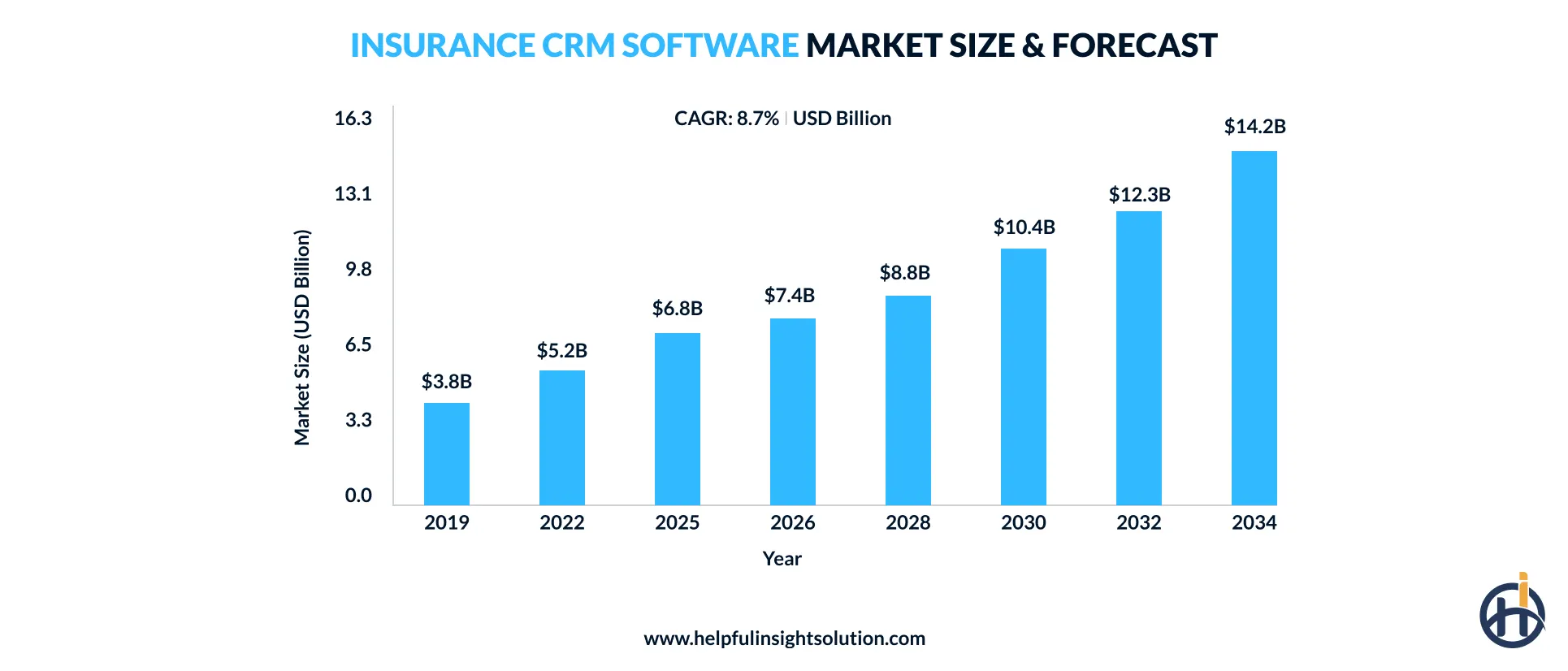
- The insurance CRM software market is expected to reach $14.2 billion by 2034, showing how more insurance businesses are considering CRM for everyday operations.
- Insurance CRM software development can bring customer data into one place, streamline daily work, speed up lead conversions, improve service, and support compliance.
- The key features of CRM for insurance agencies include managing leads, tracking policies, handling claims, and automating marketing tasks that take up teams’ time.
- Developing a simple insurance CRM costs approximately $35,000 to $80,000, whereas enterprise-grade CRM software may cost $150,000 to $350,000 or more.
Insurance companies deal with customer information, policy records, renewals, claims, and follow-ups across multiple stages of the customer journey. As these processes become harder to manage manually, insurance CRM software is becoming a practical way to bring customer data and daily operations into one connected system.
The growing focus on digital transformation in insurance is changing how CRM platforms are planned and implemented. Many insurers, agents, and brokers need systems that can work with existing software, take routine tasks off employees’ hands, and make information easier to share between teams. As these requirements become more common, demand for insurance CRM solutions is also growing.
Dataintelo, a research company, projects the global Insurance CRM Software market will reach $14.2 billion by 2034. Behind that figure are businesses evaluating how CRM technology could fit into their own operations. Before developing an insurance CRM system, there are several details to determine, including the features and integrations it requires, the development approach, and the expected investment.
This guide explains these aspects of insurance CRM development, helping insurers understand what it takes to plan and build a customer relationship management solution that fits their operational requirements.
What is insurance CRM software?
Insurance CRM software is a customer relationship management system built specifically for insurers, agents, and brokers to manage client information, policies, leads, and customer service activities. It brings insurance-related work into the same system, allowing teams to follow customer interactions, policy updates, renewal reminders, and service requests as they move through their daily work.
Unlike a general-purpose CRM, it can be configured around insurance processes and connected with other systems used to manage policy and business operations.
Insurance CRM vs. agency management system (AMS): Key differences
Choosing between a CRM and an AMS can be confusing because both handle information used by insurance teams. Insurance customer relationship management software supports customer relationships, sales, and follow-ups, while an AMS is more closely tied to the agency’s core operational work. Knowing where each system fits can make it easier to build an insurance software solution that meets the right business needs.
Here’s a closer look at the main differences between an insurance CRM platform and an agency management system.
| Factor | Insurance CRM | Insurance Agency Management System (AMS) |
| Primary Purpose | Builds customer relationships and supports sales and service. | Supports core agency operations and policy administration. |
| Key Workflows | Covers lead follow-ups, sales activities, renewals, and customer communication. | Covers quoting, policy servicing, renewals, billing, and commissions. |
| Features | Contact management, lead tracking, marketing automation, communication history, and sales reporting. | Policy management, carrier downloads, commission tracking, billing and accounting management. |
| System Integrations | Marketing platforms, communication tools, sales applications, and customer service systems. | Carrier systems, accounting software, payment platforms, and policy management systems. |
Why do insurance businesses need CRM software?
Insurance organizations often need different CRM capabilities depending on their products, distribution model, and customer journey. Custom insurance CRM development provides the flexibility to address those differences while supporting sales performance, customer loyalty, and more consistent service experiences.
Centralized customer data
An insurance CRM brings customer information from different touchpoints into one accessible record. Agents can review policy history, previous interactions, requests, and related details without switching between multiple applications.
Better data management can also reveal patterns in customer behavior, making it easier to identify suitable coverage opportunities and maintain more consistent communication throughout the relationship.
Streamlined insurance workflows
With an insurance agency CRM, recurring activities can follow predefined workflows instead of depending on individual employees to remember every step. Tasks such as renewal follow-ups, approvals, and document requests can be assigned and tracked as work progresses.
When connected with policy administration software, claims management systems, and billing platforms, the CRM supports smoother movement of information across daily operations.
Faster lead conversion
CRM platforms for insurers can speed up lead conversion by showing agents which prospects need attention and where each opportunity stands. Lead details, follow-up activity, and next steps stay connected, while an insurance lead management system can support lead prioritization. This makes it easier to act on promising inquiries while interest is still high.
Enhanced customer service
An agency CRM system allows insurers to maintain consistent and seamless customer support across different interactions. Agents can refer to previous conversations and service activity before responding, which avoids repeated questions and unnecessary delays.
Having this context also makes it easier to provide relevant answers when a policyholder contacts the sales or service team.
Read also: Generative AI in customer service
Improved compliance visibility
Compliance often becomes harder to manage when teams follow different processes or leave important records scattered across tools. CRM workflows can assist in standardizing required steps and maintaining a traceable history of activities. This gives a clearer way to check whether procedures are being followed and supports more organized insurance regulatory compliance when records need to be reviewed.

What are the different types of insurance CRM software?
Agents, brokers, carriers, and different insurance lines can have very different workflows and customer needs. Looking at insurance CRM types by business and insurance category helps insurers choose the right approach for their specific requirements.
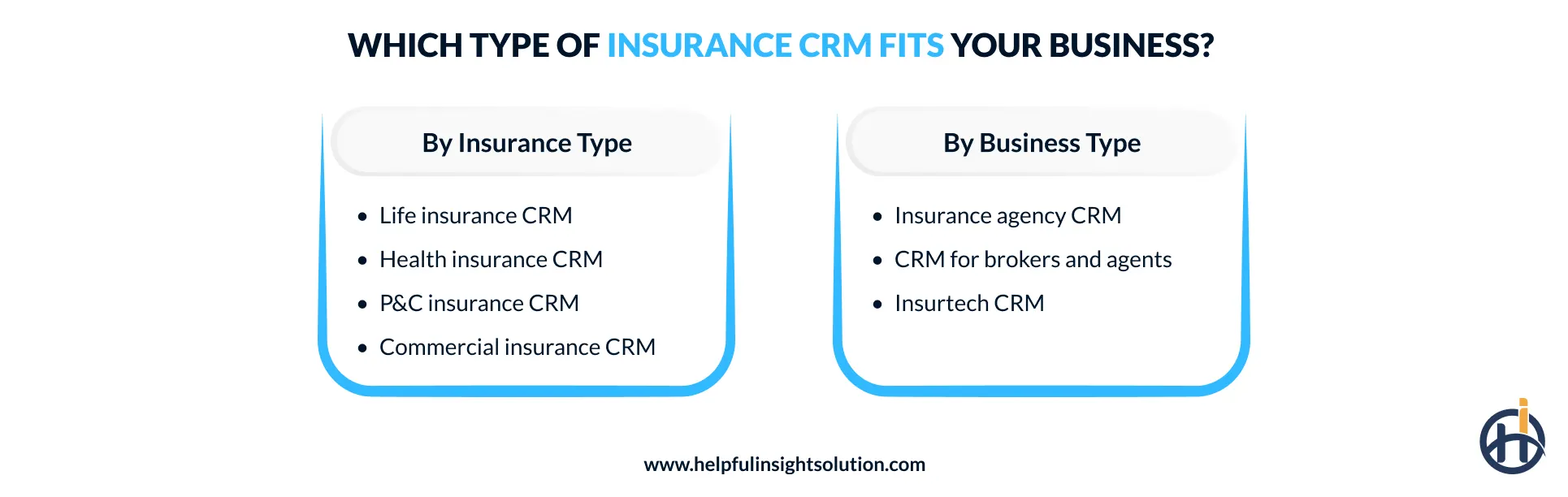
Insurance CRM by insurance type
Life insurance CRM
A life insurance CRM is designed to manage policy details over an extended period. Beyond basic contact records, it may track beneficiaries, premium schedules, policy milestones, and client reviews. These capabilities are particularly useful when agents and carriers need to maintain relationships well beyond the initial policy sale.
Health insurance CRM
Managing health insurance plans often involves regular communication with members and other parties, especially during enrollment or policy changes. Health insurance software with CRM integration can keep these interactions connected with account information and service activities. For brokers, this makes it easier to track requests and respond to clients as coverage needs change.
Read also: Healthcare CRM software development guide
Property and casualty insurance CRM
Property and casualty insurers manage customer relationships across policies, coverage changes, claims, and renewals. A CRM tool can keep these activities associated with the relevant customer record, which makes it easier to follow account history across auto, property, and commercial coverage without treating each interaction as a separate record.
Commercial insurance CRM
Managing business insurance can get complicated when one client has property, liability, workers’ compensation, and other coverage. A CRM for commercial insurance agencies can keep these policy relationships together, giving agents a more practical view of the account when reviewing coverage and renewals.
Insurance CRM by business type
Insurance agency CRM
An agency CRM system is useful when work starts spreading across emails and spreadsheets. It brings those records into a shared workspace, covering things like prospects, client conversations, renewal dates, and sales activity. This makes it easy to see what is happening across different accounts.
CRM for insurance brokers and agents
Brokers and independent agents often work with multiple carriers and products, while MGAs may also manage insurance programs across different markets. That means there is quite a bit to keep track of, from quote discussions to policy updates. A CRM can bring this information together, with insurance agent portal software providing access to the policy and carrier details they need.
Insurtech CRM
As insurtech startups reshape traditional insurance models, their CRM needs can look quite different from those of a traditional agency. An Insurtech CRM brings customer activity, digital sales, and automated processes into the same setup, with integrations connecting other applications around it. This makes the system easier to adapt as the insurance product changes.
What features should an insurance CRM have?
The features a CRM platform for an insurance business should include depend on its processes, users, and existing systems. Here are the main features worth considering when planning the system.
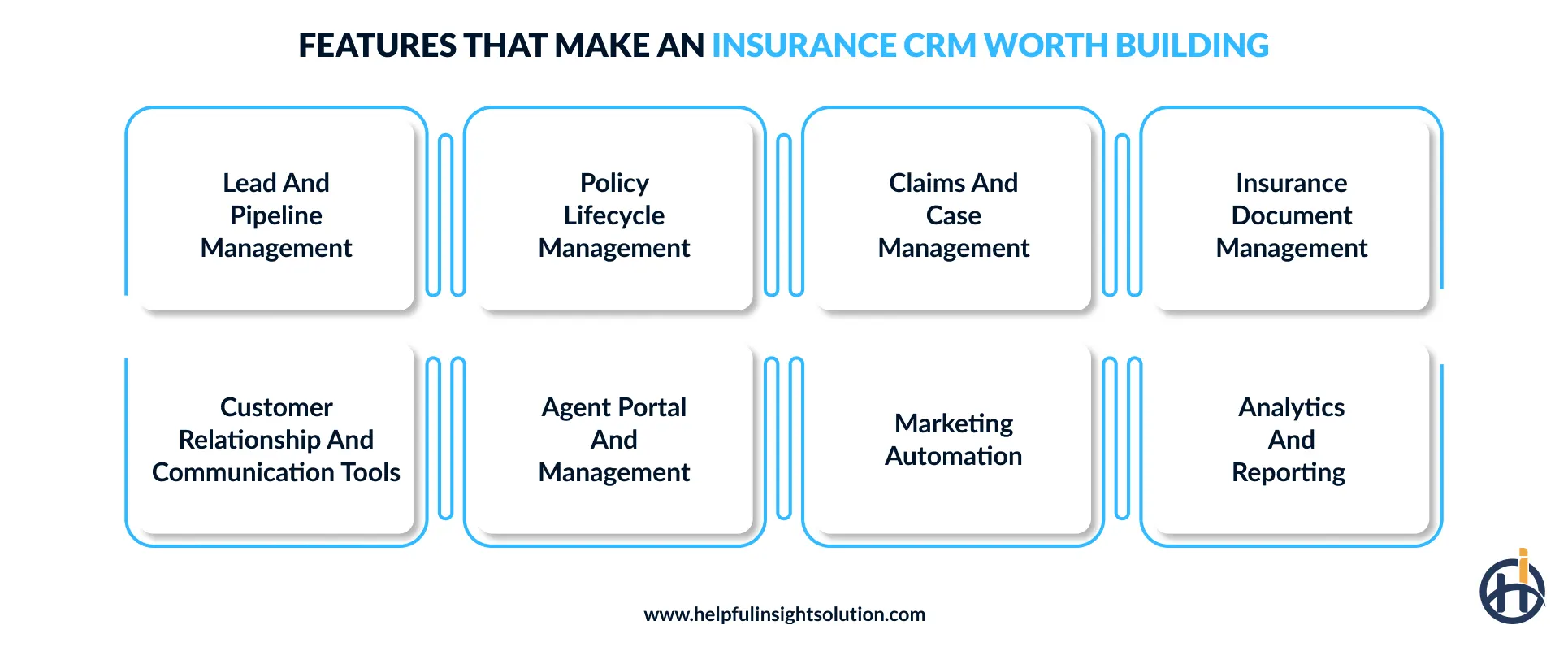
Lead and pipeline management
Prospects can be tracked from the first inquiry through quoting and policy issuance, with each opportunity placed at the right sales stage. The CRM records sales activity and follow-up status, while insurance lead management software capabilities can score and prioritize prospects based on their likelihood of conversion.
Policy lifecycle management
A CRM tool can track policies from issuance through renewals and cancellations. With insurance policy management software, coverage details and premium schedules stay linked to each policy record, creating a complete history of its lifecycle.
Claims and case management
When a claim is opened, starting with the FNOL (First Notice of Loss), several updates can follow before it is closed. A customer relationship management software can keep the incident details, documents, conversations, notes, and status changes together.
It can also record pending actions and important dates, giving agents a complete record of what has happened on the case so far.
Insurance document management
This functionality of insurance agency CRM software keeps important files and documents organized. Agents can upload applications and policy documents without keeping them in separate folders. Document search makes older files easier to find, while access controls can restrict sensitive documents to authorized users.
Communication tools
An insurance CRM can record conversations from different channels and link them to the customer profile. This provides context from earlier interactions before a new conversation starts and helps with better insurance customer relationship management.
For example, an agent handling a renewal request can review past messages instead of starting the conversation without knowing what was already discussed.
Agent portal and management
This feature provides agents with a dedicated space to view assigned leads, customer details, tasks, and commission information. An insurance agent portal software can also let managers assign leads and review agent activity from the same CRM.
Marketing automation
When you build insurance CRM software, adding marketing automation can make it easier to attract new customers and nurture leads through targeted campaigns. Messages can be triggered by policy interests, lead activity, or customer interactions. Insurers can set these campaigns in advance to reach potential customers and keep follow-ups running according to the selected schedule.
Insurance analytics and reporting
Sales, renewals, retention, and revenue figures can be included in regular reports. Dashboards can bring these numbers together so insurance companies can quickly see how things are going. This can also help them spot opportunities to reach new customers and find better ways to keep existing ones.
AI features to add to an insurance CRM system
Artificial intelligence can take an insurance CRM beyond basic automation. Using AI development services, businesses can add functions for lead prioritization, document handling, and other tasks where intelligent processing makes practical sense.
Here is a look at the AI-powered features that can be added to CRM software for insurers.
| Feature | Description |
| Predictive lead scoring | Historical data and prospect activity can be analyzed using predictive analytics to score leads, showing which inquiries have a higher chance of becoming customers. |
| AI-powered customer service chatbots | AI chatbots can answer common questions about coverage, premium payments, renewals, and simple claims, so customers do not need an agent for every small query. |
| Intelligent document processing | Machine learning reads scanned documents and pulls out useful details from forms, reports, and records. The extracted information can then be added to the appropriate customer or policy record. |
| Renewal risk prediction | AI-driven insurance software identifies likely renewal risks, while CRM helps agents prioritize follow-ups and improve customer retention. |
| Customer churn prediction | By checking customer activity, complaints, and service records, AI can identify accounts showing signs of dissatisfaction. Insurers can then review those customers before they decide to leave. |
Insurance CRM integrations: What systems should it connect with?
CRM software for insurance companies becomes more useful when it can share data with the systems an insurer already uses. It may connect with policy, claims, accounting, communication, and other business systems to keep information moving between applications.
Agency management systems
Many insurance agencies already have an agency management system in place. CRM integration can bring policy, client, and commission details into the same workflow. An agent can check a policy record without opening another application.
Updates made to customer or policy information can also stay aligned across both systems. This keeps the existing agency management software in use while adding CRM functions around customer relationships and sales activity.
Policy administration systems
Insurers can connect their insurance policy management software with the CRM to keep policy details alongside customer records. Agents can check coverage, premium amounts, limits, and recent updates from the same place. Information collected during a quote can also move into the policy system, reducing repeated data entry during policy issuance and renewals.
Claims management systems
Using claims management software alongside the CRM lets agents see claim information from the customer record. They can check the current status, previous updates, and other claim details. This makes it easier to answer claim-related questions without asking policyholders to repeat information they have already shared.
Accounting and ERP systems
An insurance CRM can connect with ERP and accounting systems to keep financial records linked with customer and policy data. For example, invoice details can move from the CRM into accounting software.
Payment history and premium collections can also stay updated. Commission records can be shared with finance systems. This makes insurance billing management easier to track without entering the same financial data in different systems.
Underwriting software
Connecting an underwriting software solution with the CRM sends customer details directly into the risk assessment process. Information such as age, occupation, income, credit history, and existing policies can be pulled from the CRM instead of being entered again. This makes insurance risk assessment more consistent and keeps quote preparation connected to the customer record.
Customer portals and mobile apps
Linking the CRM to a customer portal gives policyholders direct access to their insurance records. They can check coverage details and download documents when needed. Payment history and claim status can also be available from the same account.
A mobile app can be added alongside the customer portal when policyholders need access from their phones. The CRM can store the customer and policy information used by the app. With insurance mobile app development, businesses can also set up policy notifications and routine requests that sync with the main CRM record rather than maintaining separate data.
Security and compliance requirements for insurance CRM development
Before developing a CRM for an insurance business, it is important to define how customer data will be protected. Access should be limited based on user roles, with sensitive records stored securely.
CRM software insurance compliance depends on where the business operates and what information it handles. Let’s look at the regulatory requirements and security standards to consider.
GDPR (General Data Protection Regulation)
For insurers serving customers in the EU, GDPR sets rules for handling personal information. A CRM should support consent records and allow customers to access or delete their data. Data collection should also be limited to a clear business purpose. An insurance compliance software setup should support these requests and keep personal information protected.
NAIC (National Association of Insurance Commissioners)
US insurance businesses need to consider NAIC requirements when designing how customer information will be stored and protected. The Insurance Data Security Model Law covers safeguards for non-public information.
Custom insurance CRM development should account for access permissions and data encryption. Regular security reviews and an incident response process are also important parts of an insurance CRM security setup.
CCPA (California Consumer Privacy Act)
CCPA gives California residents certain rights over the personal information a business collects about them. For a CRM, this means customers should be able to request access to their data or ask for its deletion.
The system can also record privacy requests and verify the person making them. Another important part is the right to opt out of the sale or sharing of personal information.
The CRM should also keep these preferences updated and avoid changing the service a customer receives because they used their privacy rights.
HIPAA ( Health Insurance Portability and Accountability Act)
If the CRM handles health information for health or disability insurance, HIPAA requirements need to be considered during development. Access controls should define who can view or change sensitive records. Encryption should protect data while it is stored and transferred. Session timeouts can close inactive accounts. Audit logs should also record important activity involving health information.
HIPAA violations can lead to civil fines ranging from $145 to more than $2,190,294 million per violation. Serious or intentional violations can also bring criminal fines and imprisonment.
Role-based access control
User permissions should be planned around specific responsibilities rather than giving everyone the same CRM access. An agent may view policy information while an underwriter needs access to risk-related records. Administrative functions can remain restricted. User access management should also make it simple to add, remove, or change permissions when a person’s role changes.
Multi-factor authentication
A password alone may not be enough to secure an insurance CRM. MFA adds another identity check before a user can sign in. This could be a code sent to a phone or an authenticator app. For insurance agency software, adding MFA can reduce the risk of access through stolen or leaked passwords.
Off-the-shelf vs. custom insurance CRM software: Which is right for your insurance business?
Are you confused about whether to choose a ready-made CRM or invest in bespoke insurance CRM software development services? Both options have their own costs, setup time, and flexibility. The better fit depends on the workflows and features required.
A quick comparison can make the differences easier to understand.
| Feature | Off-the-Shelf CRM | Custom Insurance CRM |
| Initial Cost | Lower upfront cost and subscription-based pricing | Higher initial investment for development |
| Deployment Time | Ready to deploy within a short timeframe | Takes longer due to custom development and testing |
| Customization and Flexibility | Limited as it depends on available features and settings | High as it’s built around specific business workflows |
| Integration Options | Pre-built; works with integrations supported by the provider | Flexible; can connect with existing insurance systems and databases |
| Scalability | Depends on vendor plans and system limits | Can scale with business requirements |
| Best Fit For | Suitable for businesses with common CRM needs and standard workflows | Suitable for businesses needing specific workflows and deeper system control |
How to build custom insurance CRM software?
Building a CRM for the insurance industry from scratch takes more than developing the features listed in a project plan. The workflow, integrations, security needs, and future changes all need to be considered. Below, we’ll go through the main stages of insurance CRM software development and what to consider at each step.
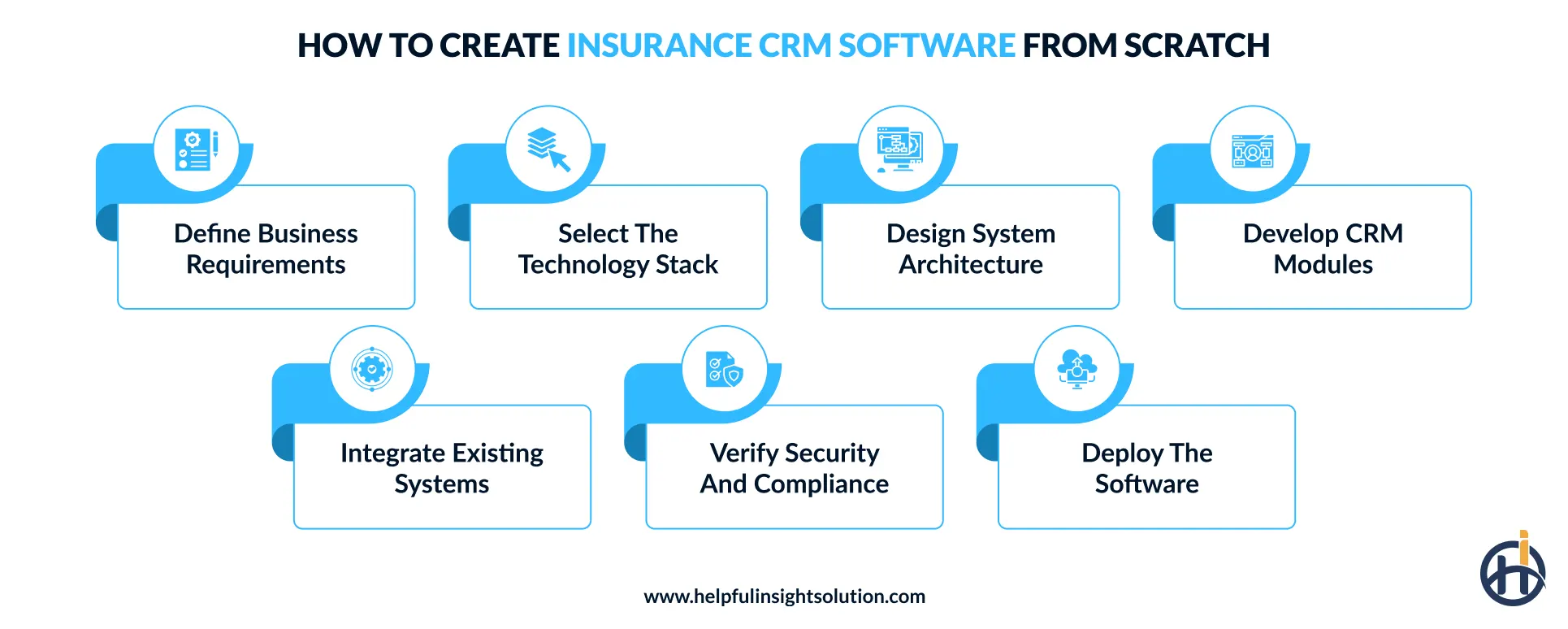
Define business requirements
Start by listing what the CRM needs to handle in the insurance business. This may include lead management, policy follow-ups, customer records, or claims tracking. It is also worth mapping the current workflow before deciding on features.
Select technology stack
The technology stack should be chosen around the insurance management software’s actual requirements. For example, Node.js, Python, or Java can be used for backend processes, while React or Angular can handle the interface. The database should also suit the type of policy and customer data being stored.
When the required technical expertise is not available internally, the business can work with an outsourced software development company to choose the stack and handle its implementation.
Design system architecture
At this stage, decide how the CRM’s main parts will work together. Core functions such as customer management, policy handling, billing, and reporting can be separated into independent services when the project requires it.
This makes the platform easier to change later. A well-planned CRM system architecture should also support secure APIs and external insurance system connections.
Develop CRM modules
With the structure in place, development can move to the modules the insurance business actually needs. This may include lead tracking, policy management, renewal reminders, customer profiles, and claims records. Each module should work with the others without creating duplicate data.
Businesses that manage sales through multiple channels can also connect insurance distribution software with the CRM where required.
Integrate existing systems
A custom CRM does not need to replace every system already in use. It can connect with policy administration tools, payment services, document systems, and other business software through APIs.
The goal is to keep relevant information in sync across platforms. For insurers managing producers, integration with insurance producer management software can also keep related records connected.
Verify security and compliance
Once the CRM for insurance agents is built, check that the platform meets the regulatory requirements that apply to the business. Depending on the data and location, this could include GDPR, HIPAA, CCPA, or state insurance requirements. Test areas such as user access, data handling, privacy requests, audit logs, and data deletion. If a gap is found, fix it and test that area again before launch.
Deploy the software
The launch stage is where the CRM moves from development into daily business use. Start with data migration and check that important customer and policy records have transferred correctly. A pilot rollout can be useful for finding issues in real usage. After the full launch, monitor system performance and address problems as they appear.
How much does it cost to develop insurance CRM software?
The cost to develop insurance CRM software usually falls into three broad ranges. A basic insurance CRM may cost around $35,000- $80,000, while a mid-level CRM can range from $80,000- $150,000. An enterprise-level CRM may cost $150,000- $350,000 or more, depending on its scope.
These figures are not fixed prices. The final cost to develop software depends on several factors, including the number of CRM modules, level of customization, integrations with existing insurance systems, and security and compliance requirements. Development location and the size of the development team can also affect the budget. These factors can push an insurance CRM development cost toward the lower or higher end of these ranges.
Before setting the budget, list the features and integrations the CRM actually needs. This makes it easier to compare development estimates and avoid paying for functions that are not relevant to the insurance business.
Common challenges in insurance CRM development and their solutions
Creating a CRM for an insurance business can raise practical issues around integrations, data migration, security, and changing business requirements. Knowing these risks before development starts makes planning easier. This section looks at common insurance CRM development challenges and practical ways to address them.
Legacy system integration
Many insurers cannot simply switch off their existing software when introducing a new CRM. Customer and policy records may still need to move between both systems. If the older application has limited APIs or uses a different data structure, keeping information in sync can become a real development challenge.
The solution
The CRM can work alongside existing insurance software rather than forcing an immediate replacement. Developers can build APIs or middleware to handle communication between the systems and map different data formats correctly. This approach keeps existing applications in use while creating a more practical path toward legacy insurance system modernization over time.
Data migration issues
Moving existing insurance records into a new CRM can expose duplicate customer profiles, missing information, and inconsistent formats. Data stored across different systems may also be difficult to match, creating accuracy issues during insurance CRM data migration.
The solution
Audit the existing records first, remove duplicates, correct missing or outdated fields, and map data carefully before migration. Run a small test transfer and verify records before moving everything.
Data privacy and compliance risks
Insurance CRMs handle personal, financial, and sometimes health information, so privacy requirements can become complicated. The rules may differ based on the customer’s location and the data being stored. Missing a requirement can leave compliance gaps, trigger regulatory fines, or lead to lawsuits.
The solution
Know which privacy requirements apply to the CRM. Once that is clear, the relevant requirements can be built into the platform during development. Run checks before launch to see whether anything is missing, then address those issues before the system goes live.
User adoption challenges
An insurance agent may be comfortable managing follow-ups in a spreadsheet, while a broker may already have another system for client records. Getting agents and brokers to adopt a new CRM solution for insurance can take some adjustment.
If the new process feels slower or unfamiliar, they may continue using older tools, leaving parts of the customer record outside the CRM.
The solution
Before rolling out the CRM, let some agents and brokers work with it on real day-to-day tasks. Their experience can show where the process needs changing. Fix those areas first, then introduce the CRM to the wider business with a simple walkthrough focused on the work users actually need to complete.
Why partner with Helpful Insight for insurance CRM software development?
As more insurance processes move into digital systems, insurance CRM software has become more important to how insurers manage customer relationships. A custom-built CRM can bring customer data together with the processes that depend on it, instead of leaving information spread across separate tools. For insurers adding customers, products, and digital channels, this makes CRM development a practical step toward a more connected business.
Our insurance software development company brings 10+ years of experience building solutions for the insurance industry, including custom CRM platforms based on specific business processes and data requirements. We can also connect your CRM with existing insurance applications, so you do not have to replace every system already in use.
Our certified developers select the right technology stack for your project and recommend features based on your actual business requirements. Rather than adding technology for the sake of it, we focus on suitable modern tools and capabilities that can support your CRM’s performance, scalability, integrations, and future growth.
Planning to build or upgrade an insurance CRM? Connect with us and share your project details. Our team will look at the requirements and the features you want before suggesting a suitable approach.
Frequently Asked Questions
In insurance, CRM stands for “customer relationship management”. It refers to software used to manage customer information, interactions, leads, policies, and ongoing client relationships.
Insurance CRM software brings customer, policy, and interaction data into one platform, then uses workflows to manage leads, follow-ups, service requests, renewals, and other relationship activities.
Developing a basic insurance CRM usually takes 2 to 5 months; enterprise-grade systems can require 9 to12 months or more. Duration depends on the required features, integrations, security controls, compliance scope, customization, and whether the solution uses an existing platform or starts from scratch.
Yes, custom insurance CRM software can connect with existing insurance systems using APIs or middleware. Data mapping keeps information consistent across policy, claims, billing, and other connected applications.