

Key Takeaways
- The build vs. buy insurance software decision depends on business needs, available resources, budget, and how much control insurers need over their systems.
- Custom insurance software is ideal for insurers who have very specific workflows, specialized products or have requirements that off-the-shelf platforms simply can’t meet.
- Off-the-shelf insurance platforms can help businesses launch faster and manage common operations without taking on full development and maintenance responsibilities.
- Before choosing build or buy options, think about the long-term costs, system compatibility, compliance issues, data ownership, and the vendor’s contract.
Insurance technology needs can vary as a business grows. New products, shifting customer expectations, and regulatory changes may all lead insurers to review their existing systems. Some may need to replace software that no longer meets their needs, while others may be starting from scratch and need to build a platform of their own. In either case, they have to decide between building and buying insurance software.
The growing focus on digital transformation in insurance is also increasing the need for systems that support policy management, claims, underwriting, and customer services. According to Mordor Intelligence, the insurance software market is estimated to reach $20.41 billion by 2031.
Some insurers prefer to buy a ready-made platform, while others choose to build their own software. There is also the option of using an existing system and adding new features where needed. Each approach works differently, so the choice depends on the insurer’s needs.
If deciding between building and buying an insurance core system seems difficult, this guide explains both approaches and the key points to consider before choosing one.
What is custom insurance software?
A custom insurance platform is built to meet the specific needs of an insurance business. It includes the features and tools needed to manage its daily operations, such as policies, claims, and underwriting.
Here are the pros and cons of a custom insurance system.
Pros
Tailored workflows
Insurance companies don’t all handle their work in the same way. Some have a particular process for reviewing applications, issuing policies, or settling claims. Bespoke insurance software can be built to follow these processes, so insurers can work without changing familiar routines
Full data ownership and control
With a custom insurance software system, an insurance agency has greater control over where their data is stored and how it is used. They can set access rules, manage the security of the data, and decide when to share information with other business applications.
Unique competitive edge
Custom software enables insurers to do things that simply aren’t possible on a standard platform. They can tailor their coverage to specific customer groups, experiment with different pricing models, or make the claims process easier. Such differences can give customers a reason to choose it over other insurers.
Cons
High upfront investment
Building software from scratch can cost more initially than buying an existing platform. Insurers have to pay for the design, development and testing before the system is even ready to use, and that can be a significant drain on the budget, particularly for a smaller insurer.
For typical figures by software type, see the insurance software development cost guide.
Longer development time
Custom software is not ready to use as soon as the decision is made. It takes time to plan, develop, and test the system before employees can start using it. For carriers that need a quick launch or are modernizing a legacy system.
Heavy maintenance burden
Building the software is only the beginning. Once it’s in use, insurers still have to fix issues, add new features, and keep security measures up to date. That takes time and money. When comparing make vs. buy insurance software, ongoing maintenance is an important cost to consider.
What is off-the-shelf insurance software?
Off-the-shelf insurance software is a ready-made platform that insurers can purchase and start using. It comes with standard features for tasks such as policy management, billing, claims handling, and underwriting, so businesses don’t have to develop a system from the beginning.
Below are the pros and cons of a ready-made insurance system.
Pros
Faster deployment
Since the platform is already developed, insurers don’t have to wait for a new system to be built. They can set it up and start using its features sooner. That’s useful for businesses that want an insurance agency management system but don’t want to go through the lengthy process of having one built.
Lower upfront cost
An off-the-shelf platform can be a more affordable starting point for insurance companies that don’t have a large technology budget. Instead of funding development, they pay for an existing product. The money saved can go towards other needs, such as customer service, staff, or business expansion.
Proven functionality
Off-the-shelf solutions have been used by a variety of businesses, so their core functionality is not new or unproven. Insurers can use existing tools for policy administration, claims, and billing, and receive regular updates from the software provider.
Cons
Limited customization
Packaged insurtech software is built to address common business requirements, so there’s not a lot of scope for change. A configurable platform will provide some flexibility, but insurers may still find it very difficult to add their own pricing rules, forms, and approval processes.
Vendor lock-in risk
Using a vendor’s platform for a long time can make it very difficult for insurers to switch. Moving the data and setting up the workflows in a new system can take a lot of time and effort. That, in turn, can restrict their options if prices go up or the platform no longer suits their requirements.
Integration challenges
A ready-made platform may not necessarily be able to plug in easily with the tools that the insurer is already using. If it doesn’t integrate well with the existing core system, staff end up entering the same data in several places, which makes daily work harder.
Build vs. buy insurance software: Key differences
Deciding which development approach to take is not always easy, especially when both options have their own benefits and limitations. The comparison below looks at custom vs. off-the-shelf insurance software side by side to help insurers understand where the two differ.
| Factor | Custom insurance software (build) | Off-the-shelf system (buy) |
| Time to market | Longer development period (3 to 12+ months) | Faster deployment (usually ready within a few weeks) |
| Initial investment | Higher upfront build cost, then ongoing maintenance | Lower entry cost, licence or subscription fees |
| Integration capabilities | Built around existing systems | Vendor-supported integrations |
| Customization and flexibility | Fully adaptable workflows | Limited configuration options |
| Maintenance and upgrades | Managed by the business or development company | Managed by the vendor |
| Compliance and regulatory updates | Updates based on specific requirements | Depends on vendor coverage |
| Data ownership and security | Control over storage and access | Vendor-dependent data control |
When to choose custom insurance software
Creating tailored software to manage insurance operations makes sense when an insurer’s requirements don’t fit the options available in the market. But how can a business leader know when building is the better choice? Here are some common situations where custom software development may be the right move.
- The insurer sells specialty or niche products with rating rules and workflows that packaged platforms cannot support, even after configuration.
- Frequent workarounds are a drag on day-to-day operations and create extra work for the staff.
- Legacy or specialized systems will need to exchange data via integrations that the standard platforms don’t offer.
- More control over software changes and ownership matters more than relying on a vendor for every update.
- The insurer’s product, pricing, or customer experience wins business, and standard vendor features would make it look like every competitor.
- Plans to introduce new insurance products or services require a platform that can adapt to changing business needs.
When to choose off-the-shelf insurance software
Not every insurance business needs software built from scratch. If an available platform can support its regular operations, buying may be more practical. Choose ready-made systems when:
- Products will follow the normal market patterns, i.e., standard personal lines, and the platform already in place supports the required rating rules and workflows.
- A new product line needs to go live in a matter of months and building the software from scratch would be a massive delay.
- The budget is tight, or the business is still very small, so a predictable subscription is far more sensible than a large upfront development cost.
- The insurance business requires software for mundane tasks, such as accounting and admin, that don’t require any of the insurance-specific functionality.
- The insurance service provider does not have a dedicated development team to build and maintain software in-house.
- An existing core system will remain in place, and a ready-made module, such as billing or an insurance portal, can fill a specific gap.
- A vendor offers proven integrations, regular updates, and ongoing support, so the business does not have to manage every upgrade internally.
The hybrid approach: Buy the core and build the rest
The hybrid approach lets insurers buy ready-made modules for routine operations and build features that need specific business rules. For example, a company can purchase a policy administration system while developing its own underwriting or risk assessment tools.
This gives the build vs. buy insurance software decision a more practical direction, without requiring every module to be developed from scratch. Moreover, hybrid insurance software approach works because:
- API-first design means insurance portals, pricing tools, and AI features can plug in without changing the platform
- Composable architecture means each component can be swapped out or upgraded individually without impacting the rest of the system.
- Industry data standards such as ACORD provide a common format for policy and claims data across all systems, so the amount of custom mapping required to connect new systems is reduced.
- The vendor deals with the standard, regulated work and the routine updates, which in turn frees up internal teams to work on higher-value projects.
- Custom work goes only where the business differs, and modernization happens in phases instead of through one risky replacement.

What to build and what to buy: Module by module
Building an entire insurance system from scratch may not always be necessary. Some modules can be bought from vendors, while others may need to be developed to meet specific needs. Let’s see how insurers can approach the build vs. buy insurance software decision for each module.
| Module | Build or Buy | Why |
| Policy administration (PAS) | Buy | Established platforms already handle policy records and renewals, which are common across most insurers. |
| Claims management | Buy or hybrid | Buy core claims features; build workflows for specialized products or processes. |
| Underwriting and risk assessment | Build | Insurer-specific risk factors and underwriting rules may require custom development. |
| Billing and payment management | Buy | Standard, with payment and compliance rules built in. |
| Customer and agent portals | Build or hybrid | Buy standard portal features; build interfaces when customer experience differentiates. |
| Rating and quotation engine | Build | Unique products and pricing rules may require calculations beyond standard configurations. |
| Document management system | Buy or hybrid | Buy document storage and capture; customize intake for insurer-specific forms. |
| Regulatory reporting and compliance | Buy | Buy platforms with maintained regulatory content and then configure them for local requirements. |
| Business intelligence and analytics | Buy | Mature analytics platforms already support dashboards, reports, and common data analysis. |
Key factors to consider before choosing build or buy insurance software
Still unsure whether to build your own platform or buy an existing one? It is an important decision that can affect your budget, daily operations, and future plans. Here are some key factors to consider when comparing custom vs. off-the-shelf insurance software.
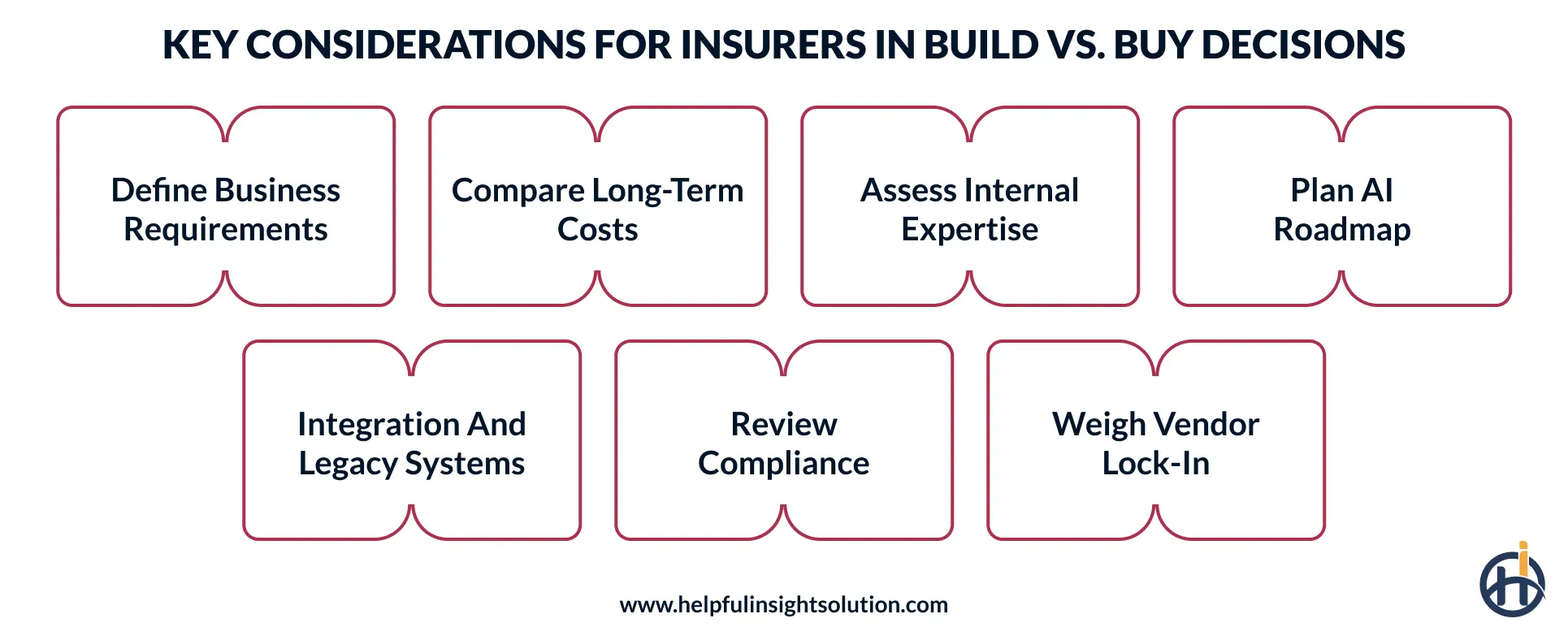
Define business requirements and fit gaps
List the problems the new software has to solve and the features required to handle them. Compare that list against what the existing platforms have to offer. When evaluating bespoke vs commercial off-the-shelf (COTS) software, this will help you avoid paying for unnecessary features or choosing a system that cannot support important business processes.
Compare 5 to 10 year costs
Before making a decision, work out what the insurer is going to spend on the software over the next 5 to 10 years. Consider development or licensing costs along with regular maintenance, upgrades, and hosting. This insurance software total cost of ownership gives a better picture of the actual financial commitment.
Assess in-house technical expertise
Look at the skills already available within the company. A custom system needs people who can maintain it, solve technical problems, and adapt it when processes change.
If the plan is to integrate AI into the system, for example, AI in insurance claims processing, then the team will also have to know how to manage the data and review the output of the AI over time without any external assistance.
Plan your data and AI roadmap
Think beyond the software’s features and consider how you intend to use the data in the future. Will bought software support that, or would custom-built tools fit better?
Data access, control, and AI requirements should be part of the decision, along with whether outsourcing AI development services will be needed to meet them.
Check legacy system compatibility
Review the existing technology before choosing to build or buy. The new software should be able to exchange data with the existing applications without requiring any additional work from the staff.
Check whether vendors support the required legacy system integration or if custom connectors will be needed.
Review compliance and security needs
Insurance regulations and data protection rules can change over time, so insurers need to think about who’s going to keep the software compliant after launch.
With a purchased platform, check how the vendor handles updates and security issues. With a custom solution, the business is responsible for insurance compliance.
Weigh vendor lock-in and exit options
Choosing a vendor is not just about what they offer today. You have to consider how difficult it would be to switch if your business requirements change. Look at the contract terms, the data export options, and the level of integration flexibility.
These points belong in the decision scorecard as long-term risks.
Common mistakes to avoid when making the insurance system build vs. buy decision
Even after comparing both options, insurance companies can still make mistakes that affect their software investment later. Here are some common mistakes to avoid when comparing SaaS vs. custom options.
- Insurers build every module from scratch, even when there are existing platforms that already handle routine tasks. That adds development time and unnecessary cost.
- A new platform might look perfectly fine on paper but can end up with rework if the connection with existing claims, billing, and underwriting systems is not checked.
- AI compliance documentation is left until after launch. AI features need the appropriate documentation and governance in place from the outset, or audits can become difficult.
- Many teams judge options only by the initial purchase or build price. Without looking at long-term ROI, the maintenance and upgrade costs that build up after launch stay hidden.
- Signing a vendor contract without having looked at the data ownership and the exit terms can make it difficult to move to another provider later.
How Helpful Insight supports your build or buy insurance software decision
There is no single approach that works for every insurer. Some businesses need software that fits their specific operations, while others can manage well with an existing platform. The decision depends on what the business wants to achieve and what it can support over time.
Your current software needs may change as you add new products, serve more customers, or expand your operations. Consider these possibilities when choosing between custom vs. off-the-shelf insurance software.
Helpful Insight can guide you through this decision. As a custom insurance software development company, we take the time to understand your business, review your existing systems, and assess your integration and development requirements. Our consultants use this information to recommend a suitable approach rather than suggesting custom development for every project. See our work in our portfolio.
If a ready-made platform cannot meet your needs, we can plan and build bespoke insurance software around your workflows and business goals.
Schedule a free consultation with our team and get expert guidance on choosing the right software development approach for your business.
Frequently Asked Questions
Buying off-the-shelf software is often the right solution for insurers with fairly standard requirements. If your business has specific workflows or features, custom development may be a better fit.
You can configure insurance software by changing its existing options, such as approval steps or user permissions. If you need a feature that the platform doesn’t offer, you’ll need customization, which involves making changes to its code.
Yes, many off-the-shelf insurance platforms allow changes through new settings, added modules, and integrations. However, major changes may be limited by the features the vendor provides.
Before signing, review the contract for data ownership, service commitments, security measures, support terms, and exit conditions. Check how the vendor handles outages and system failures. To compare vendors and development partners, see our list of top insurance software development companies.