


Key takeaways
- An AI browser extension refers to a browser add-on that uses artificial intelligence to help users summarize content, write emails, find information, and complete tasks while browsing.
- Businesses can build AI browser extensions for specific needs, including content writing, research, summarization, customer support, workflow automation, and browser-based task management.
- To build an AI browser extension, developers can use AI coding tools or no-code platforms, configure the extension, integrate an LLM API, and test its features.
- AI browser extension development costs range from $10,000 to $60,000 for simple extensions, $60,000 to $150,000 for mid-level projects, and above $150,000 for enterprise-level solutions.
Many businesses rely on browser-based tools to manage daily work, but some tasks still take more time than they should. Employees often switch between tabs, copy information from different websites, or repeat the same actions across platforms. This creates an opportunity for AI browser extensions, where businesses can add AI capabilities directly to the browser and make these tasks easier to handle.
Interest in AI-powered browsing is on the rise. A Market.us report suggests the global AI browser market will be worth $76.8 billion by 2034. However, building a useful extension requires more than connecting an AI model to a browser.
Businesses need to work out what the extension is going to do, how it’s going to get at the information on the page, and what AI capabilities it will need. If you plan to develop a Chrome extension powered by artificial intelligence, these decisions will shape its features and development approach.
In this guide, we will explore how to create an AI browser extension from scratch, including its benefits, costs, and challenges to consider.
What is an AI browser extension?
An AI browser extension is a small add-on that brings artificial intelligence features directly into a web browser (Chrome, Edge, or Firefox). It helps users perform tasks like summarizing articles, writing emails, finding information, and answering questions while browsing websites.
Unlike standalone AI websites or AI-native browsers, extensions work within the browser users already have. Users can install the features they need without switching to another platform, and whenever they want.
For example, Grammarly helps with writing, while Perplexity’s browser extension helps users get AI-powered answers.
How does an AI browser extension work?
From the moment a user opens an extension to the time it responds, several things happen in the background. Let’s break down how AI-driven browser extensions work.
Reading and extracting webpage content
When a user clicks the extension, a content script starts reading the page through the page’s DOM (Document Object Model), the browser’s structure of the page. It collects the text, headings, and links that matter and skips ads and scripts.
Understanding user instructions and intent
Now the extension has to work out what the user wants. They might want it to summarize a paragraph, answer a question, or shorten a long article. It takes the user’s instruction and the data it has gathered from the page and builds the request for the AI model.
Processing data through AI models (LLMs)
The custom AI Chrome extension now sends the user’s question and the webpage information to a large language model (LLM) through an API. The model reads both to understand the request and then generates an answer or completes the task the user asked for.
Executing actions
Some AI browser extensions are capable of performing actions on a webpage rather than just providing answers. They can type into a form, click a button, open a link, and more. The extension can also check the page to see what’s happened before it continues.
Generating responses and displaying results
Once the AI model has generated the response, the extension brings it back into the browser. It can be viewed in a side panel, a pop-up, or directly on the page. Depending on what the extension permits, the user can either copy the response or use the suggested text straight away without having to switch to a different tab.

Types of AI-powered browser extensions businesses can build
Businesses can build AI browser extensions for different purposes. One business may require it for research; another may want help with writing or routine tasks. Here are some types of AI browser extensions that businesses and startups can consider.
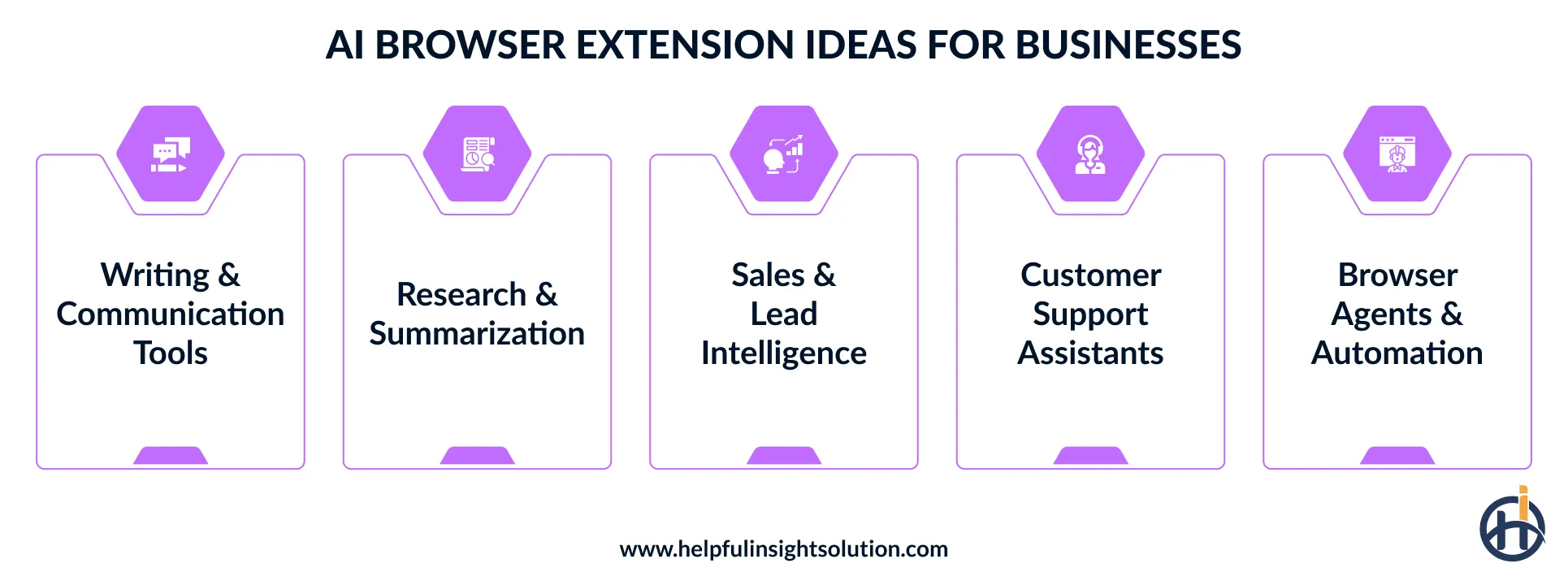
Writing and communication assistants
Writing tasks are part of almost every business role, be it writing a reply to a customer, producing a report, or updating website content. Businesses can develop an AI browser extension for content creation that can help with all of these. It could suggest alternative sentence structures, correct the grammar, draft a reply, or assist you in explaining something more clearly.
Two popular examples of this type of extension are Grammarly and Jasper Everywhere. Grammarly mostly improves what you’ve already written, with grammar, tone and clarity suggestions. Jasper Everywhere is more about creating content, drafting text for you in your brand’s voice, wherever you’re working.
Research and summarization tools
It can take a long time to just go through several webpages to find the useful information. Organizations can build research extensions that will pull the key bits of information from a number of webpages and present them in a condensed, readable format.
Some of these can even allow the user to ask questions about the page or get an explanation of a particular section. Monica and Perplexity are examples of AI tools that have the ability to read webpages and summarize them.
Sales and lead intelligence overlays
Sales teams often visit company websites and professional profiles to find potential customers. That takes time. Businesses can build browser extensions that will pick up the information needed from the site (what services they offer, how big they are, their contact details). Check each site’s terms and privacy laws before collecting personal data.
AI Chrome extension development can be used to help the sales team identify which leads are worth chasing and will also keep all the data in one place for later use.
Customer support and helpdesk assistants
Businesses using an online helpdesk to deal with customer queries can go one step further and develop AI-powered browser extensions to assist their agents. The Chrome extension could analyze the customer’s message, check what has already been said in the conversation and suggest what the agent might say next. It could also pull in the relevant answer from the help articles or the product information.
Most of the extensions can also make use of an AI agent to answer the basic questions. Tidio’s AI Copilot Chrome extension is a good example of a tool that helps support teams draft replies from their knowledge base.
Browser agents and workflow automation
Some online work does not need much decision-making. It just takes time, because it has to be done step by step. That’s where browser agents come in. They can open up a page, enter data, click a button, or go through a series of actions. You could build an AI extension for Chrome and Microsoft Edge around that exact set of actions, particularly if it’s something your staff does regularly.

Benefits of AI browser extension development for businesses
Adding artificial intelligence capabilities to the browser can pay off for an enterprise in more ways than one. Some benefits appear early, during development, while others appear only once people start using the tool. Here is what AI Chrome extension development can offer your business.
Faster and cost-effective prototyping
Cost is where AI browser extensions have the clear advantage at the outset. You get distribution via an existing extension store, the frontend is standard web development, and the AI functionality can be on a pay-per-use API rather than a self-hosted model. That keeps the first release very small and cheap. Businesses don’t lose much if there’s weak user adoption, and if it works, they can then add the more intelligent features in the next release.
Automated workflow management
Moving data from one online system to another is often a very slow process if done manually. Building AI browser extensions can take care of all that by reading the page, filling out the forms, and updating the records. Browser-based task automation can do all that and get the job done much faster and and also reduce the number of errors that often occur with manual data entry.
Higher user engagement
People are more likely to keep an extension when it helps with something they do regularly. Chrome extension AI integration can help in providing support based on what the user is looking at or doing online. It can offer suggestions or answers to questions while browsing without having to leave the page. That in itself can be a good reason to keep the extension installed.
Competitive differentiation
When several products are very similar in terms of functionality, even a small difference can influence which one people choose. An AI browser extension can differentiate itself from the pack by providing a level of support that goes well beyond simple shortcuts or fixed actions.
An AI browser assistant can understand what the user is asking for and can then go on to provide the appropriate assistance while browsing. These added capabilities give the product a stronger position among competing browser tools.
How to build an AI browser extension: Step by step
Creating an AI browser extension is far more than just adding AI capabilities to a browser. Every component has to be thought through and developed carefully. Below are the steps involved in AI browser extension development, starting from the ground up.
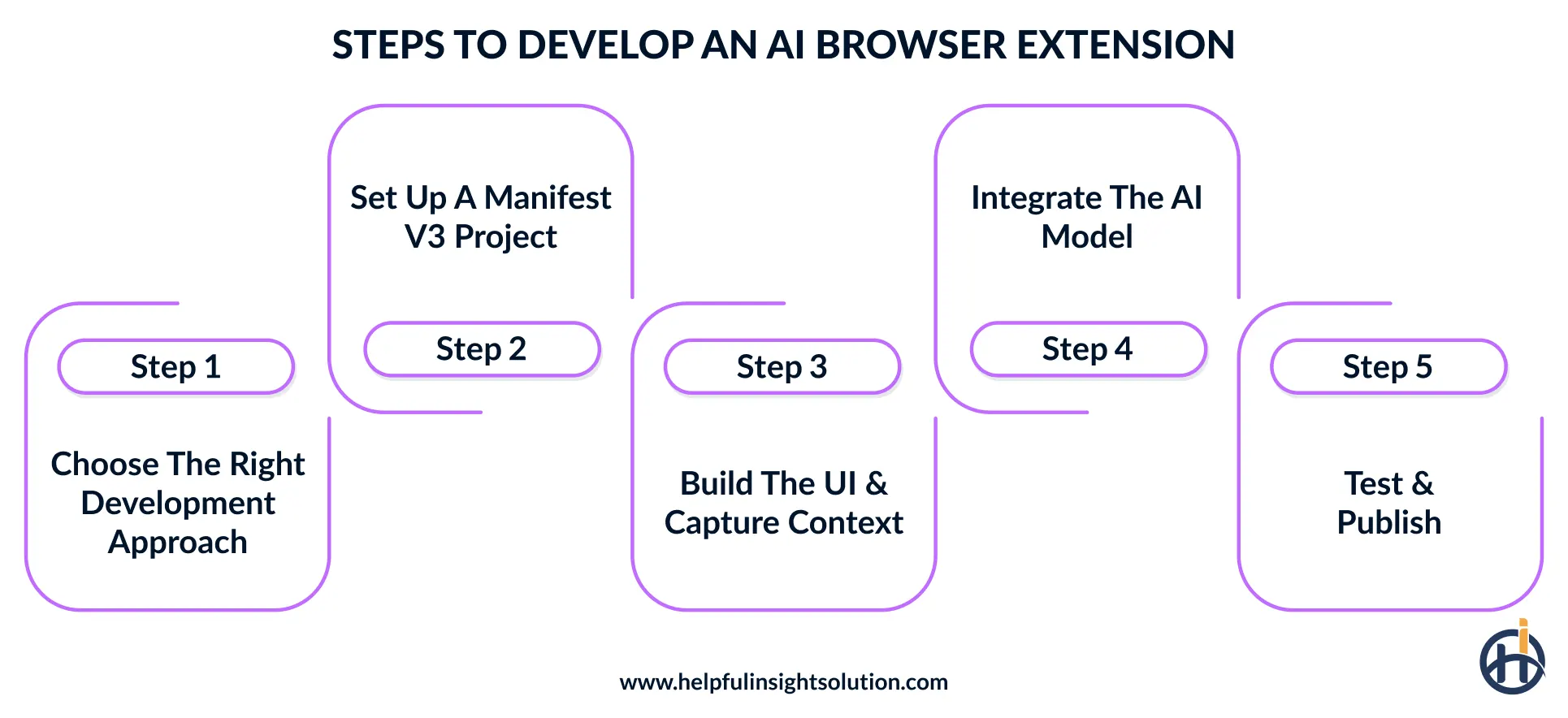
Choose the right build method
There are various ways of building an AI browser extension and the right approach will depend on how much control you need. A web development company can help you decide how much control you need and suggest the best approach. There are two main approaches to consider.
No-code extension builders
Platforms like PlugThis.ai use plain-language instructions to build out the structure of the extension, the interface, and the scripts. That reduces the amount of manual coding developers have to do.
AI-assisted coding
Cursor and Claude Code can be used to create files, write scripts and make code changes. They’re useful for working on the manifest.json, popup and background scripts. The code they generate needs to be tested before it’s released.
Set up Manifest V3 Project
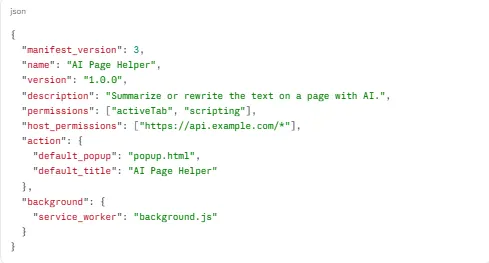
The project starts with a folder containing the files required to run the extension in Chrome. Manifest V3 is the current standard for Chrome extensions, and it gives each file a clear role. The main files are:
manifest.json: Contains metadata, permissions such as activeTab, storage, and scripting, and the service worker entry.
popup.html and popup.js: Define the popup layout and behavior.
content.js: Works with webpage elements through the DOM.
background.js: Runs background event handling through the service worker.
Build UI and capture context
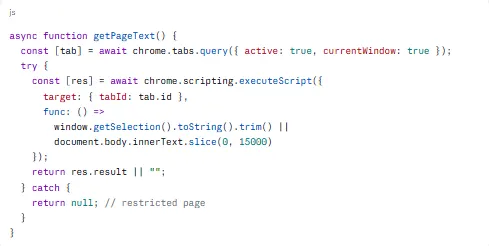
The next step is to create the extension’s interface and decide how it will collect webpage content. A simple popup or side panel can include options such as summarize, rewrite, or analyze. HTML and CSS can be used to build this interface.
To capture page content, use chrome.scripting.executeScript or a content script to read the selected text or page text. The extension should also handle empty selections and restricted pages.
Connect the AI model
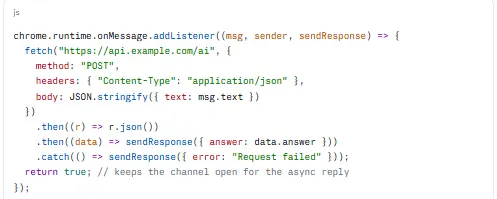
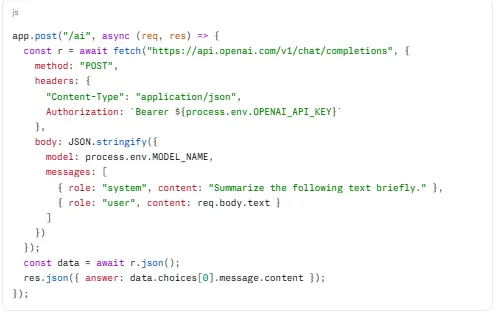
Choose an AI model based on the tasks the extension needs to perform. OpenAI, Gemini, and Anthropic offer cloud APIs for processing text. The API key should be stored on a secure backend, such as an Express or FastAPI service, rather than in the extension’s code.
For local processing, LM Studio can connect a running model, provided the required CORS settings are configured. This also supports a Manifest V3 AI extension with a local model option.
Extension side (background.js)
Proxy side (server.js, Express)
Test and publish
A working extension is not necessarily ready for release. It needs to be tested on different webpages and under normal browsing circumstances. You need to test the AI features, the page access, and the UI.
To test the extension, follow these steps:
- Open Chrome’s chrome://extensions/ page and switch on Developer mode.
- Use Load unpacked to install the local project.
- Check the popup, page interactions, and AI responses.
- Review errors and service worker logs through Chrome DevTools.
How to publish:
Prepare a ZIP package of the extension you’re testing and upload it to the Chrome Web Store Developer Dashboard. Complete the store listing with a name, description, icons and screenshots. Provide accurate privacy disclosures and explain the permissions you’re asking for. Once it’s submitted, Google will review it before it’s made available in the store.

How much does AI browser extension development cost?
The AI Chrome extension development cost depends on the features and complexity of the project. A simple AI browser extension can cost around $10,000 to $60,000, while a mid-complexity extension with SaaS integrations may range from $60,000 to $150,000. An enterprise AI browser agent can cost more than $150,000.
Several factors affect the final estimate, including:
- Project scope and complexity
- AI model usage and API fees
- UI/UX design
- Third-party integration
- Browser permission requirements
- Location of browser extension developers
It is important for businesses to understand that planning these requirements early helps control development expenses and avoid unnecessary costs.
Common challenges in AI browser extension development and how to solve them
Developing an AI-based browser extension comes with a few technical challenges. These may arise while connecting AI models, handling webpage data, or managing browser permissions. Knowing about these issues early can make the development process easier. Some common challenges and their possible solutions are:
Prompt injection from web pages
AI browser extensions tend to just read the content of a page. The issue is that some web pages may contain hidden instructions that can mislead the AI model. If the extension takes that content as trusted input, then it could leak private information or take actions the user never requested. That’s a major security issue.
The solution
A safer approach is to validate webpage content before sending it to the AI model. Dedicated developers can also set clear permission limits and add confirmation checks before the extension carries out actions that affect user data. Treat all page content as untrusted, keep it separate from your instructions, and ask the user to confirm any action that changes data.
Manifest V3 service worker limits
One downside of Manifest V3 is that background service workers can terminate when they’re no longer required. This is a problem for extensions that are reliant on long-running AI operations or on maintaining a continuous connection to an AI model. Messages can get dropped, and any temporary data in memory can be lost when the worker stops.
The solution
Use chrome.storage to save data that must remain available after a service worker stops. Break lengthy tasks into smaller operations and restore their state when needed.
AI response accuracy
An AI browser extension may not always give the right answer. Sometimes an LLM misunderstands the meaning of a webpage, misses important details, or produces information that is not actually present.
The solution
When building a Chrome extension with an LLM, use semantic HTML extraction to collect relevant webpage information instead of sending unnecessary page code. RAG can also provide verified context. An experienced AI development company can help select suitable models and improve response quality.
Conclusion
AI browser extensions are changing how people use browsers. They can understand webpage content, assist with writing, and handle repetitive tasks without requiring users to switch between multiple applications. This creates new opportunities for businesses to improve existing products and offer features that address specific user needs.
As AI models improve, future extensions are likely to understand context better, support more advanced workflows, and complete multi-step tasks with greater accuracy.
Our team has over a decade of software development experience and has built browser extensions for Chrome, Microsoft Edge, Brave, and other Chromium-based browsers. We develop extensions for different purposes, from writing and research assistants to workflow automation tools.
The team at Helpful Insight handles model selection, backend setup, security checks, and testing, whether the project starts from scratch or adds AI to an existing extension.
Connect with our experts to discuss your AI-based extension project.
Frequently Asked Questions
AI browser extensions can integrate models such as OpenAI GPT, Google Gemini, and Anthropic Claude. The right choice depends on the extension’s purpose, required features, response speed, and expected usage.
Yes, an existing browser extension can support AI without having to start from scratch. You can just integrate an AI model to provide content analysis, smart suggestions, and so on.
AI powered Chrome extensions can protect user data by enabling limited browser permissions, data encryption, and setting very clear rules around what data is collected and how it is used.
Popular AI browser extensions include Grammarly for writing and grammar, Sider AI for AI assistance, Monica for research, and Perplexity for finding information and summarizing webpages.