

Key takeaways
- The cost to develop an MVP of a Chrome extension typically ranges from $3,000-$10,000. Mid-level builds range from $10,000-$35,000, while complex extensions may cost $35,000-$70,000 or higher.
- Feature scope, project complexity, UI/UX design, API integrations, and cross-browser support, along with other factors, impact the Chrome extension development cost.
- Businesses should budget for hidden costs of building a Chrome extension, including ongoing maintenance, Chrome updates, server and hosting fees, AI token and API usage, and Chrome Web Store compliance.
- To reduce the cost of creating a browser extension, launch an MVP first, reuse proven libraries, request minimal permissions, and consider outsourcing Chrome extension development.
Chrome is one of the most widely used browsers, with more than 65% of the global desktop browser market, according to a DataIntelo report. This reach makes it an attractive platform for businesses and startups looking to build tools that work directly in the browser.
However, turning your idea into a functional Chrome extension comes with one big question: How much will it cost? While a basic extension may set you back $3,000–$10,000, feature-rich solutions with advanced functionality can cost anywhere from $35,000 to $70,000 or more, depending on their complexity and requirements.
A price range gives you a rough idea, but your actual budget depends on the work involved. An extension that runs on one website may need less development than one that connects several platforms. The developer you hire also affects the quote. It’s worth accounting for these differences, along with any costs that may come up after launch.
If you’re planning to develop a Chrome extension, it helps to know what you’re paying for before development starts. This guide looks at the factors that shape the cost, expenses that can come up later, and ways to plan your budget.
Chrome extension development cost by complexity
Chrome extensions can differ quite a bit in the work required to build them. The table below provides a Chrome extension cost breakdown, so you can compare what each type of project involves and get a better idea of where your own requirements fit.
| Extension Type | Estimated Development Cost | Typical Features | Development Timeline | Examples |
| Simple Utility Extensions | $3,000-$10,000 | Basic tools, simple UI, few permissions | 2 to 4 weeks | Word counter, tab manager, screenshot tool |
| Mid-Complexity Extensions | $10,000-$35,000 | API connections, form automation, data syncing | 4 to 8 weeks | Price comparison tool, form autofill extension, task manager |
| Enterprise-Grade Extensions | $35,000-$70,000+ | System integration, access controls, workflow automation | 8 to 12+ weeks | CRM browser extension, internal employee tool, business workflow extension |
What factors drive the cost of building a Chrome extension?
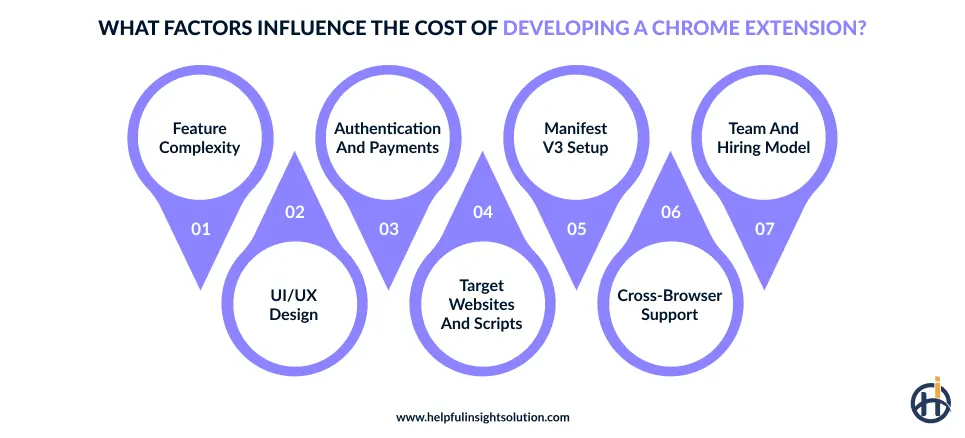
Building a Chrome extension involves different types of work, and each can affect Chrome extension pricing. Knowing what goes into development makes it easier to work out your budget. Below, we look at the factors that matter most.
Feature scope and complexity
Every feature you add to a Chrome extension affects the price. A small extension may only need a button and a simple action behind it. Add website automation, live updates, or data syncing, and the work changes. Each feature needs its own logic and testing, which can increase the Chrome extension cost. Features also tend to interact, so one change can break another and add fixing time before launch.
UI/UX design requirements
A Chrome extension doesn’t always need a custom UI/UX design. A small popup with standard browser controls may be enough for a simple tool. But startups building a customer-facing product or businesses creating an internal tool may need branded popups, options pages, or side panels to handle daily tasks.
Designing and coding these interfaces takes extra time. If layouts or user flows change during development, the price of a Chrome extension can increase further.
Backend and API integration needs
When an extension connects to another platform, it may need a backend to fetch data, check user access, and handle connection problems. A full-stack development team usually handles these parts. Building and testing them adds to the total Chrome extension development cost.
For a business tool that relies on live information from several systems, these details can add up. The number of integrations and how they exchange data both affect the development estimate.
User authentication and payment integration
A Chrome extension that works without a login is usually simpler to build. The cost changes when users need individual accounts, saved settings, or a subscription to access certain features.
Each option brings extra work, from handling account details to checking paid access. Consider which of these features your extension actually needs before setting the budget.
Target websites and content script complexity
The number of websites an extension needs to work with can affect the effort involved. When it runs on a business’s own website, the page structure is usually familiar.
On third-party sites, developers must write defensive code for layouts they can’t predict, and a redesign can break the extension overnight. Every fix means more development and testing hours, and those hours raise the budget.
Manifest V3 architecture
Manifest V3 is worth considering when estimating the cost of a Chrome extension, particularly if it handles tasks in the background. Chrome can shut down an idle service worker, so the extension needs a way to resume work when required.
This can be planned for in a new build, but older extensions may need more extensive changes if their background logic wasn’t designed for this.
Cross-browser support
Building for Chrome alone is usually more straightforward than supporting several browsers. Edge shares much of Chrome’s technology, so fewer changes may be needed.
Firefox and Safari can require more adjustments because some APIs work differently. Depending on the features involved, cross-browser support could add around 15–25% to the budget, and complex extensions may cost more.
Hiring model and team structure
Not every business needs the same setup to build a Chrome extension. Some can manage the project with one freelancer, while others need a specialized agency with design, coding, and testing skills.
One person may handle several tasks on a small project, but a more complex extension may need separate specialists. The hiring model determines how you access these skills and pay for their time.
Let’s look at the hiring models.
Hiring freelance developers
Freelancers can be a practical choice to build simple Chrome extensions that don’t require many different skills. Businesses can find them on platforms like Upwork and Fiverr, though it is worth reviewing each candidate’s earlier work to check for browser extension experience.
For startups working with a limited budget, this is often the most affordable way to get a first version built.
Hiring a Chrome extension development company
Hiring dedicated developers from a Chrome extension development firm may be worth considering when your extension needs API integrations, custom interfaces, and thorough testing.
Rates differ by region. Chrome extension developers in the USA charge roughly $40 to $150+ per hour, while teams in Asia typically fall between $15 and $70 or more.
Building an in-house team
An in-house team can make sense if you expect to update the extension regularly or maintain several browser tools. However, salaries, benefits, equipment, and recruitment add to the budget beyond each employee’s base hourly equivalent.
Hidden costs of Chrome extension development to plan for
The spending on a Chrome extension may continue well after the initial build is finished. Cloud hosting, subscription fees for external tools, and ongoing fixes may all cost extra.
Factoring them into the budget helps give a more complete picture of the Chrome extension development cost in 2026.
Ongoing maintenance and Chrome updates
A Chrome extension may need updates even after it goes live. Browser changes can affect how certain features work, so fixes and testing may be needed from time to time. Keeping around 10–20% of the original development cost aside each year can help cover routine maintenance.
Monthly server and hosting costs
If a Chrome extension saves account information or keeps settings in sync across devices, it may rely on a server. Running that service can mean a regular cloud or hosting bill after launch.
A small extension can cost around $20 to $100 a month to run. It could be more or less, depending on how many people use it and how much data it stores.
Chrome Web Store compliance and publishing
Most budgets cover building the extension and stop there. Approval for the Chrome Web Store is a separate task, including data handling and the privacy policy against Google’s policies, and a mismatch sends the extension back for changes.
Those revisions are billable, and they push the launch date.
AI token and API usage fees
Unlike a one-time build fee, AI is billed by usage. A Chrome extension that summarizes pages passes the text to a large language model (LLM) and receives a summary in return. The provider may charge for both the input and the generated response, based on token usage. Long pages and frequent use push the number up quickly.
Teams that track API calls early are less likely to be surprised later, which makes the AI Chrome extension development cost easier to control.
Store listing assets
A Chrome extension may be ready to launch, but the Chrome Web Store page still needs attention. Screenshots, icons, and a clear description all need to be created, and some features may need a demo video to explain them properly. If the interface changes later, some of this work has to be done again, adding to the budget for Chrome extension development services.
How to reduce Chrome extension development costs without compromising quality
The budget for a Chrome extension may change as the project moves forward. Features, technology choices, and development work all affect the final cost. Planning everything properly can help avoid unnecessary spending and deliver a quality extension at a reasonable price.
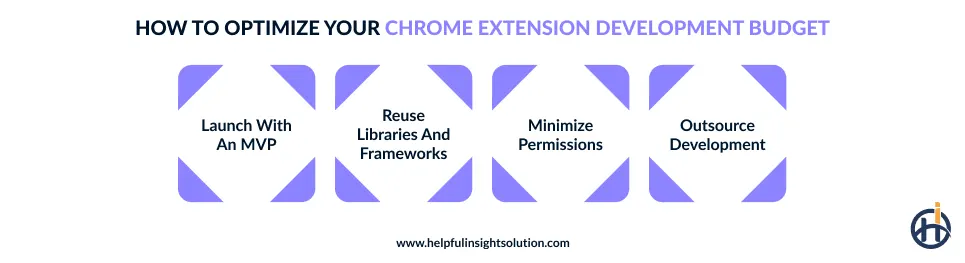
Below are some tips to reduce the cost of developing a Chrome extension.
Launch with an MVP
Start by building an MVP with only the features a Chrome extension needs to do its main job. Extra settings and less urgent features can wait until there’s a clear reason to add them. That makes the first version easier to build and check, and it keeps the Chrome extension MVP cost down without cutting the features users depend on.
For more on this approach, read our guide to software development for startups.
Reuse proven libraries and frameworks
Writing every piece of code yourself can make a Chrome extension take longer to build than it needs to. Many common tasks already have reliable libraries, so developers don’t have to build and test them again. React and Vite suit extensions with several interactive elements.
Still, popularity isn’t a reason to add a tool. For custom Chrome extension development, pick libraries that fit the project and remain actively maintained. That way, saving time now won’t create avoidable maintenance work later.
Request minimal permissions
Only ask for the access Chrome extension really needs. If it serves one website, broad permissions across all sites are hard to justify. Google’s reviewers will notice and send questions or ask you to change things before they approve it.
Fewer permissions mean less back and forth, and that keeps the cost to build a Chrome extension lower.
Outsource Chrome extension development
In-house teams without experience tend to spend time on problems a specialist solved long ago. With Chrome extension development outsourcing, you bring in that knowledge for the length of the project and skip the permanent hiring costs.
A specialist can also help the extension avoid common store review issues. Set clear deliverables early, so the scope doesn’t drift.
How to set a realistic budget for your Chrome extension project
A realistic budget gives a Chrome extension project a clear financial limit to work within. It should reflect what the business can spend and what the planned product will require.
Understanding the Google Chrome plugin development cost helps make that decision with fewer surprises.
Compare itemized vendor quotes
A lower quote isn’t always the better deal. Ask the web development company you shortlisted what’s included in the price, from interface design to API integration and testing. If one quote leaves out important work, the cost may rise later.
Add a maintenance reserve
As you work out the project budget, account for the cost of keeping the extension running well after release. Chrome extension maintenance costs may rise when browser updates affect existing features or security requirements change.
A yearly reserve of 10-20% of the original build cost can help you plan for routine upkeep.
Set aside a contingency
A well-defined scope still leaves room for surprises. Some only appear once development begins, such as unplanned fixes or change requests from your side.
A reserve for these means the project can continue without a new budget approval, and the Chrome extension cost stays under control.
Tie payments to milestones
Paying everything upfront leaves you with little leverage. A better arrangement splits the fee into milestone payments, with each one released after you’ve checked the matching deliverable. If progress slips, you find out early, and the Chrome extension development cost doesn’t run ahead of the agreed scope.
Conclusion
Building a Chrome extension can be worthwhile when it serves a clear purpose, whether that’s simplifying routine work or adding functionality to a web product. The final cost to create a Chrome extension depends on the scope, technical requirements, and future upkeep. Set your priorities early and work with a partner who understands what you’re trying to achieve, so your budget reflects the work the extension actually needs.
As a browser extension development company, we build secure, high-performing Chrome extensions for businesses and startups. Our work ranges from simple browser tools to extensions with API integrations, AI features, and advanced functionality. We plan each project around your goals and available budget.
Send us your project details, and we will review them and prepare a quote for your specific case.
Frequently Asked Questions
Manifest V3 is Chrome’s current extension platform. It replaces persistent background pages with service workers that shut down when idle, so features that run continuously must be redesigned. New builds plan for it, while migrating older extensions adds rework cost.
Outsourcing is often more affordable because businesses can avoid full-time salaries and hiring costs. In-house development may suit businesses that need frequent updates and ongoing internal control.
Yes, and most extensions earn through a free tier with paid upgrades. Since Google closed its own payment system, charging users means adding an outside payment provider and a subscription verification system.
Yes, tooling decides how fast the extension gets built, how much it takes to support other browsers, and how hard it is to find developers who can maintain it.