

Key Takeaways
- Building an app is a service engagement rather than a one-time purchase, running through research, design, backend work, testing, and post-launch maintenance. Market Research Future sizes the mobile app development market at $116.87 billion in 2025, with a projection of $988.5 billion by 2035 at a 23.8% CAGR.
- The app type decision fixes both the cost floor and the performance ceiling. Native builds compile straight to Swift or Kotlin with full hardware access, at the price of two codebases. Cross-platform runs one codebase through an embedded engine, which covers eCommerce stores, news feeds, and company portals.
- Budget follows effort multiplied by rate. A simple single-platform app runs $16,000 to $30,000 across 8 to 12 weeks, while enterprise builds carrying offline sync and role-based access control start at $100,000 and run 8 to 12 months. Developer account fees of $25 for Google Play and $99 a year for Apple fall outside that.
- Backend readiness moves the timeline further than headcount does. An app calling an API that already works can start immediately, while one waiting for the API to be written must wait for that work to finish first.
- Architectural decisions are the most expensive to reverse. A modular monolith suits an MVP, microservices suit applications where services carry different loads, an immutable schema is what gives regulated products a tamper-proof audit trail, and session state in Redis is what makes horizontal scaling work.
- On-device generative AI, passkey enrollment with device and account recovery, watch companion apps built on a separate power budget, and adaptive layouts for foldables are what 2026 adds to an app’s scope.
How many apps are on your phone? The number usually runs to several dozen, while the apps that get opened regularly stay under ten. This ratio says more about mobile app development outcomes than any market report will.
A new app now launches into a market already carrying more than five million rivals. Google Play and the Apple App Store listed 5,088,839 live apps in August 2026.
What separates an app people reopen is settled during mobile app development. The app type, build method, cost, and architecture are all chosen here, each decision aimed at keeping the app useful to the audience it targets.
This blog is a comprehensive mobile app development guide from planning to launching a successful application.
What is Mobile App Development?
Mobile app development is the process of building an application that works on phone operating systems, i.e., Android or iOS. The code of an app is written in a language that the platform then compiles into an installable file, an .ipa for iOS or an .aab for Android.
This installable file is uploaded to the Google Play Store and Apple’s App Store, where it goes through a review against the platform’s guidelines before publication.
Mobile App Development Types and How to Choose Between Them
Different types of mobile applications exist, including native, cross-platform, hybrid, and progressive web apps (PWA). Each type has its benefits and drawbacks; selecting the most appropriate one is important and determines everything that comes afterward.
| Native app | Cross-platform app | Hybrid apps | Progressive web apps | |
| What it is | Dedicated application for Android or iOS | Single application working on both Android and iOS platforms | Web code packaged inside a native container | A website that installs to the home screen |
| Codebase | Two separate codebases (one for Android and for iOS) | One shared codebase for both platforms | One web codebase inside the native shell | No web codebase with no app build |
| Design | Developed using native OS design standards | Design remains consistent across both platforms | Web pages rendered inside the app window | Rendered by the browser engine |
| Hardware access | Complete, end-to-end native support | Depends on custom integration or plugins | With the help of Plugins only | Limited to what the browser exposes |
| Distribution | Google Play Store and App Store | Google Play Store and App Store | Google Play Store and App Store | A URL, with an optional Play Store listing |
| Initial cost | Higher, as two applications need to be developed in parallel | Lower, only one application development | Lower still, as the screens are web code | Lowest, no separate application is built |
Native app development compiles directly to the platform built for, with zero-layer GPU and main-thread access, delivering faster performance.
Cross-platform apps bundle an embedded runtime layer (such as the Hermes JS engine or the Flutter/Dart engine), which executes application logic inside a dedicated secondary runtime alongside the host OS.
In simple terms, the app doesn’t directly talk to the phone, it first converts the code into its own intermediate format, and then its built-in engine translates those instructions for the phone’s native system.
This means that for a performance-focused application like a fitness app, or a game where low latency is needed, native app development is the best choice.
Cross-platform app development is the best choice for everyday apps like e-commerce stores, news feeds, and company portals that just need to display information without pushing the phone’s hardware to its fullest limit.
It can also work well for on-demand app development, where a shared codebase can support customer, provider, and administrative workflows across platforms. Also, it has lower development and maintenance costs, making it a preferred choice for building their first application.
Hybrid app development renders HTML and CSS inside a WebView (the system browser engine embedded in the app), reaching hardware only through plugins such as Capacitor or Cordova.
It is the best choice for internal tools, product catalogs, and forms-driven apps that update their content more often than their interface.
How the Mobile App Development Process Runs Across 7 Stages
The stages of the mobile app development process stay the same, whether the build is native or cross-platform. Each of the 7 steps produces the outcome the next one needs.
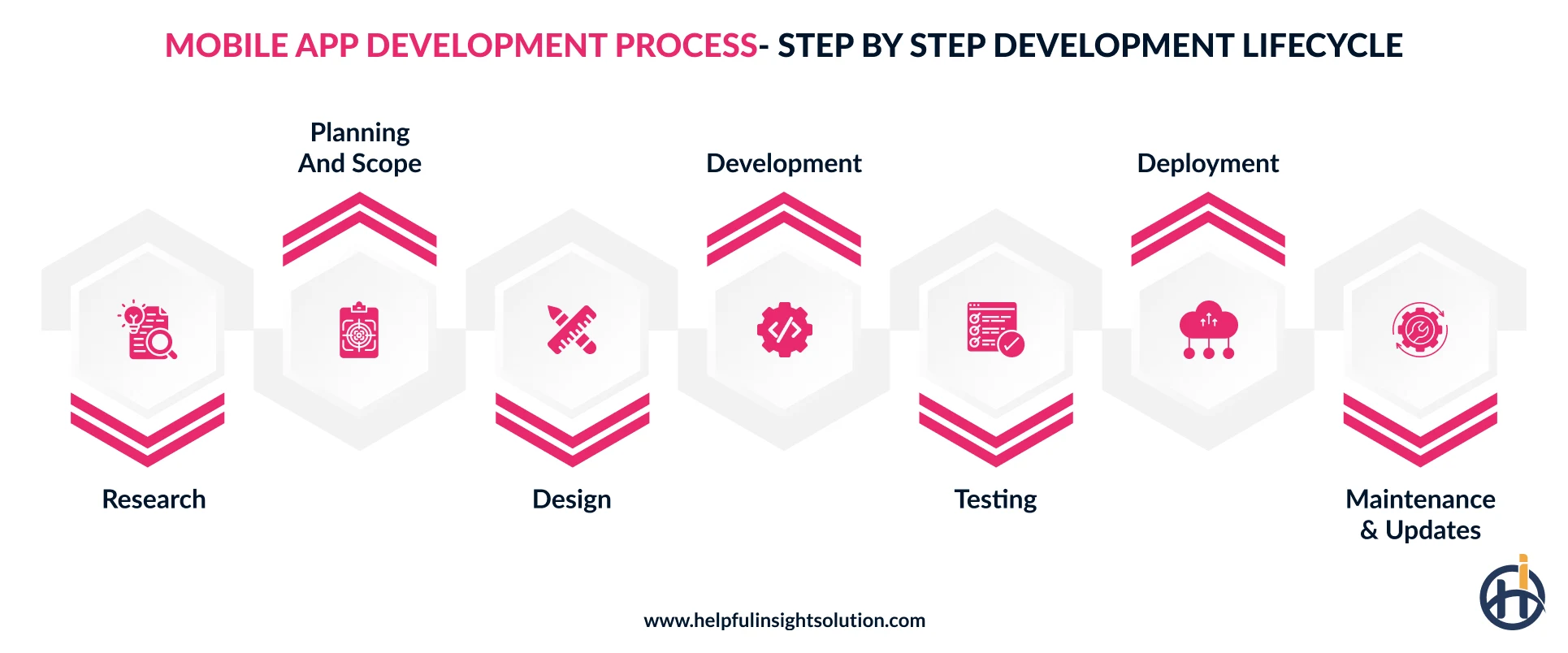
Research
The first step is understanding the market, competitors, and target users’ problems. This knowledge lays the foundation for every other stage in the app development process.
According to a survey of 126 mobile app startup failures, 15.1% (≅19) of them failed because there was no market need. These applications spend time and money building features that users never wanted.
Planning and Scope
Planning is the stage to put research output into decisions. From choosing the platform, features, app development partner, and tech stack to the timeline, all are decided together, because each of them depends on the other.
The selection of the platform should be based on the market share for the type of mobile app being built. Once settled, the tech stack, features, and everything can be worked on, as they have a direct influence on the platform.
Design
The user interface is the very first thing a customer notices about an application. It must be intuitive and accessibility-first, making it easier for users to complete every task in the feature.
Google and Apple both specify the design differently. Apple’s Human Interface Guidelines place primary navigation in a bottom tab bar. Android’s Material Design uses a navigation drawer. UI/UX design for a mobile app follows whichever set applies to the platform in scope.
Beyond platform guidelines, the mobile app design process should include wireframing to map core user flows, prototyping to validate interactions, and final high-fidelity mockups for developer handoff.
A design system built alongside these steps keeps the spacing, typography, and components consistent as new screens are added later.
Checking the early screens against the common UI/UX design mistakes in mobile products before handoff costs less than changing built code afterwards.
These steps ensure that the interface is not only aesthetic but also functional, tested, and ready for technical implementation.
Development
It is the core part of a mobile app development process. Front-end, back-end, APIs, and integrations with existing systems are all done at this stage.
By maintaining a consistent release cadence and rigorous testing alongside feature development, this phase converts a concept into a production-ready application.
Testing
Users expect a mobile app to work from the first screen. An app that crashes or loads slowly gets uninstalled, often on the same day it was installed. Testing before release ensures such issues can be fixed so each winning install can be turned into a long-term user.
Functional, device, load, and security, every aspect of the application should be tested on real devices to identify and fix the issues.
Deployment
The application is submitted to the Apple App Store and Google Play Store for review. To mitigate the risk at the deployment stage, many teams run a phased rollout to release initial updates to beta users.
This allows monitoring for crashes and user feedback before full launch.
Maintenance & Updates
Post-launch, the lifecycle continues with ongoing maintenance, including addressing OS updates, new device models, and security patches. Backlog features are then shipped on a regular release cycle.
This mobile app development process remains identical across all applications that are followed in the same order as they are mentioned.
It is an iterative process, where continuous improvements are needed to ensure the application remains adaptive to evolving needs of users.
Each stage here works together to move an app from idea to launch. For a complete breakdown of how these steps play out in practice, and what to expect at each phase, check out our detailed guide on the mobile app development process.
How Much Does It Cost to Build an App in 2026?
Mobile app development cost is the result of effort multiplied by a rate. Every feature an application has requires effort to build it, which is where the budget goes on.
Here is roughly how the tiers break down.
| Tier | What it covers | Cost | Build time |
| Simple | Forms, standard flows, local data, single platform | $16,000 to $30,000 | 8 to 12 weeks |
| Mid-level | Custom interface, user accounts, payments, push notifications | $30,000 to $100,000 | 4 to 8 months |
| Enterprise | Complex workflows, high concurrency, offline sync, role-based access control | $100,000+ | 8 to 12 months |
These are the estimated figures covering design, development, testing, and deployment. However, costs can vary significantly by location, so understanding regional app development costs is also important when estimating the overall budget. Beyond these factors, several other elements can affect the cost to build an app.
- Apple App Store and Google Play developer account fees: Google Play Store charges a $25 developer account registration fee needed to submit a publishing application. Apple App Store developer program charges $99 per membership year. Both are paid by the business.
- Cloud hosting: It is calculated based on the cost and depends on the cloud hosting provider you have chosen.
- Third-party services: Payment gateway, SMS, maps, and other third-party services charge based on the number of users or tier.
- Maintenance: Bug fixes, new device support, security patches, and dependency updates run on a retainer after launch.
These are the factors affecting mobile app development cost. Beyond these, the cost varies across different regions. Developer rates in India tend to be lower than the US and UAE rates for the same level of experience and scope.
How Long Does It Take to Build an App?
How long it takes to build an app is subject to a number of factors, including the integration count, the state of the backend, the team size, and the number of platforms in scope.
| Phase | Basic app | Mid-level app | Enterprise app |
| Research | 1 to 2 weeks | 2 to 4 weeks | 4 to 8 weeks |
| Design | 2 to 3 weeks | 4 to 6 weeks | 8 to 12 weeks |
| Development | 4 to 6 weeks | 12 to 20 weeks | 24 to 36 weeks |
| Testing | 1 to 2 weeks | 3 to 4 weeks | 6 to 10 weeks |
| Store submission | 1 to 2 weeks | 1 to 2 weeks | 2 to 3 weeks |
| Total | 8 to 12 weeks | 4 to 8 months | 8 to 12 months |
A timeline can hold together right up until it runs into one of the following, which come up on most projects:
- Waiting on credentials for a third-party system, because integration cannot start until the access is granted.
- Design approvals, because development cannot start on a screen until that screen is final, and each extra round of stakeholder feedback pushes the start date back by days.
- Whether the backend is already built, which makes the biggest difference of anything on this list. An app that connects to an API that already works can start straight away. An app that needs the API built first has to wait for that work to finish before the app work can properly begin.
- Extra developers get added once a project is already behind. That usually makes things slower before it makes them faster, because anyone joining in month four needs the codebase explained by the people who are already busiest.
How to Choose an App Development Technology Stack?
A mobile app tech stack is a combination of programming languages, frameworks, libraries, and databases to build, run, and maintain an app. It runs everything an app does, so the selection should be informative weighted against current and future needs.
| Layer | Common options | What usually decides it |
| Native frontend | Swift for iOS, Kotlin for Android | Hardware access, graphics performance |
| Cross-platform frontend | Flutter, React Native, .NET MAUI, Kotlin Multiplatform | Hiring pool, number of platforms |
| Backend | Node.js, Python, Java, .NET | Whatever the company already runs |
| Database | PostgreSQL, MySQL, MongoDB, Firebase | Data shape, offline sync requirements |
| Cloud | AWS, Azure, Google Cloud, Oracle Cloud | Data residency rules, existing contracts |
Frontend Framework
The frontend technologies renders the screen, handles input, and everything that happens on the screen.
Native development writes this layer twice. Swift handles iOS app development, and Kotlin handles Android app development.
Cross-platform frameworks like React Native and Flutter both compile to iOS and Android from a single codebase.
Both frameworks accept native modules written in Swift and Kotlin, meaning a cross-platform app can be upgraded to access hardware, AR, or VR rendering similar to a native application in the future.
Backend Technology
The backend holds the application logic, data, enforcces across control, and answers requests the app sends.
Backend languages vary by the kind of work they handle. Node.js runs on JavaScripts best choice for applications that have chat, live tracking, order status updates, and notification-intensive features. Python has mature libraries for data processing and machine learning, making it the best choice for AI-powered applications.
The right backend is determined by identifying an application’s primary workload, whether it is low-latency real-time interactions or complex data analysis. Align the primary workload with the technology that has the most robust support for that specific purpose.
Beyond Node.js and Python, there are several other app development technology stacks as well, an app development company can help to make the right choice.
APIs for Integration
APIs define how an app integrates with different third-party or existing services. The selection of the APIs depends on how data is sourced and how frequently it updates.
REST API is the default choice for integration. It has predictable, fixed endpoints returning a specific data structure that are easy to cache and debug. For applications that require repetitive and structured data exchange, like fetching a product list, REST is a go-to choice for them.
WebSocket API supports real-time, bi-directional data exchange, making it a preferred choice for food delivery apps or chat apps that need data to be updated instantly. GraphQL is a flexible alternative to support an app requesting exactly the data it needs, preventing over-fetching.
Mobile app development often uses multiple APIs to balance performance and flexibility. For example, REST for standard operations, GraphQL for complex data fetches, and WebSockets for real-time events.
Cloud Hosting
Cloud hosting is the environment where your backend, database, file storage, and background services reside to make an application functional. Making the right choice depends on your specific traffic patterns and legal obligations.
Managed serverless and container runtimes like AWS App Runner, ECS Fargate, and Google Cloud Run are meant to handle low or unpredictable traffic by scaling automatically.
Conversely, auto-scaling clusters like AWS EC2 Auto Scaling Groups and Amazon EKS are designed for consistent loads, while they require more operational oversight, they become more cost-efficient once your traffic reaches a steady scale.
How to Plan Your Mobile App Architecture?
Mobile app architecture is a set of decisions that help developers create a mobile app that supports both business requirements and industry standards.
It decides everything from where data is held, where business rules run, and how the app exchanges data. Planning it means answering those questions before creating a mobile app.
Choose an Architectural Foundation
The foundation is the first stage of developing an app that runs as a single deployable service or several.
A modular monolithic architecture organizes code into separate internal modules but packages everything into a single deployable unit. This architecture is the ideal choice for building an MVP for a mobile app or small team emphasizing development speed and simplicity.
Microservices architecture deploys each service of an application independently. These services can be scaled or upgraded without affecting the entire application, making it the right choice for enterprise applications emphasizing flexibility.
At Helpful Insight, we developed HUPR, a driver app for taxi operators, on a microservices architecture. The app handles live ride requests, driver location, earnings tracking, and in-app payment collection.
Each of these services has a different load. A driver on shift sends location updates for hours at a time. A ride request has to reach the nearest available driver the moment a passenger asks. Earnings and payments run once per completed trip.
Building each service independently meant the location service could take more capacity during rush hour while the payment service remained unchanged.
Design for Compliance and Auditability
Compliance and auditability are foundational constraints that decide how to structure databases and infrastructure.
Compliance laws like GDPR or India’s DPDP Act mandate where user data must physically reside. A cloud hosting region must be selected before development to ensure compliance is met from day one.
If an application belongs to industries like finance, healthcare, and other regulated industries, the app should be able to track and store transaction data. The architecture should have an immutable database schema to ensure that every action can be tracked.
At Helpful Insight, we developed SpotBicho, a platform bringing the traditional Brazilian game Jogo do Bicho online. The app needed precision and trust, as every bet on it involved money.
We built the app with an immutable architecture that records every transaction. This ensures a tamper-proof audit trail, allowing us to reconstruct any transaction at any time to settle payouts and maintain full regulatory compliance.
Architect for Horizontal Scalability
An application can be scaled to handle increased load in two ways: vertically and horizontally. In vertical scaling, when traffic increases, existing servers have to work at their full capacity. Horizontal scaling adds more servers on top of existing ones to handle the increased traffic.
Applications that experience unpredictable traffic, continuous user growth, high concurrency, or require high availability (99.99%+ uptime) must be architected for horizontal scalability.
Architecting for horizontal expansion necessitates that incoming requests remain independent of specific server instances.
When a system preserves session data within local memory, it tethers the user to a single machine, rendering additional capacity ineffective. To resolve this, session states are transitioned to a centralized repository, such as Redis, allowing any available server to authenticate and process the request seamlessly.
Integrate Security as a Core Component
Security is the foundational layer of an application, it must be integrated as a core component. Here is how it can be done:
- Detect jailbroken (iOS) or rooted (Android) environments using Apple App Attest/DeviceCheck and Google Play Integrity API to ensure the installing devices are protected.
- Clear sensitive data from memory after use.
- Adept zero-trust model to treat every incoming request as an attack and validate each to prevent potential attacks.
- Make encryption default across databases, database backups, and object storage buckets (S3).
- Implement role-based access control by defining granular permissions for each user to ensure sensitive data can be accessible to authorised users only.
- Implement OAuth 2.0 and JWT protocols to manage user identity securely. JWTs (JSON Web Tokens) are particularly effective for mobile apps, as they allow your backend to verify a user’s session state without needing to perform a database lookup for every request.
- All data at rest and in transit must be encrypted using SSL/TLS (HTTPS). This ensures that intercepted data cannot be read by malicious actors.
Prioritize Observability
When designing mobile app architecture, centralized logging, metrics, and monitoring make it easy to understand application health and identify issues in real-time.
- Consolidate all structured and unstructured events in a centralized, queryable logging system.
- Establish metrics for performance baselines like API response latency and memory consumption. Measure these metrics regularly to identify performance issues early before users report them.
- Implement distributed tracing to visualize the entire path of a request’s travel to identify which service is causing failure or performance issues.
- Capture mobile-specific crash reports that include stack traces, device state, and network conditions to identify specific devices or OS versions that are not compatible with the app.
While it may feel premature to prioritize such high-level observability for a new application, implementing these practices now ensures that your infrastructure is already equipped to maintain performance, reliability, and clear oversight the moment your user base begins to scale.
App Store and Google Play Store Submission
Publishing a mobile application on the App Store and Google Play Store requires meeting specific review standards of both marketplaces. The process has more steps than just uploading the file to pass inspection and ensuring that an app is discoverable on the platform.
Common hurdles during this phase include rejections due to incomplete metadata or functional bugs, which can extend review timelines. Effective ASO practices include optimizing titles, keywords, and screenshots to ensure that once the app is live, it actually reaches your target users.
By addressing these requirements early, teams can mitigate deployment risks and establish a strong foundation for organic growth.
| Phase | Key details | Strategic importance |
| Review & Compliance | Platform-specific guidelines (Apple/Google), developer account setup, and policy adherence. | Ensures the app meets security, privacy, and design standards required for approval. |
| Common Rejection Risks | Functional bugs, missing privacy policy, incomplete metadata, guideline violations. | Identifying these early prevents the rejection cycle, keeping the launch on track. |
| Typical Timelines | Apple (24–48 hours), Google Play (fluctuates based on account history). | Requires a 1-week buffer before the final launch date to handle potential resubmissions. |
| App Store Optimization (ASO) | Targeted keywords, high-impact visuals/previews, and review encouragement strategies. | Drives organic visibility, improves conversion rates, and builds platform trust. |
| Deployment Strategy | Phased rollouts, beta testing, and regular post-launch updates. | Mitigates launch risk by catching edge-case bugs and signals store algorithms that the app is well-maintained. |
Mobile App Development Challenges and How to Overcome Them
Market competition is often cited as the biggest challenge in mobile app development. However, the more persistent obstacles emerge from architectural and operational complexity.
Below are the core engineering challenges that teams must solve to ship production-ready applications.
Integrating With Legacy Systems
Modern mobile applications thrive on speed, real-time responsiveness, and concurrency. In contrast, legacy systems like mainframes, older SOAP services, and on-premises monolithic databases are typically batch-oriented, slow, rigid, and fragile.
Integrating these systems is difficult because they often lack support for modern APIs, leading to high latency, data bottlenecks, and frontend instability when the backend cannot respond to real-time user requests.
Solution
This is one of the most common challenges we have seen, and solving it by implementing a robust abstraction layer built with an API gateway.
This API gateway sits between legacy and modern applications, converting legacy data formats to mobile-friendly JSON.
Beyond format conversion, we also ensure the performance of an application by implementing features like rate limiting, dynamic request routing, edge caching for frequently requested resources, and centralized authentication/authorization.
The Scaling vs. Cost Balance
Scaling an application for unpredictable spikes like a viral event or sales peak is easy if money is no object. Cloud service providers like AWS, Google Cloud Platform, and Microsoft Azure are meant to support scalability during the times needed, that too automatically once configured. However, the challenge is doing so while keeping the cost in control.
Solution
The best practice to balance scalability vs cost is implementing an elastic, event-driven architecture. Use serverless functions like AWS Lambda to handle fluctuating load, while using container orchestration (Kubernetes) for consistent base loads.
This practice supports horizontal scaling, enabling companies to pay only for compute resources used.
Supporting the OS Versions Already in Use
An app has to run on the OS versions people already have installed. As of June 7, 2026, 86% of iPhones introduced in the last four years were running iOS 26, and 79% across all iPhones in use. A team building for iOS supports two releases and covers most users.
Android versions are spread wider, because handset makers update on their own schedule. The test matrix is larger, and each combination adds time to the release. Three mobile app development tips keep it manageable:
- Set a minimum supported OS version at planning: Devices below the floor leave the test matrix.
- Test on real devices: Cloud device farms like AWS Device Farm and Firebase Test Lab run the build on physical handsets. Emulators miss GPU behavior or thermal throttling.
- Build against the developer preview: Both mobile app development platforms publish one month ahead. Breaking API changes are found before the update reaches users.
Data Silos
Data silos are common in companies that have been running for a long time. Different departments buy different software over the years. Each of them keeps its own data, and there is no common structure between them.
Data silos become a problem in mobile app development. The app is supposed to show the customer everything on a single screen. But the data behind that screen is lying in three or four separate systems.
Solutions
A unified data model can be used to overcome the challenges of data silos. Every field on the screen is linked to the system that holds that data. This should be done before development begins, so an app can call one interface for whatever data it needs.
How to Choose a Mobile App Development Company?
Most of the decisions covered so far are settled by whoever does the build. How to choose a mobile app development company can be worked out through a few checks made before the contract is signed.
- Technical capabilities: Years in business do not indicate much on their own. The check is whether the company has already built the specific things the project needs, like offline sync, Bluetooth pairing for a wearable, video streaming, or a payment gateway integration. Be specific with the technical expertise a project needs and how proficient the company is in delivering the same.
- Domain experience: Fintech, eCommerce, and healthcare each carry their own rules around data and payments. Verify whether the company has prior experience working for these industries through the portfolio. Ask about the standards the team has worked with earlier, PCI DSS for card payments or HIPAA for health records. For businesses building financial products, reviewing FinTech app development experience is particularly important because payment flows, financial data, authentication, and regulatory requirements can materially affect the architecture.
- Communication and transparency: Direct channels with the project manager and the lead developers, on Slack, Microsoft Teams, or a shared Jira board. Requirements routed through a non-technical sales representative pass through a translation step before they reach the people writing the code.
- AI and developer tooling. Development teams are using AI coding assistants for a fair amount of the routine work now. The question is what happens to that code afterwards. Ask about the review process, and about test coverage on the modules where the assistants were used.
- In-house or outsourced resources. Part of the work is subcontracted to a third party in many arrangements, and the client is not always told about it. Ask for the names of the people on the team along with their employment status. The contract should also be checked for a clause on subcontracting. Ownership of the IP and the availability of the same team for post-launch support both depend on this.For companies considering distributed engineering teams, offshore software development can be another delivery model, but the same checks around technical ownership, communication, security, and IP should apply.
How to hire a mobile app developer on an individual basis comes down to the same criteria. Every element, from specialized technical proficiency to architectural transparency, is a core component in the selection process.
Mobile app development for startups runs through small outsourced engineering teams, which allows scaling on a fixed per-resource rate while the same standards apply.
Mobile App Development Trends for 2026
A few things have changed in what users now expect from an app by default. Four of them affect the scope of a new build.
Generative AI and AI-Native Apps
On-device AI has moved out of the flagship phones into the wider premium range. Gartner estimates that 71% of premium smartphones sold in 2026 will be capable of running on-device generative AI models.
The processing happens on the handset itself, so data does not have to leave the device for a model to work on it.
For app development, this changes where certain features can run. Summarization, image editing, transcription, and search ranking are being moved onto the device wherever the hardware allows it. AI in mobile apps is increasingly shaping how these features are designed and deployed.
A hosted model is kept as the fallback for older handsets, which means the choice between the two paths is now part of the scoping conversation for AI development services. Both paths get built, because older phones stay in the installed base for several years.
Passkeys and Passwordless Authentication
A passkey replaces the password with the unlock method already on the phone: a fingerprint, a face scan, or the device PIN. The credential is held on the device while the matching key stays with the service, so there is nothing for a phishing site to capture.
The FIDO Alliance reported in 2026 that around 5 billion passkeys were in use worldwide, with 75% of consumers having enabled a passkey on at least one account. 68% of organizations were deploying, piloting, or rolling them out.
Banking, commerce, and enterprise apps are where this is heading first. The work on the app side is more than an enrollment screen. Device recovery, account recovery, and cross-device sign-in have to be handled as well, along with a fallback path for users who still need one.
Wearable, Health and Ambient Apps
Companion apps for the wrist have a large enough installed base now to be planned along with the main build. IDC expects smartwatch shipments of about 159.7 million units in 2026. Fitness tracking, notifications, payments, and safety features are the common use cases on that hardware.
Businesses planning these experiences should account for wearable app development as a distinct part of the mobile app scope, since watches have different interaction patterns, battery constraints, and hardware capabilities than smartphones.
Health data is the bigger part of it. The global digital health market is projected to reach about $946.04 billion by 2030 at a 22.2% CAGR from 2025, with remote monitoring and telehealth counted among the contributors.
A watch app is built against a different power budget than the phone app. Interaction lasts a few seconds at a time, and the data syncs when the phone comes back in range.
The same principle extends to connected products beyond watches, where IoT app development connects mobile interfaces with sensors, devices, and real-world data.
Foldables, Large Screens and Multi-Device Continuity
Screen sizes have spread out. Foldables, tablets and connected displays all run the same app, while users move between them during a single task.
Cross-platform frameworks are being picked up partly for this reason. Flutter is reported at around 46% adoption among cross-platform framework users, which reflects the demand for one codebase covering several device categories.
Layouts built on fixed dimensions break on this hardware. Adaptive layouts, split-screen support, and drag-and-drop are being added in their place.
Posture changes on a foldable, multi-window mode, and keyboard input all need testing, which adds device models to the test matrix.
Move From Planning to Development With Helpful Insight
The mobile app development process from planning to a live application on the App Store and Google Play Store requires technical experience paired with your vision.
At Helpful Insight, we have more than a decade of experience developing mobile apps for businesses of all sizes across industries. From meeting regulations to evolving user expectations, we have been at the forefront of the evolving technology sector and working with businesses like yours to make the most of it.
Our expertise is built on real-world delivery. We have architected high-concurrency systems like the HUPR driver app, where performance and latency are critical, and built immutable, high-trust platforms like SpotBioch that demand perfect auditability and compliance.
By leveraging modular architectures, automated quality gates, and senior-led technical ownership, we ensure that your roadmap results in a resilient, production-ready application.
Do not leave your deployment strategy to chance. Partner with a team that understands the intersection of business intent and technical reality. Consult Our Development Experts today to review your technical roadmap and move your project from planning to production.
Frequently Asked Questions
The blog compares native against cross-platform, and hybrid is a third category that works differently from both. A hybrid app is a website packaged inside a native shell, built with tools like Ionic or Capacitor, where the screens are HTML rendered in a WebView. Cross-platform frameworks like Flutter and React Native compile to actual native components instead of rendering web pages. In the native vs hybrid app development choice, hybrid costs the least to build and gives the least control over animation smoothness, which is why it suits internal tools more than consumer products.
One complete user journey, working end to end, on a single platform. An MVP for a mobile app that covers signup, the core action, and payment on iOS alone will teach a startup more than a half-finished version of every planned feature on both stores. Managed services carry a lot of this scope, so authentication goes to Firebase Auth or Auth0, and payments go to Stripe rather than being built. The admin panel can wait, because a spreadsheet and a database client will handle the first few hundred users.
The answer depends on what the engineering team already writes and where it hires. A company running .NET across its systems gets more out of .NET MAUI than out of Flutter, because the same developers maintain both sides. Kotlin Multiplatform is worth a look where the business logic needs to be shared while each platform keeps its own native interface. The best framework for mobile app development is the one the team can still staff in three years, since maintenance runs far longer than the build.
Version management is the part teams miss. Old app versions stay installed on phones for years, so the app needs a force-update mechanism that checks a minimum supported version at launch and blocks anything below it. Feature flags let a new feature be switched on for a segment of users without shipping a new build, which removes the store review wait from the release cycle. A mobile app development strategy should also assign someone to answer store reviews, because reply rate feeds into store ranking.