


Key takeaways
- Mobile app development best practices matter because they prevent common issues, reduce development rework, keep apps secure, and make future updates easier to manage.
- Set clear app goals and document technical requirements early to keep development focused, avoid confusion, and prevent costly changes during the project.
- A modular structure keeps app components separate, which makes development easier to manage and supports future updates and growth.
- Encrypt sensitive information both on the device and during transfer. Use secure storage, HTTPS, and strict access checks to prevent unauthorized users from viewing private data.
Getting a mobile app into the stores is no longer the hard part. Keeping people around is. Users have plenty of alternatives, and they won’t wait for a slow screen or a confusing sign-up flow. That’s where mobile app development best practices earn their place. They help product owners and teams make the right calls early, before small mistakes lead to extra work and higher costs.
Most of those calls have little to do with code. What goes into version one? Which stack suits your budget? How much user data do you really need? These choices get made at the start of the mobile app development process, and they look minor at the time. Once the app is live, they’re expensive to undo.
Whether you are planning a new app or making changes to an existing one, knowing what to focus on can make development easier to manage. In this blog, we will look at mobile application development best practices that app developers and businesses should consider when building the app.
Why following mobile app development best practices is important
Most app problems can be traced back to a decision made early and never revisited. A stack chosen in a hurry, a security check pushed to the end, or testing done on one phone can each cost far more to fix after release than they would have during planning. That is the real value of mobile application development best practices.
Rework is expensive, and proper development steps help businesses avoid much of it. The app performs more steadily and crashes less, maintenance costs less, and users keep it installed. When the code and design stay consistent, future updates are also easier.
10+ Best practices in mobile app development
A well-built mobile app depends on more than the features it offers. The way it is planned, designed, developed, and maintained also matters. Below, we have covered some important mobile app development best practices that product development teams should keep in mind.
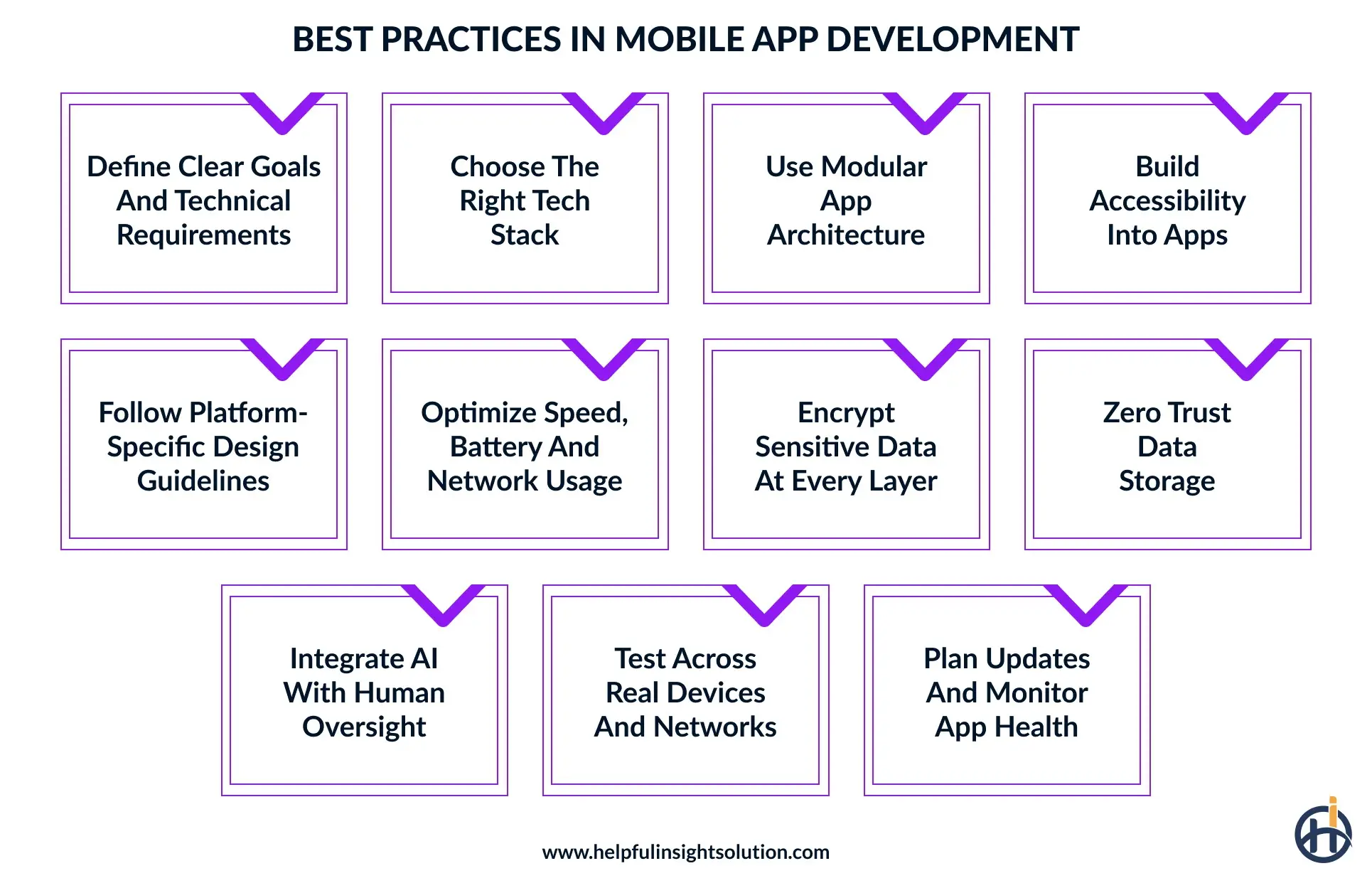
1. Define clear goals and technical requirements
Most apps don’t go wrong in development. They go wrong before it, when nobody has agreed on what the app is for. So agree on it. Who’s the user? What’s their problem? These answers will guide decisions about features, design, and technology.
Put the goals and technical requirements on paper before development starts. That means target platforms, supported devices, integrations with other systems, and the performance you expect. It doesn’t need to be long. But when these points are missing, changes show up mid-build, and those are the ones that hurt the budget.
2. Choose the right tech stack
The technology used to build an app should match what you expect it to do. For example, apps with complex features or heavy graphics may need native development, while apps with standard features can work well with Flutter or React Native.
As part of mobile application development best practices, compare the cost, development time, performance, and maintenance needs of each option. Also, consider whether the chosen technology will support future changes.
3. Use modular app architecture
A single large codebase works at first, then slows everything down. Modular architecture avoids that by dividing the app into loosely coupled parts with clear boundaries. It’s one of the mobile app development best practices for developers that pays off most as the app grows, since parallel development, testing, and updates become far easier to manage.
These points help keep each module clean, focused, and ready to scale.
- Define clear boundaries between modules
- Keep separation of concerns consistent
- Isolate bugs within single modules
- Let dedicated developers work in parallel
- Reduce build and compile times
- Swap services without breaking features
4. Build accessibility into apps
Accessibility problems are easy to miss if you never test for them. Consider users who find small text hard to read, can’t tell certain colours apart, or struggle with touch controls. The app must work for them too.
Target WCAG 2.2 Level AA as your baseline, which means scalable text, enough colour contrast, comfortable tap areas, and clear labels for screen readers. Among mobile app development best practices, accessibility is easier to get right when planned from the first sprint.
5. Follow platform-specific design guidelines
Put an Android phone next to an iPhone, and you’ll see the navigation works differently. Android follows Material Design; iOS follows Apple’s Human Interface Guidelines. Check both before you sketch screens. An app that follows these rules needs little explaining, because people already know where to tap.
Some important design points include:
- Use familiar navigation styles
- Keep menus easy to understand
- Choose readable font sizes
- Maintain proper colour contrast
- Make touch areas comfortable
Good UX rarely gets praise. Bad UX gets uninstalls. Following mobile app UX best practices keeps screens simple and actions easy to find. It also makes common UI/UX design mistakes, like crowded layouts, easier to spot while changes are still cheap.
6. Optimize speed, battery, and network usage
Most users give an app a few seconds. If it’s still loading after that, they leave. Battery drain gets the same reaction. So track loading time, screen response, and background activity as you build. Remove repeated API calls, shrink large images, and save the data users open most through local storage.
As part of best practices for enterprise mobile app development, test the app on different devices and network connections. This will show whether screens load properly, features respond on time, and the app continues to work well when the internet connection is slow. Remove anything that puts extra load on the app.
7. Encrypt sensitive data at every layer
Think about where passwords and payment details go after a user enters them. Don’t leave this information in normal app files. It needs a safer place to stay. iOS Keychain and Android Keystore are two options that developers can use to protect stored user details.
User details need protection even when they leave the phone. For example, if someone enters their login details, the app should send that information through a secure connection. HTTPS with TLS can protect it during transfer.
Mobile app developers should avoid writing passwords and private keys into the source code. These are some basic best practices for secure mobile app development that shouldn’t be skipped.
8. Zero trust data storage
Storing more than one type of data in an app means access needs limits. Give users only what they need, which is the idea behind zero-trust. A regular employee, for instance, shouldn’t be able to view admin records or confidential business information.
Mobile app best practices also say to check permissions on every request for stored data. The app shouldn’t assume someone is still allowed in just because they logged in earlier.
9. Integrate AI with human oversight
More businesses are putting AI in mobile apps, and Market.us says around 66% plan to invest in it to improve app functionality. But adding AI features is not enough; it is also important to check how these features work after they go live.
For example, AI chatbots should give relevant answers, and personalized recommendations should match what users are looking for. For actions that involve payments, personal details, or important decisions, give users a chance to review the AI’s suggestions before moving ahead.
10. Test across real devices and networks
Real devices behave differently from test environments. An app that runs cleanly in one can lag or break on a customer’s phone. Run it on different screen sizes, operating system versions, and hardware settings. Pay attention to loading speed and button response, and don’t skip unstable network conditions, where problems often show up first.
Include older devices in these tests as well. These checks are part of the best practices for cross-platform mobile app development and help make the app work consistently across devices.
11. Plan updates and monitor app health
Launching an app is the start of its maintenance, not the end of the work. Plan regular updates and monitor the app’s health from day one. Review crash reports, user feedback, and slow screens to see what needs fixing.
Release updates for bugs and for each new operating system version, since changes to iOS or Android can break features that worked before. Along with this, keep track of mobile app development trends and see if any new feature is worth adding.
Conclusion
Building a mobile app involves many decisions, and each one can affect how the app works for users. Technology, features, design, security, and testing each leave a mark on the final experience.
Mobile app development best practices help teams and businesses avoid common problems and stay ready for future changes. Launch isn’t the finish line either. User needs and mobile technology keep moving, so the app needs regular reviews and steady improvements.
Helpful Insight is a trusted mobile app development company, and best practices for mobile app development guide our work from the first plan to the final release. We build secure, easy-to-use apps for businesses of different sizes that serve both their users and their goals.
Our certified developers follow established development practices and pay attention to the details that matter, from app security and performance to how people use its features.
Share your app idea with our team and see how we can turn it into a quality app, built on the best industry practices.
FAQs
Several mistakes can affect an app’s quality, development cost, and user adoption. Pay attention to these common issues during development:
- Skipping market research and validation
- Not defining a clear MVP
- Creating confusing app navigation
- Ignoring user feedback
- Adding too many features
- Overlooking app security requirements
- Skipping testing on real devices
Keep mobile apps secure by protecting stored data, verifying user identities, securing API traffic, limiting data access, fixing known vulnerabilities, updating dependencies, and testing for security risks regularly.
Native development is better for apps that need high performance, complex features, or platform-specific functions. Cross-platform development suits businesses that want to launch on Android and iOS using one codebase.
To choose the right mobile app development partner, consider these factors before making your decision:
- Check experience in your industry
- Read client reviews and feedback
- Assess technical skills and expertise
- Understand its development process
- Compare pricing and engagement models
- Check communication and project updates
- Review post-launch support services