


Key Takeaways
- ERP in finance is one system that runs accounting, payables, receivables, reporting, and planning on a shared database.
- It differs from accounting software because it also connects finance to procurement, sales, inventory, and HR.
- The core modules are the general ledger, accounts payable and receivable, financial reporting and planning, and payment and billing.
- The main benefits are faster reporting, fewer manual errors, easier audits, and clearer cash flow.
- Cloud is the fastest-growing deployment model. Banks and regulated lenders may still choose on-premises or hybrid setups.
- Most ERP projects struggle because of gaac data quality and nx unclear scope, not the software.
Closing the books takes a finance team about 6.2 business days on average at month-end, according to a Vena Solutions survey published in October 2026. The same survey found that 78% of teams had to fix numbers in the past year after they had called the close done.
Those fixes usually trace back to where the data sits. Invoices are in the billing tool, payments are in the bank portal, and the rest is in spreadsheets. Somebody has to match it all by hand, and that is where mistakes creep in.
An ERP system in finance takes the matching out of the task. The ledger, invoices, payments, and reports live in one database, so one entry updates everything linked to it. Some businesses build custom ERP software, so the system follows how their team already works.
This guide shows the ERP workflow in finance, which modules matter, and what a rollout involves. It also covers banks and accounting firms in detail, where needs differ most.
What is ERP in Finance?
ERP stands for enterprise resource planning. ERP in finance is one platform that runs accounting, payments, reporting, and planning. Procurement, sales, inventory, and HR feed the same database, so finance can see activity as it happens.
Put it simply, a central database stores every transaction. Modules sit on top of it and manage particular tasks like the ledger or payables. When one module posts a transaction, the others see it at once.
The link between ERP and finance is data. Finance depends on numbers from every other department. ERP for finance removes the delay and the re-keying between them.
For many companies, ERP is one part of broader digital transformation in financial services, and finance is where the results show up first.
The market reflects this demand. Straits Research values the worldwide ERP software market at $78.40 billion in 2025 and expects $181.86 billion by 2034. Finance and accounting is the largest function segment, with a 19.2% share in 2025. Finance enterprise software remains the entry point for many ERP buyers.
How does ERP differ from Standalone Accounting Software?
Standalone accounting software records transactions and produces statements. It works best for a small business with one entity and simple requirements. ERP and accounting software are not the same. An accounting package is a single tool. In an ERP, accounting is one module inside a wider platform.
HTML
| Standalone Accounting Software | ERP Finance System | |
| Scope | Bookkeeping, invoicing, basic reports | Accounting plus procurement, sales, inventory, HR |
| Data | Finance data only, often exported to other tools | One shared database for all departments |
| Integration | Limited, usually through add-ons | Built-in modules and open APIs |
| Reporting | Standard financial statements | Real-time, cross-department, drill-down |
| Multi-entity and currency | Limited or manual | Native consolidation support |
| Best for | Small teams with simple workflows | Growing or complex organizations |
A typical ERP accounting system also connects to sales, inventory, and payroll data, which a single package does not. Businesses usually outgrow the simple software when they add warehouses, legal entities, or currencies. ERP starts to pay off at that point, since a change in inventory or billing reaches the ledger without extra work.
How Does ERP Work for Financial Management?
A financial management ERP system stores every transaction in one database and shares it with all modules in real time. Here is the ERP workflow for financial management.
Data enters once
First, the person responsible records a sale, a purchase, or a payment at the source. A sales representative enters the order, or a store manager logs a vendor bill. That entry is the only manual one, and every other module reuses it.
Postings happen on their own
When a sales invoice is raised, the system creates the receivable and the ledger entry together. Nobody in accounts has to book it again. The same applies to purchases, payments, and stock movements, so the ledger stays current all day.
Workflows route approvals
Now, rules decide who signs off on a payment, a journal entry, or a purchase order, based on the amount or type. A small expense may need one approval. A large vendor payment may need two or three. The system tracks each step, so nothing waits in an inbox.
Reports read live data
After that, balance sheets, profit and loss statements, and dashboards pull straight from the main ledger. Nobody exports files or merges spreadsheets. The numbers match in every report, and a finance lead can open any total and see the entries behind it.
Integrations link outside systems
Lastly, banks, tax portals, and payment gateways connect to the ERP through APIs. Bank statements load automatically for matching, and tax data flows to the filing format. This keeps the ERP in step with the systems that sit outside it.
Take a purchase as an example. A buyer raises a purchase order, and a manager approves it. When the goods arrive, the system matches the order, the goods receipt, and the vendor invoice. This is called a three-way match. After that, it books the payable and schedules the payment.
ERP financial systems depend on a layered design that covers the database, business logic, API layer, and user interface. It is vital to plan integrations within a sound fintech architecture to avoid rework later.
Key Modules of ERP for Finance
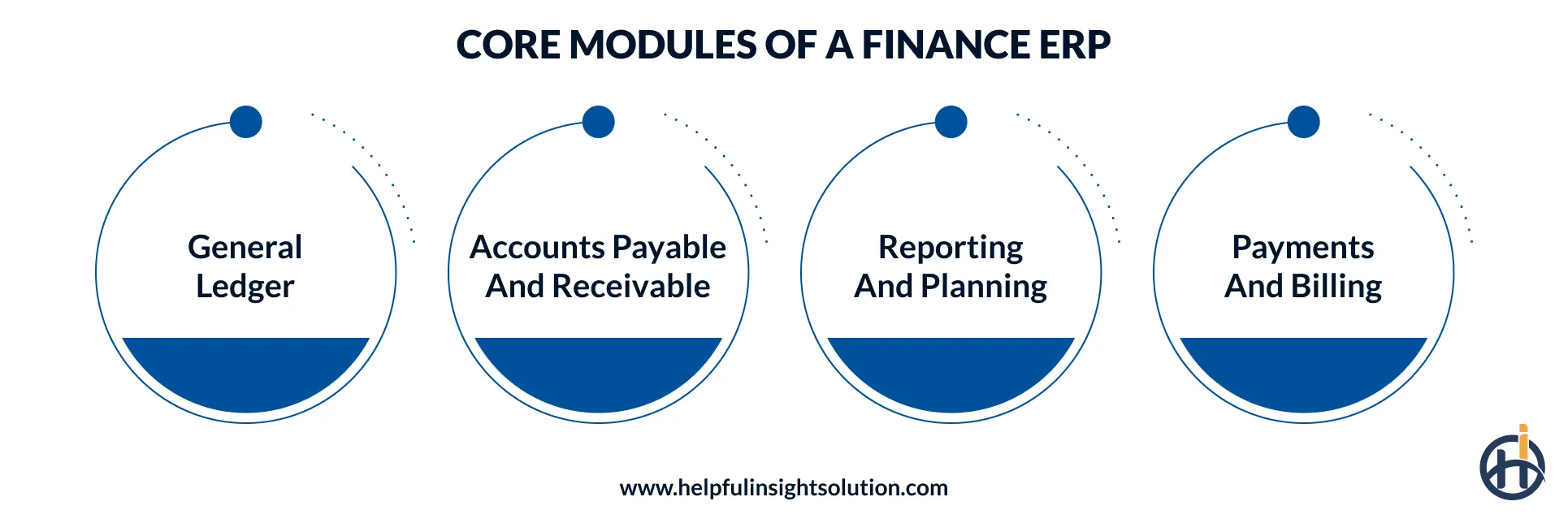
Companies create feature suites differently in ERP financial systems. Still, the finance module in ERP covers four areas: the ledger, payables and receivables, reporting and planning, and payments and billing.
A buyer can often license an ERP finance module on its own and add other modules later. Banks and lenders also add specialized fintech software on top for lending, payments, and compliance workflows. Here are the key modules of ERP for finance.
General Ledger and Accounting
The general ledger is the base of every finance module. It holds the chart of accounts, journal entries, and period-end closing. Multi-entity and multi-currency support lets groups consolidate accounts without manual workbooks.
In an ERP system for accounting, the ledger updates the moment a subledger posts. Fixed asset accounting sits here too. It manages purchase records, depreciation schedules, and disposals. This is different from enterprise asset management, which tracks maintenance and repairs.
Accounts Payable and Receivable
Payables control what the business owes, and receivables control what it is owed. Together they design the cash flow. Accounts payable includes vendor records, invoice capture, three-way matching, approval workflows, and scheduled payment runs. But accounts receivable covers invoicing, collections tracking, credit limits, payment reminders, and ageing reports.
Financial Reporting and Planning
This module creates the balance sheet, profit and loss statement, and cash flow statement. It also supports budgets and forecasts made on actual ledger data.
ERP financial planning allows teams to compare budgets with actuals in the same system. Variance reports appear without a separate export. The finance lead can click any total to view the actual invoice details. That is how ERP improves financial reporting at the detail level.
Payment and Billing Management
Payment and billing management is part of the finance module. It issues invoices, tracks payments, and matches bank statements. It integrates payment gateways and bank feeds. Recurring billing and tax rules like sales tax in the US and VAT in Europe can be set once and applied automatically.
Benefits of ERP for Financial Management
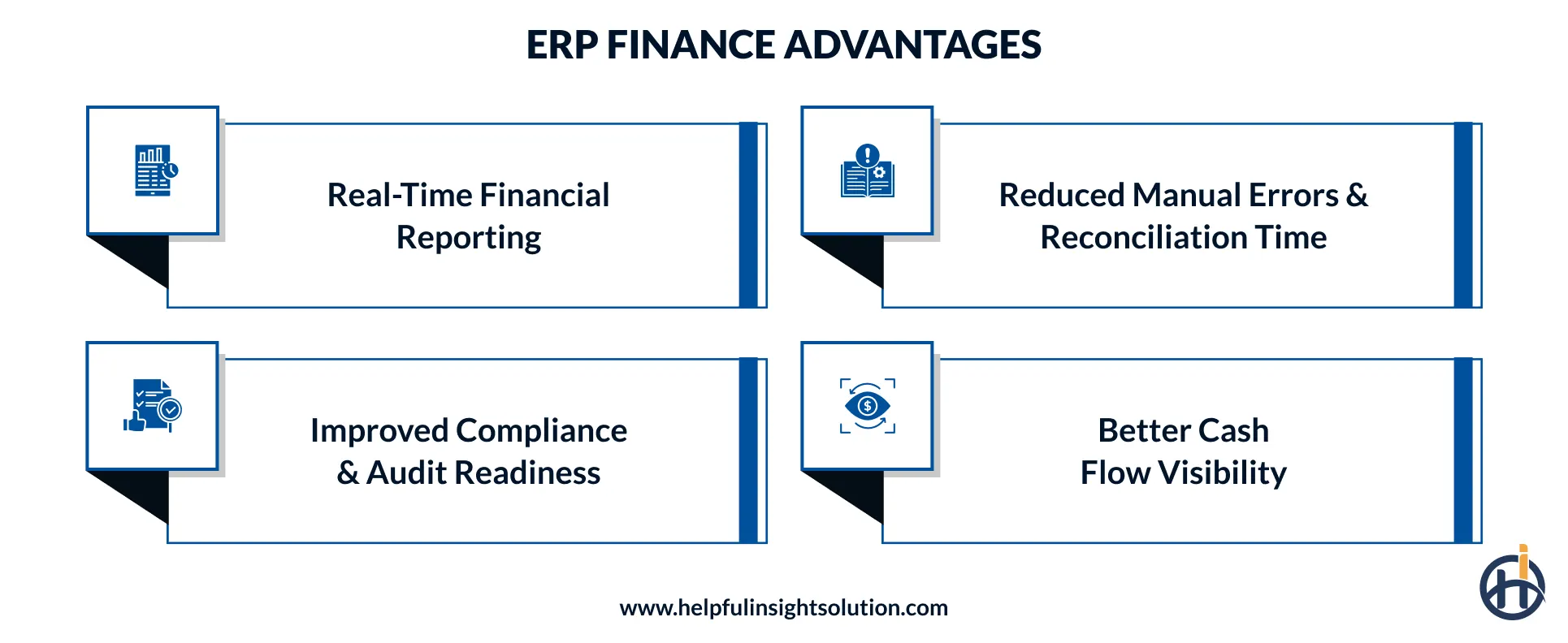
The main benefits of ERP for financial management are real-time financial reporting, reduced manual errors, improved compliance, and better cash flow visibility. ERP financial management works because every transaction sits in one database. Finance teams spend less time fixing data and more time using it. Many finance teams see these four changes after go-live.
Real-Time Financial Reporting
Month-end reports no longer wait for data collection. Numbers update as transactions post. Every statement reads from one ledger, so totals match across reports. This is how ERP improves financial reporting in practice. Leaders can check cash, revenue, and spend on any given day.
Reduced Manual Errors & Reconciliation Time
Manual re-entry causes many spreadsheet errors. ERP captures data once and reuses it. Matching rules handle most of the bank matching automatically, and staff review only the exceptions. Reconciliation can shrink from a full task to a quick check.
Improved Compliance & Audit Readiness
ERP keeps an audit trail for every entry. Role-based access limits who can approve or change records. Accounting standards like IFRS, US GAAP can be built into the posting logic. Auditors get the documents they need from one place. For US public companies, SOX adds requirements for internal controls over financial reporting, such as access control and audit trails, that the ERP has to support.
Better Cash Flow Visibility
Finance ERP systems show receivables ageing, upcoming payables, and bank balances side by side. Treasury can forecast cash needs and decide when to collect, pay, or borrow. Late payers become visible sooner.
ERP for Finance by Industry
Finance work differs by industry. ERP for financial services has to manage regulation, high transaction volumes, and strict controls that a simple manufacturing setup rarely sees. Two groups need extra attention: banks and accounting firms. Here is how ERP for finance differs by industry.
ERP for Banking & Financial Services
ERP for the banking industry does not replace core banking. The core platform manages accounts, deposits, and loans. ERP covers the back office around it, such as the corporate general ledger, procurement, fixed assets, HR, and group reporting.
An ERP system for banking must connect to the core platform through APIs. Branch and department ledgers then roll up into group accounts without manual journals. The main priorities are:
- Regulatory reporting: Clean ledger data to feed Basel III, IFRS 9, and local regulator reporting.
- Treasury: Cash positions across accounts, currencies, and branches.
- Procurement control: IT spend approval in branches and departments.
- Asset tracking: Fixed asset tracking for branch equipment, ATMs, and leased property.
- Security and audit: Role-based access, segregation of duties, and full activity logs.
ERP for financial services also covers NBFCs (non-bank lenders), insurers, payment companies, and wealth managers. Each weighs the same modules differently.
| Segment | Typical ERP Priorities |
| Banks | Group ledger, regulatory reporting, branch assets, procurement |
| NBFCs and lenders | Link to loan accounting, collections reporting, multi-branch consolidation |
| Insurers | Premium and claims accounting links, reserve reporting, reinsurance |
| Payment and fintech firms | High-volume reconciliation, settlement accounting, merchant billing |
| Wealth and asset managers | Fee billing, client reporting, multi-entity consolidation |
ERP sits next to core banking, risk, and security tools. Together, these make up the IT services in the finance industry that a bank depends on.
ERP for Accounting Firms
Accounting firms run a different model. Revenue comes from client work. ERP and finance needs in a firm center on time, billing, and client profitability. An ERP system for accounting firms covers:
- Time and expense tracking by client and engagement.
- Work-in-progress and billing for fixed-fee, hourly, and retainer work.
- Multi-client ledgers and consolidated reporting.
- Client portals and document management.
- Engagement profitability reports and partner dashboards.
- Deadline tracking for tax and statutory filings.
Smaller firms start with practice management software. Many firms also use professional services automation (PSA) tools for time and billing. Multi-office firms, or firms with an advisory arm, tend to need broader ERP for consolidated billing, payroll, and reporting. An ERP accounting system also allows the firm to run its own books alongside client work.
Cloud ERP vs. On-Premise ERP for Finance Teams
Deployment is one of the first choices in any project. Cloud ERP for finance teams runs on the vendor’s or a partner’s servers and opens in a browser. On-premise ERP financial systems run on the company’s own servers and need in-house IT staff.
The table below shows the difference between cloud ERP and on-premise ERP for finance teams.
| Factor | Cloud ERP | On-premise ERP |
| Upfront cost | Lower and subscription-based | Higher, with licenses plus hardware |
| Updates | Handled by the vendor | Scheduled and managed in-house |
| Control over data | Shared with the provider | Full control |
| Customization | Good, within platform limits | Deep, but costly to maintain |
| Scalability | Add users and modules quickly | Needs hardware planning |
| Remote access | Built in | Needs VPN or extra setup |
| Data residency | Depends on provider regions | Set by the company |
- Cloud leads the market. Straits Research lists it as the leading deployment model and projects growth of 12.6% a year from 2026 to 2034. Lower infrastructure costs and easier remote access are common reasons.
- On-premises still makes sense for some. ERP for the banking industry often leans toward hybrid setups, which keep sensitive systems in-house and move the rest to the cloud. Whatever the model, financial data needs encryption, strict access control, and constant monitoring, which are core parts of cybersecurity in fintech. For cloud ERP, ask the vendor for its latest SOC 2 Type II report.
How to Choose and Implement the Right ERP for Your Finance Function?
Key Evaluation Criteria
Shortlist ERP financial management software on fit, not on feature count. Compare ERP financial systems on how they handle the company’s real workflows. Check these points:
- Process fit: does it match how the team closes books and approves spend?
- Integrations: banks, tax portals, payment gateways, CRM, and payroll.
- Compliance: local tax rules, accounting standards, and audit needs.
- Scalability: more users, entities, currencies, and transaction volume.
- Reporting: custom reports and dashboards without developer help.
- Security: access control, encryption, logging, SOC 2 reports, and data residency.
- Vendor support: implementation help, training, and response times.
- Total cost: licenses, services, integrations, and upkeep over several years.
Test each ERP finance module with real month-end data during demos. A good ERP system for financial management should handle current volume and the next three years of growth. Cloud ERP for finance teams suits most growing companies, though regulated firms should check data residency first.
If standard packages miss key workflows, custom software development services can build the missing pieces or the whole system.
ERP Finance System Implementation: Step-by-Step
Every finance system implementation looks a bit different. Size matters, and so do the number of entities and how much gets customized. For a mid-size company, a finance-module rollout often takes three to seven months, while a full ERP rollout can take longer. Here is the ERP finance system implementation process.
Discovery and planning
Decide what the project has to fix and who is in charge of it. Then sit with the people who do the work and watch how the books get closed today. They will show you the spreadsheet workarounds nobody wrote down.
Design
This is where the chart of accounts, the approval rules, and the list of connected tools get decided. Put it on paper and have the finance head sign it off. A change now is a short conversation. A change after the build is rework.
Data cleanup and migration
Vendors, customers, opening balances, and fixed assets move over in this step. Finance ERP systems only work well on clean master data, so remove the duplicates and dead accounts first. After the move, pick a sample of records and check them against the old system.
Configuration and integration
The team sets up the modules, bank feeds, tax rules, and reports as designed. Test each connection on the day it is built. Leaving the bank and tax links to the last week is a common reason go-live dates slip.
Testing
Sample data is too neat, so use a real month. Throw in the messy cases: part payments, credit notes, foreign currency. Run the old and new systems side by side for one close, and chase every difference in the numbers.
Training
A payables clerk needs practice with invoices. A manager needs practice with approvals. Train each group on its own job in short sessions, and leave a one-page guide behind for when people get stuck.
Go-live and support
Switch right after a period close, so the new system starts on clean books. Expect small problems in the first few closes. Keep someone on hand to fix them, and note what went wrong each time.
A financial system implementation is not just a software install. It changes how people close the books and approve spend, so treat it as a finance transformation project Business owners should lead it, not only IT. A small business can finish an accounting software implementation in a few weeks. A full ERP project has more entities, more integrations, and more users, so plan for longer.
Common ERP Implementation Challenges and Possible Solutions
A failed financial system implementation usually traces back to people and data, not software. Here are the common challenges, with a solution for each.
Dirty data
Old vendor lists, duplicate customer records, and wrong opening balances all move into the new system if nobody stops them. The reports then look wrong from day one, and the team stops trusting the ERP.
Solution: Clean the data before migration, not after. Remove duplicates, archive records that are no longer active, and fix missing details. Then check the opening balances against the old books, line by line, before go-live. Ask a finance person to sign off on the migrated data.
Scope creep
Partway through, someone asks for one more report or one more approval step. A few of these are fine. Fifty of them push the launch back by months and raise the cost.
Solution: Freeze the scope at the end of the design stage. After that, log every new request in one list, with the reason and the effort it needs. The business owner approves or rejects each one. Approved items can go into a second phase after launch.
Low user adoption
If finance staff only see the system at go-live, they will often go back to spreadsheets. The ERP then holds half the data, and the benefits never show up.
Solution: Involve the people who will use it from the design stage. Let them test the screens and give feedback early. Train each role on its own tasks. Payables clerks need to practice invoices, and managers need to practice approvals. Keep a support person available for the first few weeks.
Over-customisation
It is tempting to rebuild the old process exactly as it was. But every custom change adds cost, makes upgrades harder, and creates one more thing to test.
Solution: Start with the standard features and use them for the first round of testing. Customize only where your process is genuinely different from the norm, such as a special approval rule or a local tax format. For each custom request, ask: “What breaks if we don’t build this?”
Integration gaps
The ERP has to work with your bank, tax portal, payment gateway, payroll, and other tools. A missed connection usually shows up at go-live, when it is the hardest and most expensive to fix.
Solution: List every connected system during discovery, including small tools that only one team uses. Note what data goes in and out of each one. Build and test these links in the early stages, not in the last week before launch.
What Does ERP Implementation Cost?
ERP cost depends on scope, user count, and customization more than on the software brand. Public cost guides put total project costs at roughly $25,000 to $150,000 for small businesses and $150,000 to $750,000 or more for mid-market companies. A rollout limited to finance modules usually costs less than a full ERP, since it has fewer modules and integrations.
Here are typical planning ranges:
| Cost item | Typical range | What to know |
|---|---|---|
| Cloud subscription | $40 to $200 per user per month | Includes hosting and upgrades. Some entry-level systems start near $70, and enterprise platforms can go higher. |
| On-premise license | Paid up front, plus annual maintenance | Server hardware and in-house IT staff add to the total. |
| Implementation and consulting | Roughly 1 to 3 times the first-year software cost | Depends on scope, data migration, and integrations. |
| Small business, total project | About $25,000 to $150,000 | One entity and simple workflows. |
| Mid-market, total project | About $150,000 to $750,000 or more | Several entities, integrations, and custom reports. |
For example, a 50-user cloud ERP at $100 per user per month costs about $60,000 a year in subscription fees alone.
These figures are planning ranges, not quotes. Actual prices vary by vendor, modules, and region.
- Licenses or subscription fees.
- Implementation and consulting services.
- Customization and extra modules.
- Integrations with banks, tax systems, and other tools.
- Data migration and validation.
- Training.
- Support and upgrades.
- Internal staff time.
It is vital to ask vendors to price every item and not just licenses. Integration and migration are easy to miss in early quotes.
How Helpful Insight Supports ERP Finance Implementation?
As a custom ERP software development company, we develop finance enterprise software and ERP systems for finance teams. The work starts with process mapping. We document how the team closes books, approves spend, and reports to management. Then we design a financial management ERP system around those steps. Our ERP finance projects typically include:
- Requirement workshops and process mapping.
- Custom finance modules: general ledger, payables, receivables, billing, and reporting.
- Integrations with banks, payment gateways, tax systems, and existing core platforms.
- Data migration and validation.
- Compliance-aware architecture for regulated sectors.
- Testing, training, and post-launch support.
Every ERP financial management project starts from the same question: what does the finance team do today, and where does it lose time? The answer shapes the scope. Design choices also reflect current fintech trends, such as API-first integration and automated reconciliation, so the system stays useful as needs change.
Conclusion
ERP in finance puts accounting, payments, reporting, and planning on one database. The result is faster reporting, fewer errors, and clearer cash flow. ERP for finance works best when the data is clean and the process is mapped before the system is chosen.
The right setup depends on industry, deployment model, and team size. Banks, accounting firms, and growing companies all weigh the same modules differently. An ERP financial rollout succeeds when business owners lead it. That is where Helpful Insight comes in.
Through our fintech consulting services, we help finance teams choose, plan, and build ERP for their operations. We build the ledger, payables, receivables, and reporting modules, then connect them to banks, payment gateways, and tax systems. We provide post-launch support to resolve any issues that arise during first few close cycles.
Frequently Asked Questions
ERP in finance combines accounting, payables, receivables, reporting, and planning on a shared database. It connects finance to sales, purchasing, and operations so that data stays consistent across departments.
Accounting software records financial transactions and produces statements. ERP covers accounting plus procurement, inventory, sales, and HR on one database. The difference between ERP and accounting software is scope and integration.
Reputable cloud vendors use encryption, access controls, and monitoring. Safety also depends on setup, including role-based access, multi-factor login, and data residency settings. Regulated firms should review contracts and compliance needs before choosing.
Many mid-size projects take 3 to 7 months to implement an ERP finance module. The timeline depends on data quality, the number of entities, integrations, and customization.
Yes, cloud options have made ERP available to smaller companies, and market forecasts show medium-sized enterprises as the fastest-growing buyer group. A small business with one entity and simple workflows may do well with accounting software until its needs grow.
The core modules of ERP financial software are:
• General ledger
• Accounts payable and receivable
• Financial reporting and planning
• Payment and billing
Many systems also add fixed assets, treasury, and tax management.