


Key Takeaways
- Intelligent document processing is already in production across banking, insurance, healthcare, and logistics. BFSI holds the largest share of the market, according to Grand View Research.
- It reads a document in whatever format it arrives and passes the values into the ERP, CRM or core system with no manual entry. The work repeats for every new document type, since a system trained on supplier invoices does not read claim forms.
- The process runs as five stages, each depending on the one before it. A document classified wrongly at the start produces a wrong extraction later, even when the extraction model itself is accurate.
- Extraction is the cheapest line on the bill. Amazon Textract charges $1.50 per 1,000 pages for plain text against $50 for form fields, while the build, the integration, and the exception handling all cost more than that.
- The straight-through processing rate decides the business case. At 60%, four documents in ten still reach a person, at 90%, only one does, on identical volume.
- DPDP, GDPR, HIPAA, and the UAE data protection law decide where documents may be processed, which usually pushes insurers and healthcare providers onto an in-region or on-premise deployment.
Every business has to deal with documents in different formats, including invoices, claim forms, and shipping records. AI in intelligent document processing reads these documents, extracts relevant data, and updates it into the business without manual effort.
AI can work on scanned files, PDFs, emails, and even handwritten documents.
This blog will help you know what intelligent document processing is, how it works, the core technologies behind it, its benefits, applications across industries, and how to implement it.
What Is Intelligent Document Processing and How Does It Work?
Intelligent document processing is the technology that takes a document, reads it the way a trained human would, and returns the data in a form a software can use.
Traditional document processing tools worked on templates, someone had to tell the software that the invoice number always appears in the top right corner. When a vendor changed the layout, the developer had to write a new rule. Automated document processing of that kind still runs in plenty of companies, however, it only holds up when the sender never changes the layout.
An intelligent document processing model does not depend on the layout of the document. It has been trained on enough documents to know that a field labeled VAT number in the UAE is a tax identifier wherever it appears on the page, and it can handle a layout it has never been shown before.
How Does AI-Powered Intelligent Document Processing Work?
AI-powered document processing works in stages, and each stage depends on the one before it. If a document is classified wrongly at the start, the extraction after it will also be wrong, even when the extraction model itself is accurate. Many teams look at the extraction model when the accuracy is low, however, the problem often starts at the capture stage itself.
Different models handle different parts of this process. One model reads the layout of the page, another decides what the document is, and separate models pull the values out of each document type. Contracts and emails have no fixed fields in them, so a language model is used there to read the text and decide what the value should be.
Every value the document processing software returns comes with a confidence score, which is a number showing how certain the model is about that field. The business sets a level below which the document is sent to a person for checking.
Accuracy in AI document processing improves over time, because every correction a reviewer makes goes back into the training data. A rule-based tool does not work in this way, it stays the same until someone updates the rules by hand.
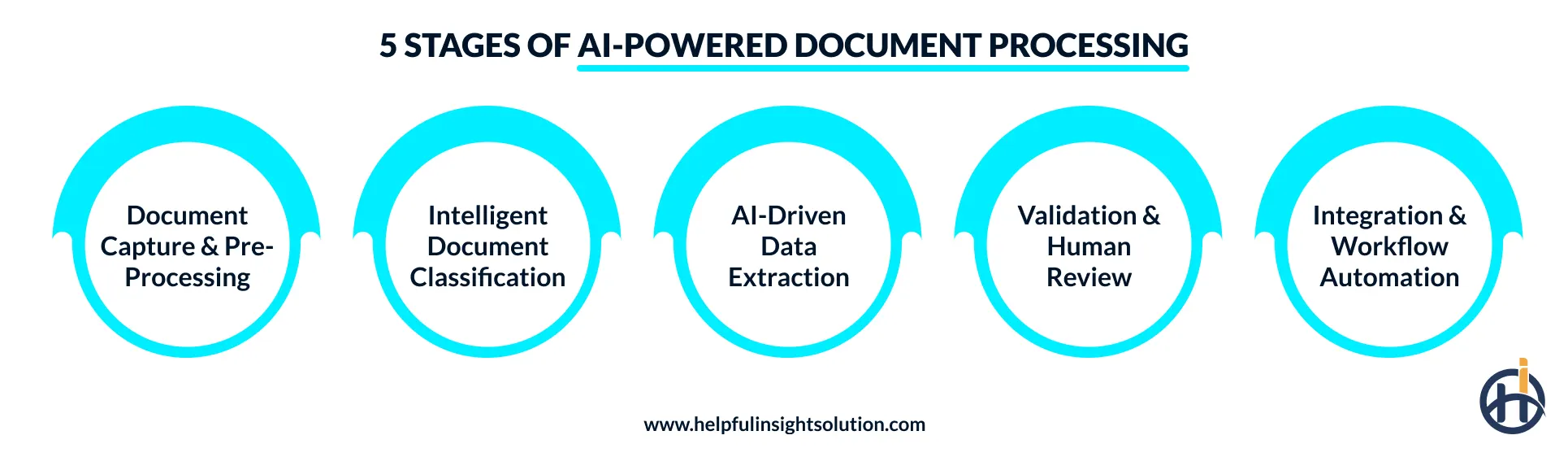
Step 1: Document Capture & Pre-Processing
Documents come into the system from a scanner, email inbox, SFTP folder, or a mobile upload. Before anything is read, the file is cleaned up, which means a tilted scan is straightened, background noise is removed, and the contrast is corrected. A batch scan of 200 pages is also split here into the separate documents inside it.
This stage limits how well everything after it can work, because AI-based document processing cannot pull out a field that was never captured clearly in the image. A claim form photographed at an angle on a phone is the usual problem.
Step 2: Intelligent Document Classification
The system has to identify the document before it can read anything from it. An intelligent document processing machine learning model is trained on labeled samples of each document type, and it compares the layout along with the words on the page to decide whether the file is an invoice, purchase order, bank statement, or KYC document.
Classification also handles bundles. A loan file that arrives as one PDF with eight different documents inside it is separated here, and each part is sent to the model that handles that document type.
Step 3: AI-Driven Data Extraction
Intelligent data extraction is the stage where the actual values are taken out of the document. Labeled fields like the invoice number or the due date are picked up by key-value detection. Tables need a different model, because the line items in a purchase order have to keep their row structure, otherwise, a five-line invoice comes back as plain text, and there is no way to tell which quantity belongs to which item.
In contracts and emails, the information is written inside sentences, so natural language processing is used to identify the names, dates, and amounts.
Step 4: Validation (Domain-Specific + Human-in-the-Loop)
The extracted data is checked before it is used anywhere. Business rules are applied first, ensuring that the document matches the business requirements. Any field that scores below the confidence level goes to a reviewer instead of being passed on.
This human-in-the-loop step is what makes automated document processing technology acceptable in regulated work like lending or claims, where a wrong value carries a compliance cost. The correction the reviewer makes is also stored as training data.
Step 5: Integration & Workflow Automation
The data still has to reach the system where the work continues. Document processing automation sends the extracted record into the ERP, CRM, or core banking system through an API. Where an older system has no API available, an RPA bot enters the data into the screen directly.
After the data reaches the system, the next step in the workflow starts on its own, an approved invoice moves into the payment run, and a validated claim opens an FNOL record for the adjuster.
Core Technologies in Intelligent Document Processing
The core technologies in intelligent document processing were each developed as separate fields, and an IDP system uses them together on the same document.
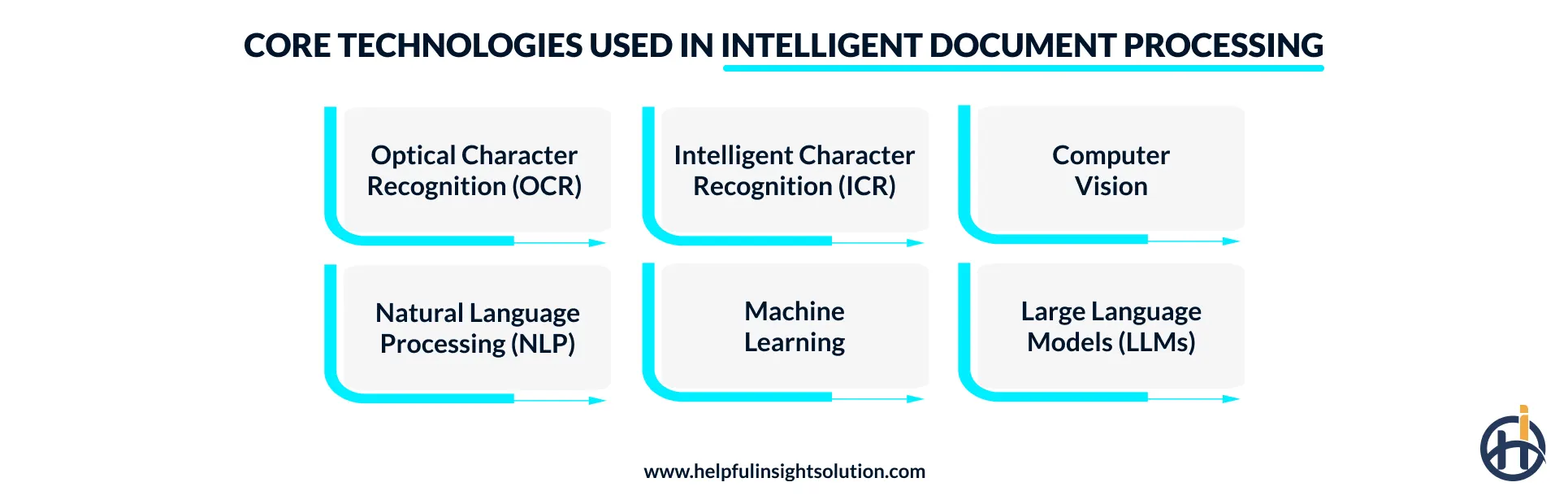
- Optical character recognition (OCR) converts the characters in a scanned image into text a computer can read. The limitation is that it does not understand what it has read.
- Intelligent character recognition (ICR) is the same idea applied to handwriting, and without it a hand-filled claim form or a signed delivery note cannot be processed at all.
- Computer vision reads the page as an image. It finds boundaries, the edge of a table, a box holding a signature, stamp, or barcode. In a 200-page scanned batch, the point where one document ends and another starts is marked here as well. Tables would not work without it, since the meaning of a number in an invoice comes from the row and the column it appears in.
- Natural language processing (NLP) deals with meaning. A name, date, amount, or a policy number is identified from the sentence it appears in, and the surrounding words decide whether a figure is the invoice total or the tax on it. NLP is also what lets one system read an invoice issued in English and the same invoice issued in Arabic.
- Machine learning is the part that gets better. Classification models and extraction models are trained on labeled samples of each document type, then every correction a reviewer makes goes back into that training set.
- Large language models arrived last and changed what is worth automating. A contract or a lease agreement used to need a model trained on thousands of labeled samples before it could be extracted reliably. An LLM reads the clause and answers the question directly, so document types that were too expensive to automate traditionally now clear the cost bar.
Benefits of Intelligent Document Processing
The benefits of intelligent document processing are easiest to see in the work that happens after a document is read. Reading was never the expensive part.
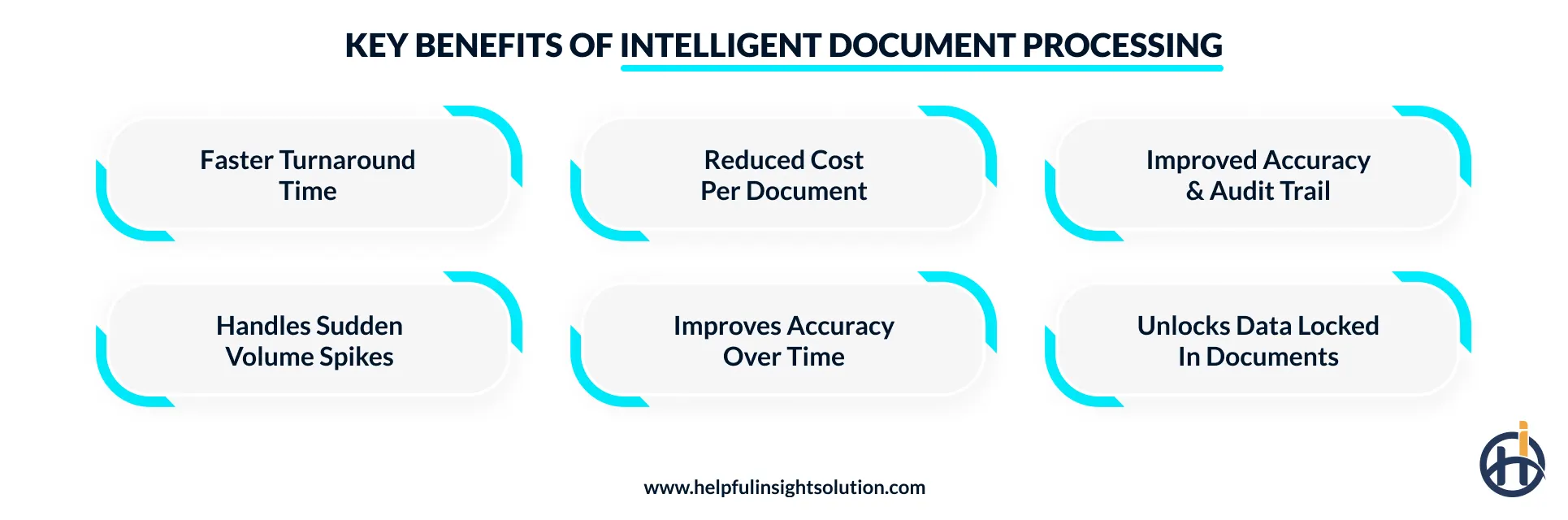
- Turnaround time: A loan file earlier moving between three desks for verification now clears in a single pass, and the applicant hears back the same day. Claim settlement can also be improved the same way, the FNOL record opens as soon as the form passes validation.
- Cost per document: Manual entry has a fixed cost per page that keeps increasing as volume rises, requiring more human effort. Automated document processing moves the spending into the exception queue, and what a business pays for tracks only the files the system was unsure about.
- Accuracy and the audit trail: Every extracted field has a confidence score along with a record of who changed it. For banking, financial services, and insurance work under the RBI, IRDAI, or HIPAA, showing how a value reached the system matters as much as the value being right, and that trail is produced automatically here.
- Volume that arrives in bursts: Volume never remains predictable. It may spike up during month-end, tax season, and a catastrophic event. Artificial intelligence document processing can handle the sudden spike without asking for temporary hiring.
- How AI improves document processing over time: Nothing about month one is the best the system will do. Accuracy on a document type rises with the corrections fed back into it, so the straight-through rate a pilot reports at the start understates what the same pipeline does a year later.
- Data that was locked inside the documents: A year of invoices held as scanned images cannot be analyzed. The same year held as structured records makes spend analysis possible without a separate project, and claims data extracted this way feeds predictive analytics directly.
Intelligent Document Processing Use Cases by Industry
Intelligent document processing use cases follow the paperwork-intensive industries where a document has been read and checked to make a decision. BFSI holds the largest share of the market for that reason.
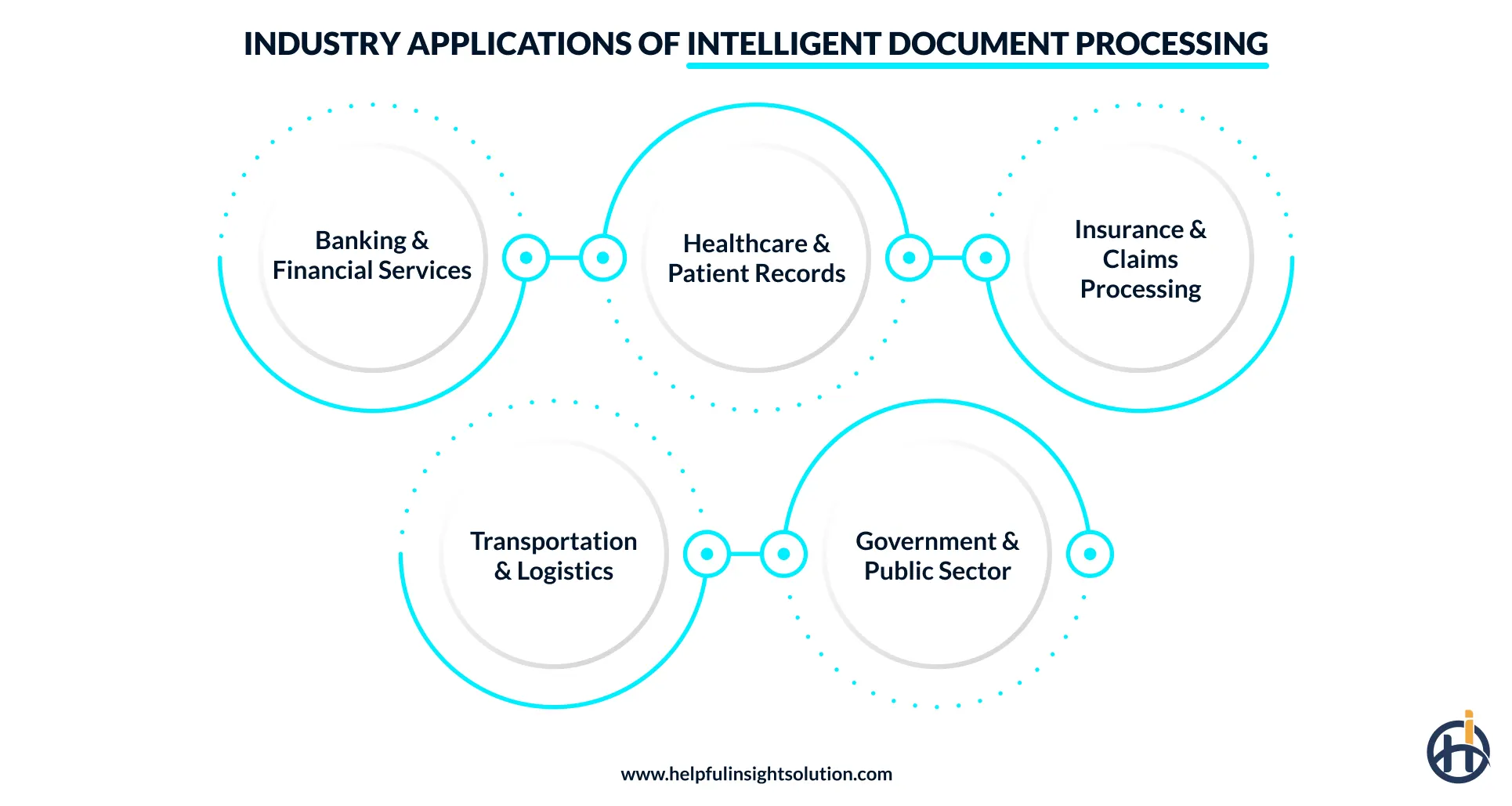
1. Banking & Financial Services (Loan Processing, KYC)
A mortgage or business loan file runs past a hundred pages, including salary slips, bank statements, identity documents, and property papers. Every page must be captured, classified, and cross-checked against the application before an underwriter opens the file. In a digital loan origination system, this is the step between application intake and the credit decision.
KYC works the same way, where the name on a PAN card or an Emirates ID has to match the name on the address proof, and a mismatch routes the case to a person.
2. Healthcare (EHR Automation, Patient Records)
Patient records arrive as referral letters, discharge summaries, lab reports, and handwritten prescriptions, most of which never fit a form. Extraction pushes the values into the EHR so a clinician reads them in the patient record instead of a scanned attachment.
The UK’s National Health Service uses IDP technology on patient records to improve accuracy and reduce medical errors. (Grand View Research)
3. Insurance (Claims Processing)
Intelligent document processing in insurance starts at FNOL (First Notice of Loss), where a claim form, a police report, a garage estimate, and photographs of the damage all arrive from different senders in different formats.
The claim cannot be processed until all the submitted details are verified. Straight-through settlement of small motor claims depends on that step, which is why carriers treat it as the first thing to automate.
4. Transportation & Logistics
From lading bills, customer declarations, and commercial invoices to delivery receipts, documents are an integral part of the transportation and logistics industry. The value mentioned in the documents must be verified before shipment.
The work cannot be automated with a standard template, as every carrier has its own style of layout. AI-powered document processing can understand the data irrespective of template layout and feed in the right fields.
5. Government & Public Sector
Applications, licenses, and permits arrive in volume, thus human efforts often fall short. IDP can help the government and public sector handle the volumes.
The United States Department of Defense uses intelligent document processing for military contract handling, experiencing cost savings and a decline in the likelihood of fraud.
What Does Intelligent Document Processing Cost?
We have taken reference from cloud document processing solutions providers to help businesses understand how much it might cost them to begin.
Amazon Textract, a document AI service. It reads a page and returns the text, the form fields, the tables, or the identity details, depending on which API you call. Each API is billed separately. Google runs the same kind of service as Document AI, and Microsoft sells its version as Azure Document Intelligence, where the first 500 pages each month are free and training a custom model is free for 10-hours before it moves to $3 an hour.
All three charge by the page. Textract publishes the fullest rate card, so its numbers are used here.
| What is being extracted | Textract API | Cost per 1,000 pages |
| Plain text and handwriting | Detect Document Text | $1.50 |
| Invoices and receipts | Analyze Expense | $10 |
| Tables | Analyze Document, Tables | $15 |
| Identity documents | Analyze ID | $25 |
| Key-value form fields | Analyze Document, Forms | $50 |
| Forms, tables and queries together | Analyze Document, combined | $70 |
| Mortgage document packets | Analyze Lending | $70 |
The rates above are for the US West (Oregon) region on the first million pages in a month, and the per-page price drops after that.
Reading plain text off a page costs $1.50 for a thousand pages, while reading the labeled fields out of a form costs $50 for the same thousand pages. It is the same document at the same volume, the difference lies only in what is being asked of it.
Extraction is not usually where the money goes, though. An operation running fifty thousand invoices a month spends around $500 on the Analyze Expense API. The build, integration into an ERP or a policy administration system, and the people kept free to handle exceptions are all larger numbers than that.
Exception handling matters most here. At a 60% straight-through rate, four documents in every ten still reach a person. Take the same pipeline to 90% and only one does, on identical volume. This is why work on accuracy usually returns more than negotiating a volume discount.
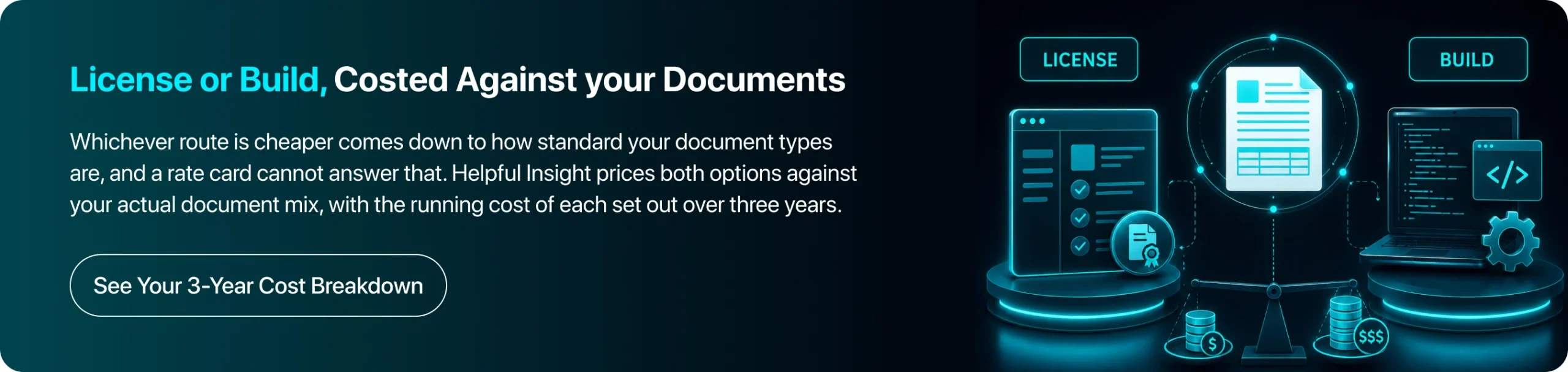
Beyond these, a license and build cost is applied. Document processing software bought as a platform gets you running sooner, though you keep paying per document for as long as you use it. Custom software development costs more upfront, and afterwards the running cost is mostly infrastructure.
For standard invoices, receipts, and IDs, document processing software is generally cheaper. Once your documents carry fields specific to your own business, a build tends to work out better.
How to Implement AI in Intelligent Document Processing?
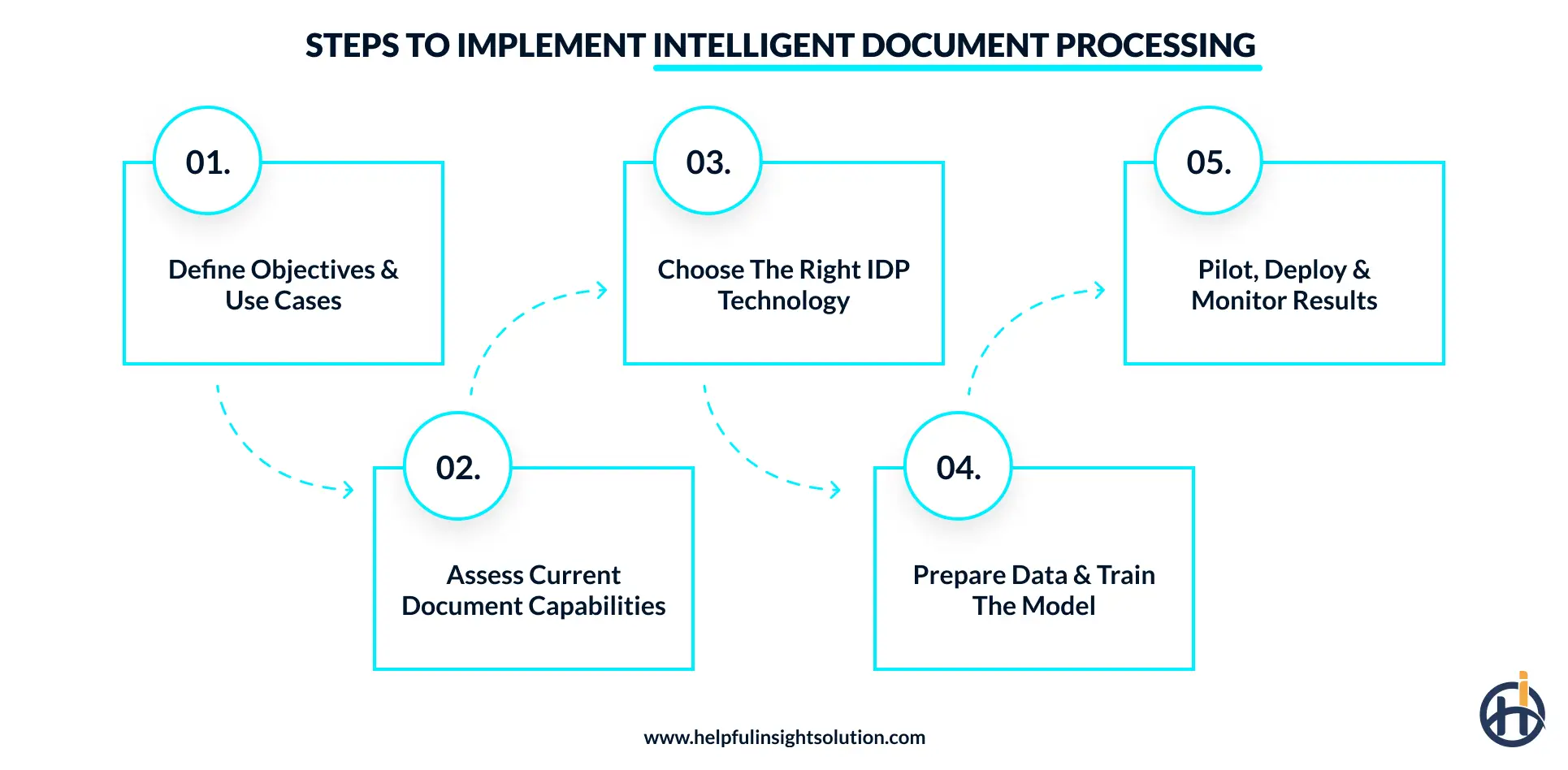
AI makes document processing practical on documents that were never designed to be read by software. Templates work only while the layout stays the same, however, layouts change constantly. Implementation follows a defined sequence, and it gets repeated for every document type the business adds.
Step 1: Define Objectives & Use Cases
A typical first scope for AI for document processing is accounts payable invoices from the top twenty vendors. Three numbers get recorded before anything is built, including the cost of processing one document, turnaround time from arrival to posting, and the headcount currently on it. Finance usually has the first two, and the third takes about a week of asking around.
Step 2: Assess Current Capabilities
This stage depends mostly on the inventory. A process to list where the documents come from, like email, scanner, SFTP folder, or a customer portal. A count of distinct layouts comes out of the same exercise, and one document type routinely hides thirty to sixty of them. The last item is the target system and whether it exposes REST endpoints at all.
Step 3: Choose the Right IDP Technologies
Three routes exist, a cloud API like Textract or Document AI, a licensed IDP platform, or a build on top of open models. Volume and how unusual the documents are decide between them. Deployment is a separate question and health providers in the US often end up in-region or on-premise, which rules out part of the intelligent document processing solutions available to you.
Step 4: Data Preparation & Model Training
A trained extraction model needs roughly 200 to 500 examples per layout, though an LLM-based approach gets by on far fewer. Twenty percent of the labeled set is kept aside and never shown to the model during training. Bad scans belong in there too, rotated pages, faxes, and the bilingual invoices a Gulf supplier sends.
Step 5: Pilot, Deploy & Monitor
The pilot project should be run in parallel with your existing system for 4 to 6 weeks. The output from both of them is compared field by field to be certain about the accuracy of the new system. Once it is live, three things get monitored like straight-through rate, exception rate by document type, and accuracy on individual fields.
Challenges and Compliance Considerations with Intelligent Document Processing Solutions
Accuracy problems and compliance problems arrive at different points in a project, and both are worth settling before the pilot starts.
- Handwriting and scan quality: Printed text is close to solved, while handwriting is not. A claim form completed by an agent will not have the accuracy same to a typed form. Faxes and photocopies of photocopies behave the same way. A page photographed on a phone at an angle adds several points of error on its own.
- Template drift: A supplier redesigns its invoice, without letting the next party know. Accuracy on that layout falls, and the fall shows up as a rise in the exception queue rather than as an alert. Accuracy has to be tracked per sender for this to be caught at all, since an overall figure hides one vendor going bad among forty.
- Where the document may be processed: GDPR in Europe, HIPAA in US healthcare and the UAE data protection law all restrict the movement of personal data. In practice, this decides deployment. A cloud API processes in whichever region it is called in, so an insurer that cannot send policyholder data outside the country ends up on an in-region deployment or an on-premise container.
- Business associate agreements: US healthcare adds a step. No patient document goes through a cloud provider until a business associate agreement has been signed with them. AWS, Google and Microsoft all offer one.
- Personal data inside the training set: Training a model on real documents puts real customer data into a labeled set, held somewhere, seen by whoever did the labeling. Masking the fields that are not being extracted handles most of it. The labeling vendor belongs inside the same data agreement as everyone else.
- Keeping the decision out of the model: The model extracts values. Whether a claim is paid or a loan is approved stays with a rule engine or a person. That separation is worth holding, since an extraction error can be corrected and reprocessed, while an automated decision has already reached the customer by then.
Future Trends in Intelligent Document Processing
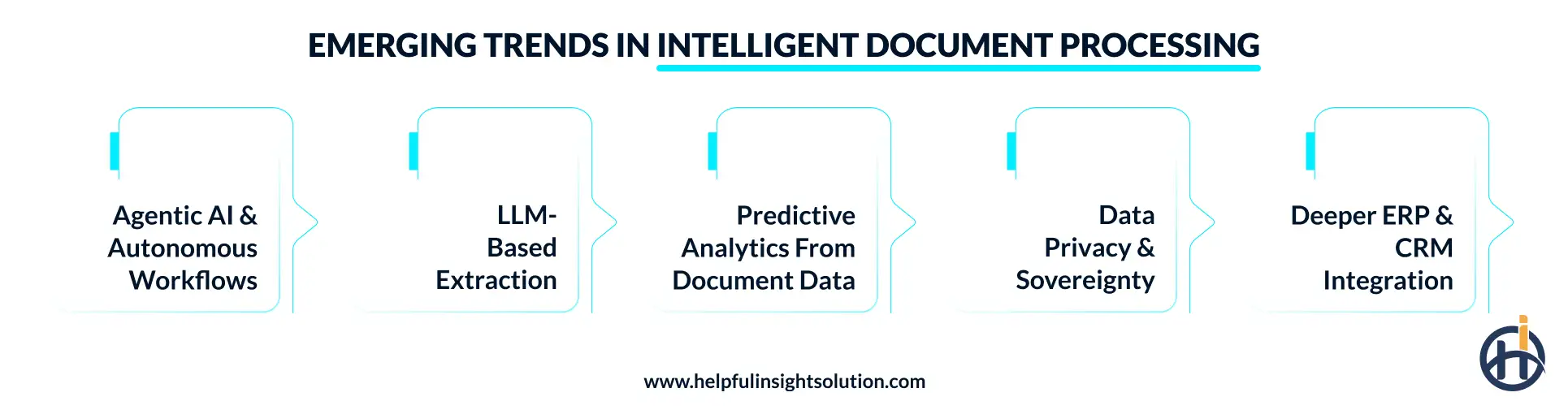
Document processing changed twice in the last three years. Trained models replaced template rules first, then large language models removed most of the training requirement. The changes now underway affect what happens to the data after extraction.
1. Agentic AI and Autonomous Workflows
Extraction currently ends when the data reaches the ERP or the policy administration system. AI agents extend that. An extracted invoice gets matched against the purchase order, a mismatch gets raised with the vendor by email, and the file only reaches a person when the reply fails to resolve it.
The major automation platforms have rebuilt their products around this, and intelligent document automation is being sold as the data layer underneath it.
2. LLM-Based Extraction
A trained extraction model needs hundreds of labeled examples per layout. A language model needs none. This change moved contracts, lease agreements, and long medical notes inside the range of what is worth automating. Two costs come with it.
Per-page pricing on LLM extraction runs higher than a trained model at volume, and a language model asking for a field that is not on the page will sometimes produce one anyway.
3. Predictive Analytics from Extracted Data
Structured document data becomes forecasting data. A year of extracted claim files supports a model that flags which new claims are likely to escalate. Invoice data supports payment-timing forecasts and supplier risk scoring.
None of this is possible while the documents remain images in a folder, and predictive analytics work usually waits for an extraction project to finish.
4. Data Privacy and Sovereignty
Grand View Research names data privacy as the main restraint on this market, since documents carry personal information by definition. The response is moving processing closer to the data.
In-region cloud deployments, containerized versions running inside a customer’s own infrastructure, and smaller models that run on modest hardware are all part of that. the European sovereign cloud programs push the same way.
5. ERP & CRM Integration
The document processing works on one-way synchronization. Extracted values go into the ERP, and nothing comes back. Where that is changing, the ERP gets queried during extraction, the vendor master confirms the supplier exists, and a duplicate invoice number is caught before a payment run picks it up. On the CRM side, a completed KYC form updates the account record directly, and a salesperson stops rekeying it.
6. Blockchain for Secure Document Management
Ownership of goods moves with the bill of lading, and a photocopy is worthless. Whoever holds the original holds the cargo. Blockchain development answers that by making one electronic version cryptographically unique, so possession becomes provable without paper. UNCITRAL’s MLETR gives that electronic version the same legal force as a printed one. Singapore, the UAE, the UK and France have written it into law.
Final Take
Intelligent document processing now runs in production across insurance, banking and logistics. It reads a document in whatever format it arrives, pulls the values out of it, and passes them into the systems a business already uses.
The accuracy of the extraction is only one part of the outcome. Data has to reach the core system without anyone copying it across. Exceptions need an owner. A project that ends with a clean data file and a person still typing it into the policy administration system has not changed anything.
Most companies looking at this already understand their own documents. The engineering around those documents is usually brought in from outside.
FAQs
OCR converts an image of text into characters a computer can store. It has no view on what those characters mean. Intelligent document processing runs OCR as one step, then classifies the document, works out which value belongs to which field, checks the result against business rules, and passes it on. Artificial intelligence document processing covers everything that happens after the characters are read.
No. RPA moves data between systems by driving the screens a person would use. It follows fixed instructions and cannot interpret a document it has not been scripted for. IDP reads the document and produces structured data, then RPA carries that data into a system with no API. The two are usually deployed together rather than as alternatives.
Not always. Pre-built models already exist for common documents, including invoices, receipts, passports, driving licenses, and W-2 forms. These work without any training. Training is needed for documents specific to one business, like a proprietary claim form or a supplier contract template. Large language models have reduced how much of it is required.
Printed text is well supported across most major languages. Handwriting works in a smaller set. Arabic is handled, including the right-to-left layout, though a mixed Arabic and English invoice from a Gulf supplier still needs testing before go-live.
A document management system stores documents and controls who can open them. It does not read what is inside. Intelligent document analysis extracts the values from the file so those values can be used by another system. Most businesses end up running both, with the extracted data going to the ERP and the original file going to the DMS for retention.
Two figures are used, field-level accuracy and the straight-through processing rate. Field-level accuracy counts how many extracted values were correct. Straight-through processing counts how many whole documents are cleared with no human touch. A pipeline can score 98% on fields and still send half its documents to review, since one wrong field sends the whole document there.