

Key Takeaways
- AI helps most with routine work such as writing code, tests, and documentation. In field trials, developers completed 26% more tasks, and newer developers gained more than experienced ones.
- The most common tools fall into four groups: code assistants, AI editors, coding agents, and security tools. Which one fits depends on your team’s languages, editor, and data rules.
- The main risks are insecure code, fake packages, code that looks right but is wrong, repeated code, unstable releases, data leaks, and missing rules. Each one has a fix, and most come down to testing, scanning, and code review.
- Teams that do well start with one stage of the lifecycle, write a short usage policy, and keep human review in place.
AI in software development means using machine learning models to help plan, write, test, deploy, and maintain code. Most teams already use it in some form.
The 2025 DORA report found that 90% of technology professionals use AI at work, and Stack Overflow’s 2026 survey found that only 17.2% of respondents don’t use AI tools.
Wide use does not guarantee good results. Studies report faster routine work, along with new risks in code quality, security, and delivery stability. Every software development team needs to know where AI helps, where it falls short, and which checks to keep.
This guide explains how AI in software development works across the lifecycle. It covers benefits, phases, tools, and risks. The data comes from DORA, Stack Overflow, METR, and Veracode.
AI Software Development Market Snapshot for 2026
Analysts size the market differently because each defines the category in its own way. Global Market Insights values AI code tools at $7 billion in 2025 and $9.5 billion in 2026. It forecasts $62.3 billion by 2035, a 23.24% compound annual growth rate. North America is the largest regional market in that report.
- Markets forecasts AI code assistants at $127.05 billion by 2032, using a broader scope. Forecasts for AI in software development tools vary because each firm counts different products. Treat each one as an estimate.
- Researchers from Microsoft, MIT, Princeton, and Penn ran three randomized trials with 4,867 developers at Microsoft, Accenture, and a Fortune 100 manufacturer. Developers with an AI coding assistant completed 26% more tasks per week. Junior developers and new hires gained 27% to 39%. More senior developers gained 8% to 13%. The trials ran in 2022 and 2023 with an early version of GitHub Copilot, so current tools may perform differently.
- In DORA’s 2025 survey, developers said they use AI most for writing new code (71%), changing existing code (66%), writing documentation (64%), and creating test cases (62%). Debugging (59%), code review (56%), and maintaining legacy code (55%) came next. In Stack Overflow’s 2026 survey, 74.2% of respondents rated AI useful or very useful for implementation. These numbers show where teams use AI. They do not show how much time it saves.
- In the same DORA survey, more than 80% of respondents said AI raised their productivity, and 59% said it improved their code quality. These are self-reports. In METR’s trial, developers believed AI had sped them up by 20% even though it had slowed them down.
- DORA 2025 found that AI adoption now links to higher delivery throughput. The 2024 report had linked it to lower throughput. The 2025 report also found that AI still increases delivery instability, so teams should track speed and stability together.
- METR ran a randomized trial with 16 experienced open-source developers on 246 tasks in their own large codebases. With early-2025 tools, they took 19% longer. METR says the result may differ on smaller projects, with less experienced developers, or with newer tools. That fits the field trials above, where senior developers gained the least.
Adoption data is easier to verify than market size. The table lists survey and test results from 2025 and 2026.
| Measure | Result | Source |
| Technology professionals using AI at work | 90% | DORA, Sept. 2025 |
| Developers using coding assistants or agents | 66% | Stack Overflow, 2026 |
| Developers using automated agent workflows | 26.2% | Stack Overflow, 2026 |
| Developers who trust AI with important decisions | 6.6% | Stack Overflow, 2026 |
| Employers with approved AI tools or formal guidance | 24% | Stack Overflow, 2026 |
| AI code test cases with OWASP Top 10 flaws | 45% | Veracode, July 2025 |
Services made up 18% of the AI code tools market in 2025, and Global Market Insights forecasts a 25.28% annual growth rate for services from 2026 to 2035. Many U.S. companies hire AI development services providers when internal teams lack AI experience. Others build skills in-house first. Both routes need clear review rules before AI-generated code reaches production.
What Is AI in Software Development?
AI in software development is the use of machine learning models, mainly large language models, to support tasks across the software lifecycle. These tasks include writing code, reviewing pull requests, generating tests, finding bugs, drafting documentation, and monitoring systems. Developers direct the work and approve the results.
How Do AI and Software Development Work Together?
AI and software development meet at the task level. A developer states a goal, the model drafts a result, and the developer checks it. The loop repeats until the work meets the team’s standard. The model supplies speed. The developer supplies context, judgment, and accountability.
This split explains why results vary. A team with clear requirements, tests, and review habits gets usable drafts. A team without them gets more code to sort through and fix. AI adds volume. The process decides whether that volume helps.
How Is AI Different From Traditional Development Tools?
Traditional tools follow fixed rules. A linter flags code that breaks a defined rule. An AI model predicts likely code from patterns in its training data and the context it receives. That makes it flexible and fallible. Output can look correct and still contain errors, so every result needs review.
Most current coding assistants run on generative AI models. These models produce new code and text from natural language prompts. They do not run the code or know the full system unless the tool gives them that context.
AI in Software Development Roles: What Changes
Current data shows tasks changing inside each role. It is not settled how employment will change over time. Table 2 shows where AI takes on work and where people stay responsible.
| Role | Where AI helps | What stays with people |
| Software engineer | Drafts code, tests, and docs; explains unfamiliar code | Design choices, review, accountability |
| QA engineer | Generates test cases; flags flaky tests | Test strategy, edge cases, release sign-off |
| DevOps engineer | Summarizes incidents; suggests config fixes | Incident ownership, access control |
| Product manager | Summarizes feedback; drafts requirements | Priorities and trade-offs |
| Security engineer | Sorts findings; suggests fixes | Threat modeling, risk acceptance |
Reviewing AI output is now a core skill for every role. Writing clear prompts and supplying the right context also matter. These skills build on existing engineering judgment. They do not replace it.
What Are the Benefits of AI in Software Development?
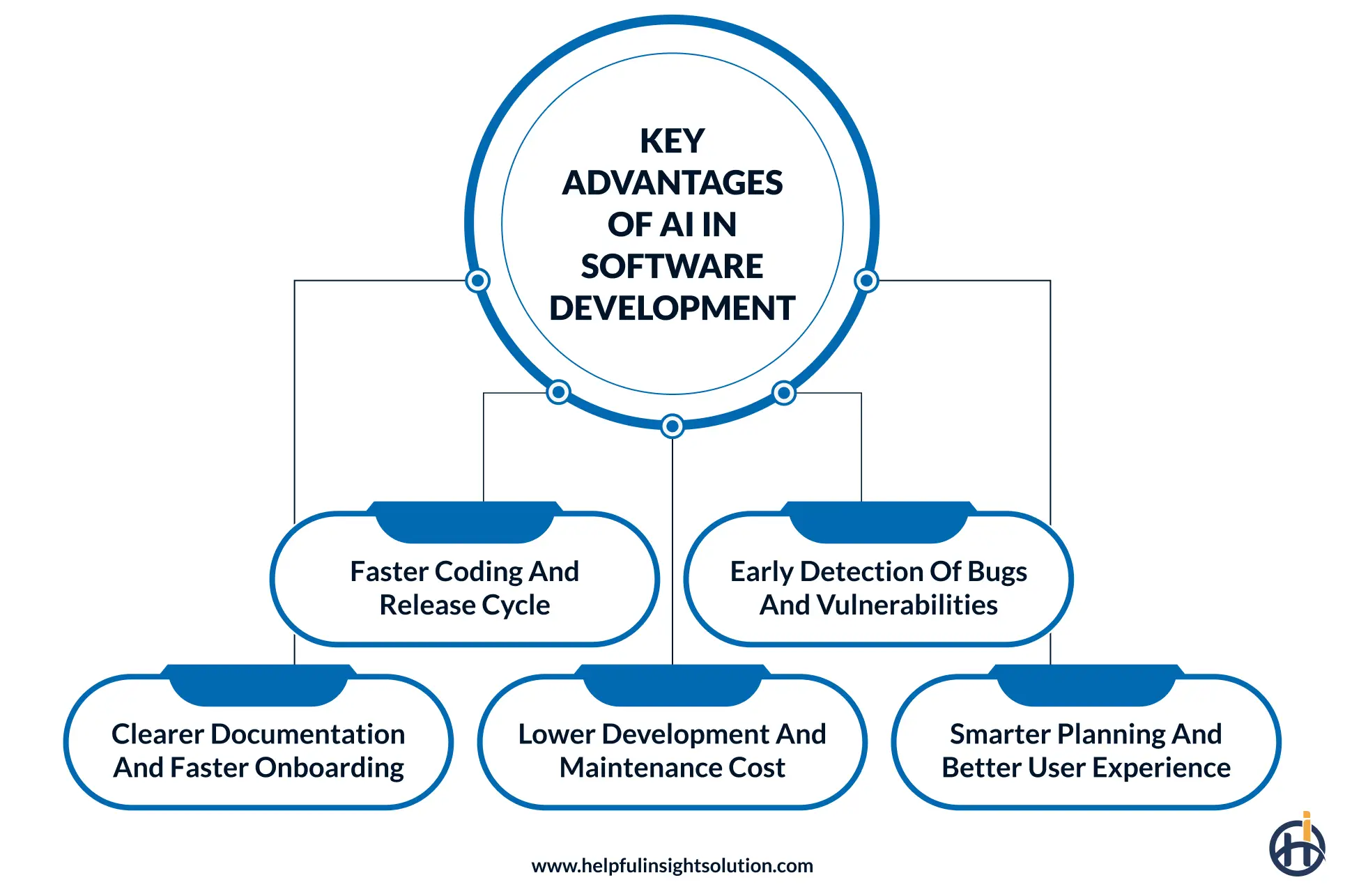
AI helps software teams at every stage, from planning a feature to maintaining it after launch. It takes over repetitive work, flags problems early, and gives developers more time for design and problem-solving. In one set of field trials, developers completed 26% more tasks. Results vary by task, team experience, and how closely the work is reviewed. Let’s walk you through the major benefits of AI in software development.
1. Faster Coding and Release Cycle
Developers spend less time on repetitive tasks and more on the logic that makes a product unique. Prototypes come together sooner, and features move from idea to release with fewer delays. Teams can test ideas quickly and drop weak ones before spending much time on them
How AI helps:
AI coding assistants suggest code as developers type, generate boilerplate, and turn plain-language instructions into working functions. They can also explain unfamiliar code, convert code between languages, and suggest refactors.
2. Early Detection of Bugs and Vulnerabilities
Problems are caught when they are cheapest to fix. Fewer defects reach production, and security becomes part of daily development instead of a last-minute check. AI is a second pair of eyes, not a replacement for human code review. People still need to verify what it flags and what it misses.
How AI helps:
AI tools scan code as it is written and flag errors, risky patterns, and common security flaws before the code is merged. They can generate unit and edge-case tests, review pull requests, and point to the likely cause of a failure.
3. Clearer Documentation and Faster Onboarding
Documentation stays closer to the current state of the code, and knowledge is no longer locked in a few people’s heads. New team members become productive sooner, and experienced developers get fewer interruptions. Someone should still review AI-written documentation for accuracy.
How AI helps:
AI can draft code comments, API documentation, README files, and release notes from the code itself. New developers can ask it to explain how a module works, why a function exists, or how parts of a codebase connect.
4. Lower Development and Maintenance Cost
Less time on routine work lowers the software development costs and effort behind each feature, and earlier bug detection cuts costly rework after launch. Maintenance becomes more manageable because teams spend less time deciphering old code. Savings are real but partial, because AI-generated work still needs senior review.
How AI helps:
AI reduces manual effort in coding, testing, debugging, and documentation. It can also help modernize legacy code by explaining old systems, suggesting updates, and drafting migration steps.
5. Smarter Planning and Better User Experience
Teams plan with clearer requirements and fewer surprises mid-project. Products are shaped by how users actually behave, so the result is easier to use and more relevant to the people using it.
How AI helps:
AI can turn rough requirements into user stories, spot gaps or conflicts in specifications, and help estimate effort. On the product side, it can analyze user feedback and behavior to show where people struggle, and it enables features such as personalization, smart search, and chat-based support.
Phases of an AI-Driven Development Life Cycle
An AI-driven development life cycle follows the same stages as any software project: planning, design, coding, testing, deployment, and maintenance.
The difference is that AI helps at every stage. It drafts, suggests, and checks the work. Your team reviews it and decides what moves forward. That is how AI in the software development lifecycle work stays useful and under control.
Phase 1: Planning and Requirements
AI turns meeting notes and customer feedback into draft user stories and acceptance criteria. It also flags gaps and conflicting requirements. The product owner reviews the draft and decides the scope. AI-driven software development starts here, because clear requirements make every later step easier.
Phase 2: Design
AI suggests architecture options, drafts API specifications, and creates diagrams from text. This speeds up early design talks. An architect checks each draft for scalability, cost, and security. The model only knows the context it receives, so people must confirm the final design.
Phase 3: Coding
Coding is where AI tools see the most use. Assistants complete lines, write functions, refactor code, and explain errors. Agents can edit several files in one task. Good teams set rules in advance. Every AI-generated change goes through code review, and secrets never go into prompts.
Phase 4: Testing
Models draft unit and integration tests, suggest edge cases, and summarize failures. Security tools such as Veracode Static Analysis and Veracode Fix flag known weakness patterns and suggest fixes. Security and QA staff review the output. High coverage numbers do not prove high test quality.
Phase 5: Deployment
AI can draft CI/CD configurations, review infrastructure code, and summarize release risk from change history. DORA 2025 found that AI adoption still increases delivery instability. Release gates matter more, not less. Teams that apply AI in DevOps keep staged rollouts and rollback plans in place.
Phase 6: Maintenance
AI summarizes incidents, proposes fixes, and updates documentation and dependencies. It also reads old code, maps dependencies, and drafts migration plans. Legacy ERP upgrades use this often, because ERP software development teams must understand older finance and operations code before changing it. The on-call owner confirms every fix before release.
Popular AI-Powered Tools for Software Developers
AI in software development uses four types of AI tools that include code assistants, AI editors, coding agents, and security tools. The table below lists the most popular ones. Check each vendor’s current plans, data policies, and supported languages before choosing.
| Tool | Category | Typical use and notes |
| GitHub Copilot | IDE assistant | Completion, chat, and agent features in common IDEs |
| Cursor | AI-native editor | Multi-file edits and repository-aware chat; 18% usage in Stack Overflow 2025 |
| Claude Code | Coding agent | Terminal-based, multi-step repository tasks; 10% usage in Stack Overflow 2025 |
| OpenAI Codex | Coding agent | Delegated coding tasks |
| Gemini Code Assist | IDE assistant | Google Cloud workflows; Google closed individual plans in June 2026, and organization editions remain |
| JetBrains AI Assistant | IDE assistant | Completion and chat inside JetBrains IDEs |
| Tabnine | IDE assistant | Teams with privacy and self-hosting needs |
| Kiro (AWS) | AI-native editor | Spec-driven IDE; AWS stopped new Amazon Q Developer sign-ups in May 2026 |
| Veracode, Snyk Code | Security tools | Scan code and suggest fixes for vulnerabilities |
Most of these tools work best with common languages like Python and JavaScript, which are among the top programming languages developers use.
Challenges and Risks to Watch For
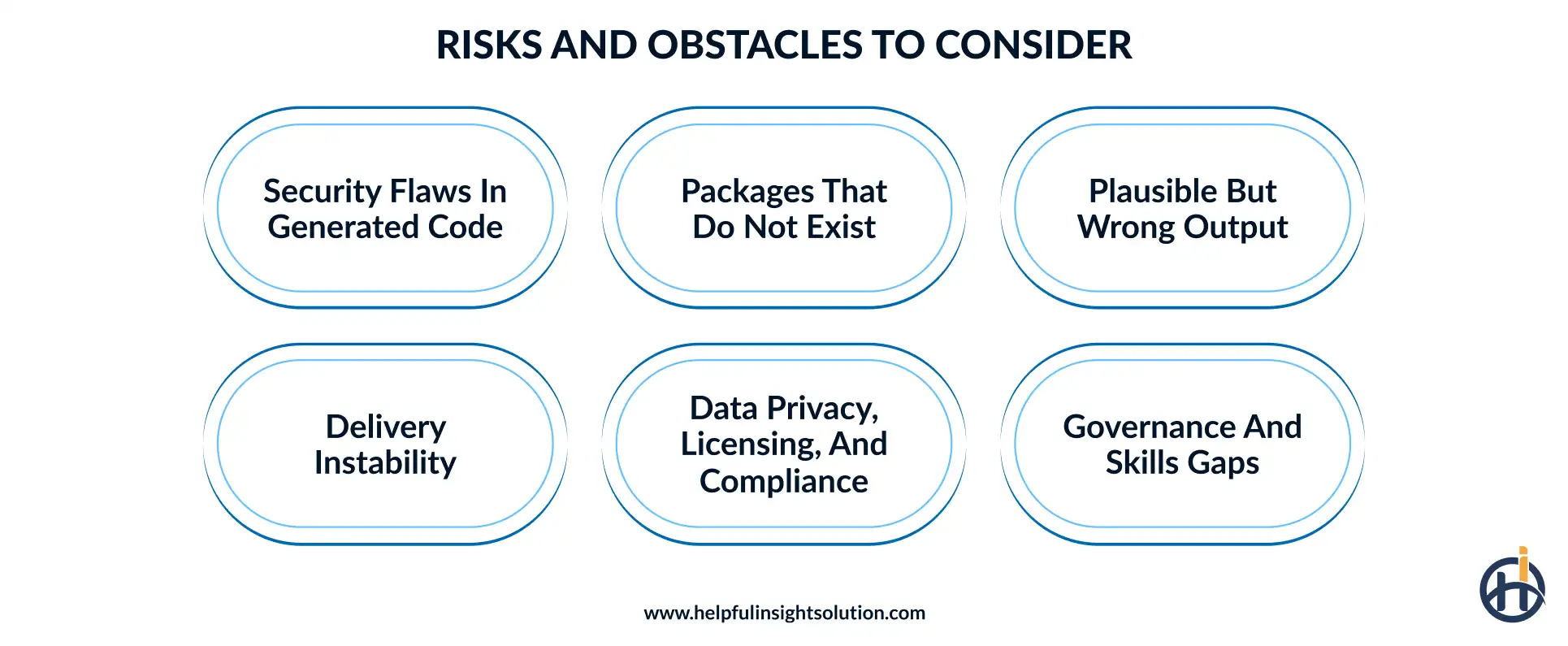
AI in software development saves time on routine work, but it also brings problems that teams often notice late. These are the ones that matter most, and what teams can do about each. The main risks of AI in software development are insecure code, over-trust, delivery instability, data exposure, and weak governance.
1. Security Flaws in Generated Code
Veracode tested more than 100 AI models on 80 coding tasks. In 45% of the results, the code had a serious security flaw. Java was the worst, at over 70%. The fix is the same one teams use for human code, applied more strictly. Run a security scan on every pull request.
Have a senior developer read anything that touches logins, payments, or user input. It also helps to state the security need in the prompt, such as asking the model to validate all input.
2. Packages that do not exist
Models sometimes recommend a package that was never published. A 2025 USENIX Security study of 16 models found that 19.7% of recommended packages were fake. Attackers can publish malware under those names and wait for someone to install it.
Before adding any dependency, check that it exists on the official registry and has a real history. A dependency scanner and a list of approved packages catch most of the rest.
3. Plausible but Wrong Output
Stack Overflow’s 2025 survey named solutions that are almost right, but not quite, as the top frustration with AI tools. Wrong code that looks right is harder to catch than code that fails at once.
Typical cases include outdated library calls, invented function names, and missing edge cases. Tests, type checks, and careful reading catch most of these.
4. Delivery Instability
DORA’s 2025 report found that AI raises delivery speed and delivery instability together. More code ships, and more of it fails. Smaller releases, automated tests before deployment, and rollouts to a small group first keep the damage limited. Have a rollback plan ready for every release.
5. Data Privacy, Licensing, and Compliance
Prompts can carry private code, customer records, or passwords. A model can also reproduce code that falls under an open-source license. Keep secrets and customer data out of prompts.
Choose business plans that do not train on company code, and scan for secrets and license issues. Rules for AI software development in the USA vary by state and industry, so have a lawyer review the policy. NIST’s Secure Software Development Framework is a good starting point.
6. Governance and Skills Gaps
Policy lags behind use. In the 2026 Stack Overflow survey, 29.7% of developers said AI use at work was optional and left to the individual. Only 24% said their employer had approved tools or formal guidance.
Companies without in-house AI experience often choose a software development partner. A partner should explain its code review process, its security controls, and how it handles client data.
Conclusion
AI in software development is now part of normal software work. The data shows clear value for routine tasks and mixed results for overall speed. It also shows real risks in security, stability, and governance. Teams that treat AI as a tool under human review get the most from it.
Three points are worth keeping. First, AI and software development work best when people stay accountable for the result. Second, benefits show up in routine tasks first, and teams should measure them.
Third, security and stability checks must grow as AI use grows. Artificial intelligence software development will keep changing as tools and rules change, so policies need regular review.
A sound plan is short. Pick one lifecycle stage. Approve a small set of tools. Write review rules. Measure results against a baseline. Expand once the numbers hold. U.S. teams should also track state and sector rules, since AI software development in the USA has no single standard.
Companies that need outside help with AI software development services should ask each vendor to show its review and security process first.
FAQs
AI in software development is the use of machine learning models to help with planning, coding, testing, deployment, and maintenance. Common examples include code assistants, test generators, and coding agents. Developers review and approve the output.
AI in software development lifecycle follows the standard stages. Teams use AI to draft requirements, suggest designs, write and refactor code, generate tests, review release risk, and summarize incidents. Each stage keeps a human approval step. AI speeds up drafting. People decide what ships.
AI in software development roles has so far shifted tasks toward review and direction. Only 6.6% of developers trust AI with important decisions, and agent use is still limited to scoped work. Surveys do not measure job loss, so the long-term effect on employment is uncertain.
They are systems that plan and carry out multi-step coding tasks with limited prompting, such as editing several files and running tests. In the 2026 Stack Overflow survey, 26.2% of respondents used automated agent workflows. Teams keep human review before merging.
Not by default. Veracode found security flaws in 45% of its test cases across more than 100 models. Teams should scan AI-generated code with static analysis and dependency checks and review it like any other code.
Check data handling and prompt storage, code ownership terms, license risk, and sector rules such as financial or health regulations. Confirm which tools the company approves and who reviews AI output. The NIST AI Risk Management Framework can guide a governance policy.