

Key Takeaways
- Ocado runs an online grocery as a technology business, using its own software and automated warehouses to fulfil and deliver every order.
- You can build several types of grocery apps, including single-store, on-demand, marketplace, quick-commerce, automated fulfilment, and white-label.
- A grocery app is really three products working together: the customer app, the driver app, and the admin panel.
- A cross-platform stack with Flutter, backed by AI for recommendations and demand forecasting, keeps the build efficient.
- Costs start around $15,000 for a basic app and reach $300,000 or more for a full Ocado-style build, depending on features and team location.
- Apps like Ocado earn from product margin, delivery fees, subscriptions, advertising, commission, and technology licensing.
Online grocery has become one of the fastest-growing ways people shop, and Ocado has become one of the best-known names.
Customers order everything through the Ocado app, and their groceries get packed and delivered from highly automated warehouses. The app runs the front of the business, and the rest works behind it.So, if you already sell groceries or plan to, an online grocery app like Ocado gives you a model that already works.
This blog will help you understand the features, tech stack, cost, and revenue model of a grocery delivery app like Ocado.
So, let’s get started.
What Makes Ocado Different?
Ocado grew by running an online grocery as a technology business. It built its own software and automated warehouses to fulfil orders, which let it serve more customers without opening any stores of its own. This is the model that became an inspiration for people planning to develop a grocery app like Ocado.
The growth of Ocado proved the potential of its business model. According to its 2025 financial year results, Ocado Retail grew orders by 13.1% and revenue by 15.4%. Across its wider platform, the group shipped 72 million grocery orders worldwide in the same year.
Automation is what kept this growth profitable. Its most advanced site now picks close to 50% of order volumes robotically, and group adjusted EBITDA rose 59% to £178 million in FY25. So the more orders Ocado handled, the more efficient each one became, which is hard to achieve in grocery where margins stay thin.
The grocery delivery market is also growing globally, fueling the growth of grocery delivery apps like Ocado. According to Statista, the worldwide market is valued at US$1.04 trillion in 2026.
Types of Online Grocery Apps You Can Build
There is more than one way to build a grocery app, and the type you choose depends on how you plan to source and deliver stock. Here are the main types of online grocery apps you can build, and where each one fits.
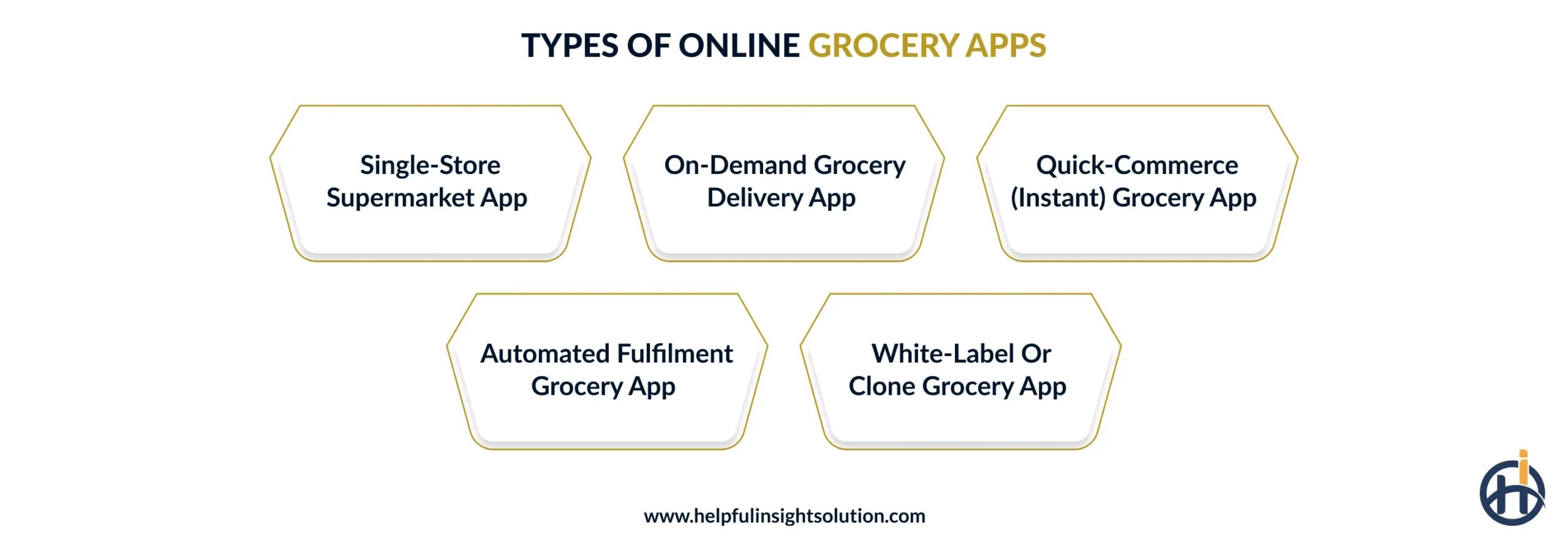
1. Single-Store Supermarket App
As the name says, a single-store supermarket app is meant for only one retailer to sell its stock through a branded platform. It connects to that retailer’s catalogue and loyalty programme, and orders are picked from its own stores or a linked warehouse
This is the route for an established grocer that wants control over its brand and customer data. Supermarket app development of this kind helps the retailers to have the full margin, and it is the closest starting point if you want to build a supermarket app like Ocado under your own name.
2. On-Demand Grocery Delivery App
An on-demand grocery app enables people to order groceries, and it gets delivered within a delivery window they choose at checkout. Most of these apps run on a hyperlocal model, so each order comes from a store or hub near the customer and reaches the door the same day. Short distances keep both the delivery time and the delivery cost down.
Ocado runs this model too, through Ocado Zoom, which delivers groceries in under an hour from local depots stocked by its main warehouses. Other UK grocers do the same, like Tesco Whoosh and Sainsbury’s Chop Chop. Tesco Whoosh alone added more than 250,000 new customers over the Christmas period in its 2025/26 year, which shows how quickly this kind of service is growing.
This model works best for businesses that already hold stock close to their customers, and an experienced grocery delivery app development company can manage the routing and live tracking that this model depends on.
3. Quick-Commerce (Instant) Grocery App
A quick-commerce app promises delivery in 10 to 30 minutes from dark stores, which are small fulfilment hubs placed inside dense neighbourhoods.
Instant delivery apps often have a limited catalogue of high-demand items instead of a full supermarket-like inventory.
The global quick commerce market is valued at US$297.5 billion in 2026, and projected to grow at 23.5% CAGR, reaching USD 1,303.5 billion in 2033. (Source: Grand View Research)
4. Automated Fulfilment Grocery App
This is the model on which Ocado runs itself. The app takes the order, and automated warehouses pick and pack it using robotics. Therefore, this application needed to be connected with the warehouse software and with the systems that forecast stock and plan delivery slots, which is why this kind of build is often called an AI grocery app.
The cost to build a grocery delivery app like this is also higher. The automation and the integration work both add to it, so this model asks for real investment before the first order goes out. The payoff comes with volume, because the cost of handling each order keeps falling as the numbers rise. For most businesses, choosing to develop a grocery app like Ocado means taking on this fulfillment model along with the app that customers see.
5. White-Label or Clone Grocery App
A white-label or Ocado clone app is a ready-made grocery platform that you rebrand and launch under your own name. Core features like catalogue, cart, payments, and delivery tracking are already built, so launch takes weeks rather than months.
A white-label grocery app lowers upfront cost and suits businesses that want to test a market before investing in custom development.
Must-Have Features for a Grocery App Like Ocado
A grocery app like Ocado has three connected products. The main application through which Customers order, the delivery app for drivers, and the admin panel to manage everything. Here are the must-have features for each application.
1. Customer App
The main application that customers use to place orders, therefore, it has to be fast and dependable. These are the core Ocado app features to include:
- Quick registration and login: Options to sign up through phone, email, or social login, so customers can be onboarded on the application with no hassle.
- Product search with categories and filters: You might have thousands of items, therefore, search and filters make it easy to navigate through them and find an item the customer needed.
- Real-time stock and pricing: Live inventory and current prices mean a customer only adds what you can actually deliver, which keeps substitutions low.
- Personalised reorder lists and recommendations: Grocery is part of daily household items, so you can expect repeat buying. The application must have a reorder list and recommendations to make it easy to order the items they need frequently.
- Push notifications and in-app support: Order and delivery updates, plus a support channel inside the app, keep customers informed without a phone call.
- Live order tracking with driver location: Once an order is out, a map with the driver’s location and an updated arrival time keeps customers informed.
- Loyalty, offers and coupons: Loyalty points and targeted offers give shoppers a reason to reorder, which matters when grocery margins are thin.
- Scheduled and recurring orders: Enable customers to set up daily, weekly, or monthly repeat orders based on their routine buying. These orders will be delivered to them automatically according to their preferences.
- Dietary and allergen filters: Customers can filter out the groceries according to their requirements, like vegan, gluten-free, or allergen-free.
Delivery App
This is the application drivers use to pick up the order and deliver it successfully to the customer.
- Order assignment and route optimisation: The app assigns the order to a driver based on the set rules like availability, location, and more. Furthermore, the application must have an option for route optimisation to ensure the driver can reach the customer within the estimated time.
- GPS navigation: An in-app navigation to keep drivers on the fastest route.
- Delivery status updates and proof of delivery: A driver can mark an order as picked up and delivered. Also, you can add proof of delivery to ensure the order reaches the right person.
- Earnings and shift view: This is the most important feature for drivers, enabling them to keep track of their deliveries and earnings.
- In-app contact with the customer: A masked call or message option lets a driver reach the customer about access or a delivery note without sharing numbers.
Admin Panel
You can name the admin panel as the operating system for a grocery delivery app, that is where the business runs, and nothing reaches the customer without it.
- Catalogue and inventory management: The team manages products and stock levels here, so the customer app always shows what is really in the warehouse.
- Order and fulfilment management: Every order can be viewed and moved through picking, packing and dispatch from one screen.
- Delivery slot and logistics control: Admins set delivery zones and control which time slots stay open, then assign drivers to them, which keeps promised windows realistic.
- Pricing, offers and promotion management: Prices, discounts and campaigns are set here and pushed to the app without a code change.
- Demand forecasting and sales analytics: Reports on sales and demand patterns help plan stock and staffing, which is the same data an Ocado-style operation runs on.
- Customer management (CRM): Admins see customer profiles, order history, and support issues in one place to resolve queries and target offers.
Advanced Features:
Beyond the core features, these advanced ones help an online grocery delivery app be competitive in the market.
- AI recommendations: The app looks at what a customer buys and suggests items they are likely to need next. Over time, this builds a personalized shop that makes it convenient for customers to place orders.
- Smart routing: The system plans each driver’s route so several deliveries fit into one trip. Furthermore, it can also respond to traffic and new orders, which keeps delivery times and fuel costs down.
- Warehouse automation: The app connects to the automated warehouse, so each order is sent to the picking system the moment it is placed. This keeps fulfillment fast and removes the manual steps between an order and its dispatch.
- Dynamic pricing: Prices and delivery fees adjust to demand and the delivery slot. For example, a quiet afternoon slot can cost less than a late-night delivery.
- Predictive inventory: The app forecasts what will sell and when, so stock is ordered before it runs out. This keeps popular items available and cuts the waste that comes with fresh food.
- AI chatbot support: Deploy AI to ensure common customer queries are answered automatically by AI without waiting for a human agent.
Tech Stack for Building a Grocery App Like Ocado
The grocery delivery app tech stack decides how well the app scales and how much it costs to run over time. Your choice depends on the model and budget, below, we have compiled a list of the best recommended technologies along with their use cases:
| Recommended technology | What it handles | |
| Cross-platform mobile app | Flutter (or React Native) | One codebase that runs on both iOS and Android, which saves development time and cost. |
| Native modules (optional) | Swift for iOS, Kotlin for Android | Used where a feature needs full device performance. |
| Admin panel (web) | React or Angular | Runs a data-intensive dashboard that updates in real time. |
| Backend | Node.js or Python (Django) | Manages orders, users, and business logic as volume grows. |
| Databases | PostgreSQL with Redis | PostgreSQL holds orders and inventory, Redis caches stock and slots for fast reads. |
| Real-time and notifications | Firebase and WebSockets | Power live tracking, stock updates, and push alerts. |
| Maps and delivery tracking | Google Maps or Mapbox | Handle navigation, routing, and driver location. |
| Payments | Stripe with local rails | Process cards and regional methods securely, such as Stripe and Plaid in the US or UPI in India. |
| Search | Elasticsearch or Algolia | Return fast results across a large catalogue. |
| AI and machine learning | Python with TensorFlow or PyTorch | Run recommendations and demand forecasting. |
| Cloud and DevOps | AWS with Docker and Kubernetes | Scale the app and keep it available during peak hours. |
Clone vs. Custom vs White-Label: What to Choose?
Once you know the type of grocery app you want, the next decision is how to build it. There are three routes to choose from, a clone, a custom build, or a white-label product. Each route makes a different trade-off between speed and control, so the pick depends on your budget and how far you plan to scale.
| Approach | Launch time | Cost | Customisation | Best for |
| Clone app | A few weeks to a couple of months | Low to moderate | Limited to the features already built in | Testing the market quickly with a proven feature set |
| Custom build | Several months or more | Highest | Full, built to your exact model | A long-term, differentiated grocery operation |
| White-label | The fastest, often a few weeks | Lowest | Branding and basic settings only | A quick launch on a tight budget to prove demand |
A white label grocery app or a clone is the fastest way to test the market and iterate based on the customers’ feedback. Custom app development is the right choice when you need an application
How Much Does It Cost to Build an App Like Ocado?
The cost to build a grocery delivery app like Ocado is subject to the features and the location of your team.
A simple app with core features costs far less than a custom platform with automation and AI. The main things that impact the cost are the number of features, the apps you need, the platforms you target, and the hourly rate of your development team.
The geographical location of an app development company also impacts the cost. A developer in India may charge $25 to $50 an hour, while a team in the US or UK can cost $100 to $150 or more, so the same app can carry very different price tags. The ranges below are working estimates for a cross-platform build, and your own quote will move with scope and region.
| App version | What it includes | Estimated timeline | Estimated cost |
| Basic (MVP or clone) | Customer app with core ordering, payments, and live tracking | 2 to 3 months | $15,000 to $40,000 |
| Standard custom | Customer, driver, and admin apps with delivery slots, real-time stock, and analytics | 4 to 6 months | $40,000 to $90,000 |
| Full Ocado-style build | Everything above, plus warehouse integration, AI forecasting, and scaling for high volume | 8 to 12 months or more | $100,000 to $300,000 and up |
For grocery app development costs in 2026, most businesses start at the basic or standard level to launch, then invest in automation once order volume justifies it. This keeps the early spend manageable and ties the bigger investment to demand you have already proven.
How Apps Like Ocado Make Money?
A grocery delivery app like Ocado has more than one revenue model. Your grocery app business model should match how you source stock and what your customers are willing to pay for. Here are the main revenue models, with what they look like for a business the size of Ocado.
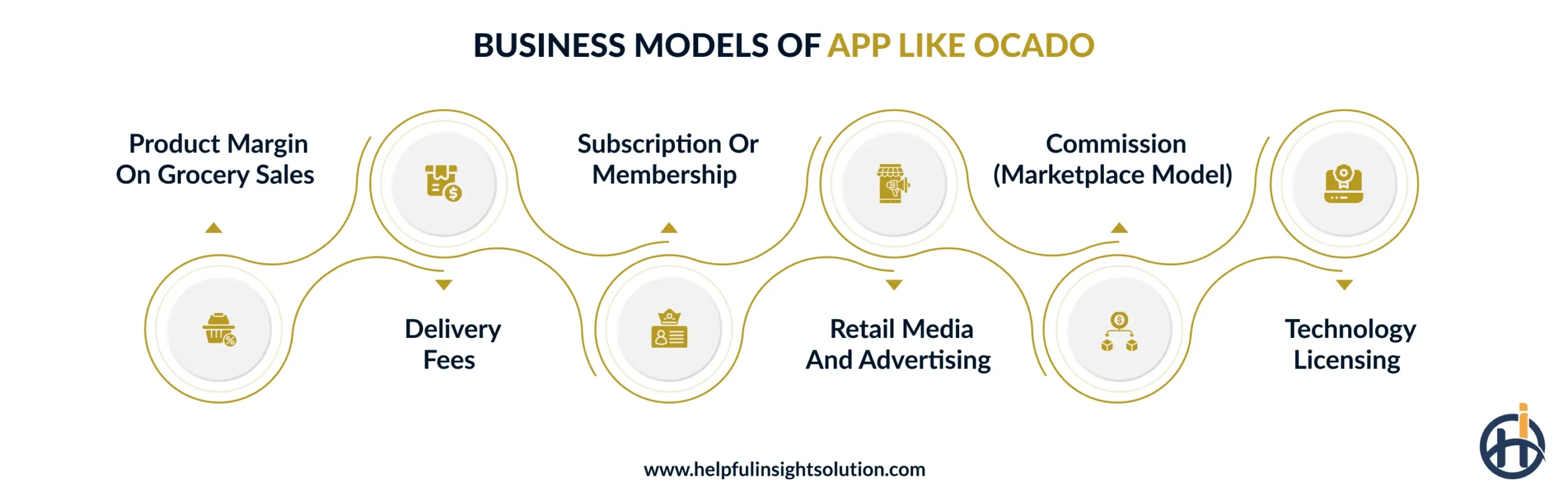
1. Product Margin On Grocery Sales
This grocery delivery app revenue model refers to the margin between what you pay suppliers for stock and what the customer pays at checkout.
This revenue model is the best choice for grocers that hold their own inventory, and it is the largest income stream by far. Ocado Retail reported £2.83 billion in revenue in its 2025 financial year at a 33.7% gross margin, which came to £952 million in gross profit.
2. Delivery Fees
The app charges a fee for each delivery, which is often calculated based on the demand and basket size. It offsets part of the last-mile cost, which stays high in grocery stores. Ocado folds this fee into its retail revenue rather than reporting it separately, so it supports the margin above instead of standing on its own.
3. Subscription or Membership
A paid membership, like Ocado’s Smart Pass, is a proven grocery delivery app revenue model that gives customers cheaper or free delivery for a fixed monthly or yearly fee.
This model is the right choice for customers who often use the Ocado application in their day-to-day life.
3. Retail Media and Advertising
Once the app has steady traffic, suppliers pay to advertise their products inside it. Ocado launched Ocado Ads in 2024 to sell this placement through a self-serve platform. Ocado has not published Ocado Ads revenue on its own yet, though retail media is a high-margin stream because the audience and the data already exist.
5. Commission (Marketplace Model)
If you want to list other grocery stores, then you can work on this revenue model. The grocery stores will hold the inventory, and you can charge them commission on each order they receive from your platform.
Instacart runs this way, and in 2025 it earned $3,742 million in revenue across 338.8 million orders, which came to about 10% of the order value that flowed through it. The model needs far less capital because you never own the inventory.
6. Technology Licensing
This is the model Ocado is now known for, licensing its warehouse and software platform to other grocers for a fee. Ocado’s Technology Solutions arm earned £561.2 million in 2025. This revenue model can only become possible once your platform is proven at scale, so it is a later-stage stream rather than a starting point.
Most apps like Ocado begin with product margin and delivery fees, add a subscription to hold customers, then bring in advertising and licensing as they scale. You can use all these revenue models together to make the most profit out of your grocery delivery app like Ocado.
How to Build an App Like Ocado? Step-by-Step Guide
Developing an app like Ocado must follow a clear sequence, and skipping any of the steps early might cost you more later on. Here is a step-by-step guide on how to build an app like Ocado.
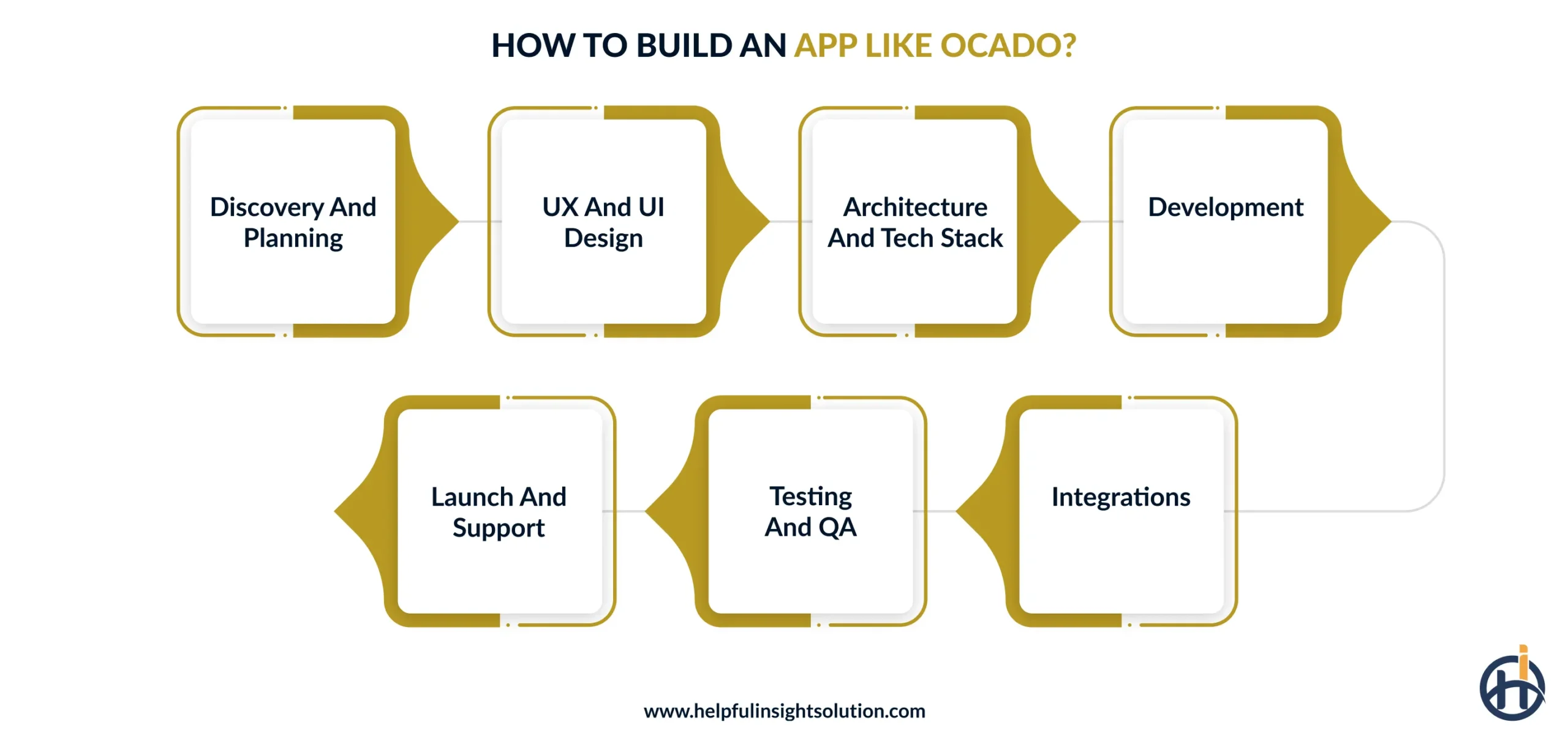
- Discovery and planning: This is the very first step, where you decide what you are building and why. You have to study the market and choose the app type and market you want to serve. Furthermore, list all the features the app needs and the budget you might have. This will help you to ensure that the project is in the right direction.
- UX and UI design: Designers map out the screens for the customer, driver, and admin apps. The design must be intuitive, making every feature easy to access.
- Architecture and tech stack: Now the team picks the backend and database, and decides where everything will be hosted. Real-time stock and delivery slots have to be planned at this stage.
- Development: This is the longest part in an Ocado clone app development. The development team works on building the app to make it functional.
- Integrations: A grocery app also depends on payments and maps. Therefore, the application must be integrated with both of them.
- Testing and QA: Before launch, every flow is checked on real devices, including a full order and the delivery that follows. Payment and order accuracy must be validated to ensure that the right things get done.
- Launch and support: The apps go live on the App Store and Play Store.
Challenges in Grocery App Development and How to Overcome Them
It is a lucrative business, but you might face a few challenges in the process of doing so, such as:
1. Low Margins On Every Order
Grocery has some of the lowest margins in retail, and the delivery cost makes it even lower. Even Ocado, at its scale, reported a 33.7% gross margin in its 2025 financial year, and that is before the cost of getting each order to the door.
In development, the delivery side will need the most attention. You can build an app that batches multiple orders into one trip and adds route optimisation to cut the distance each driver travels.
2. Keeping Inventory Accurate
If an app is showing an item as available, then it must be available. However, if you find out after the customer places an order that the item is out of stock, the customer should get a substitution or a refund, which affects the experience.
Keeping the inventory accurate in a grocery store is difficult because the stock moves fast and includes fresh items with a short shelf life. So, the application must have a real-time integration with your inventory system, so the catalogue keeps updating as the stock changes.
3. Retaining Customers
Grocery is a repeat purchase, but customers can easily switch to another app if it is cheaper or faster. So, retention becomes the real challenge here, as you need the customer to keep ordering every week. The best practice to retain customers is building an application with features that give customers a reason to come back. Push notifications remind them about the offers or an item left in the cart, so your application must have this feature.
The application also has to be simple and fast, along with personalized recommendations to make it easy for customers to make a purchase.
4. Scaling During Peak Demand
Grocery orders go up during the evenings and around holidays, and if the app slows down or crashes at that time, you lose both the orders and the trust. Therefore, you need a cloud setup that can scale as the traffic increases, and automation to handle the order volume behind it. Ocado picks close to 50% of order volumes robotically at its most advanced site, which helps it keep up as the orders grow.
Final Take
The demand for grocery delivery apps is there, and it is growing globally. So, if you are planning to build a grocery delivery app like Ocado, then it is the right time.
Helpful Insight is a mobile app development company that has built grocery and delivery apps for businesses across India, the USA, and the UAE. Our team has worked with leading grocery delivery brands, so we understand what matters most in a grocery build, like real-time inventory and delivery logistics. Whether you need a simple MVP or a full Ocado-style platform, we can build the version that fits your business today.
FAQs
Developing an app like Ocado is subject to the complexity of the application. A simple application with core features can be developed within a month or two. However, an app with advanced features can take time somewhere between 4 and 6 months.
Yes, a startup can build an Ocado clone app. You can start with a white label app to get started with a fully functional grocery delivery app quickly and at a lower price. You can scale to custom grocery delivery app development as your business grows.
The best practice is to choose a development company that has prior experience in grocery app development. Ask the company about the portfolio, and evaluate the performance of their deployed applications in real-time to make a decision.