

Key Takeaways:
- A grocery product management platform automates stock tracking, demand forecasting, and replenishment, which reduces overstocking and food wastage.
- It delivers essential features, like POS integration, barcode scanning, and multi-store support, that streamline daily grocery operations.
- Businesses need the right tech stack, cloud infrastructure, and robust security measures to build advanced grocery inventory control systems.
- These platforms can generate recurring revenue through SaaS subscription plans, premium features, and API licensing, which ensure consistent profit.
The grocery industry has changed a lot after the digital revolution that brought inventory automation, customer personalization, and store optimization. Supermarkets or grocery stores that haven’t developed or integrated advanced grocery inventory management software are still struggling with financial issues, buyer trust, and stock discrepancies. Additionally, unnecessary warehouse expansion and mismanagement of perishable products also affect the credibility of grocery businesses.
According to the National Grocers Association, 35% of independent store owners in the USA have adopted automated solutions, which is far less than 95% of large chains. On a broader aspect, 47% of retailers in the USA have already implemented AI, whereas 93% of suppliers are ahead. Businesses are investing heavily in modernizing their existing platforms or building new ones to prevent overstocking.
If you are looking to shift your services from traditional grocery management to optimized inventory, then you are at the right place. This blog provides information on benefits, features, development process, cost, and compliance. You will get more insights to explore in this write-up.
What is grocery inventory management?
Grocery inventory management is the process that allows market vendors to easily track, organize, and control different products with smart technologies. Its main goal is to maintain optimal stock levels for customers and minimize financial losses from expired or spoiled goods.
Grocery inventory management system monitors historical data, trends, and demographics to predict future sales. The use of AI in grocery delivery optimizes store efficiency by automating product management and reducing manual workload. It integrates with POS systems for stock tracking, quality control, and revenue cycle management.
- The system uses the First-In, First-Out (FIFO) method to manage batches in real-time.
- It sets a threshold value that triggers reorder automatically during lower stock levels.
- The platform helps store owners manage perishable items by upselling them first.
Supermarkets, local stores, and retail owners must invest in this industry, as it is growing rapidly at a rate of 7.9% CAGR between 2026 and 2035. The grocery retail inventory management market is expected to reach a volume of $12.5 billion by the end of this tenure at the global scale.
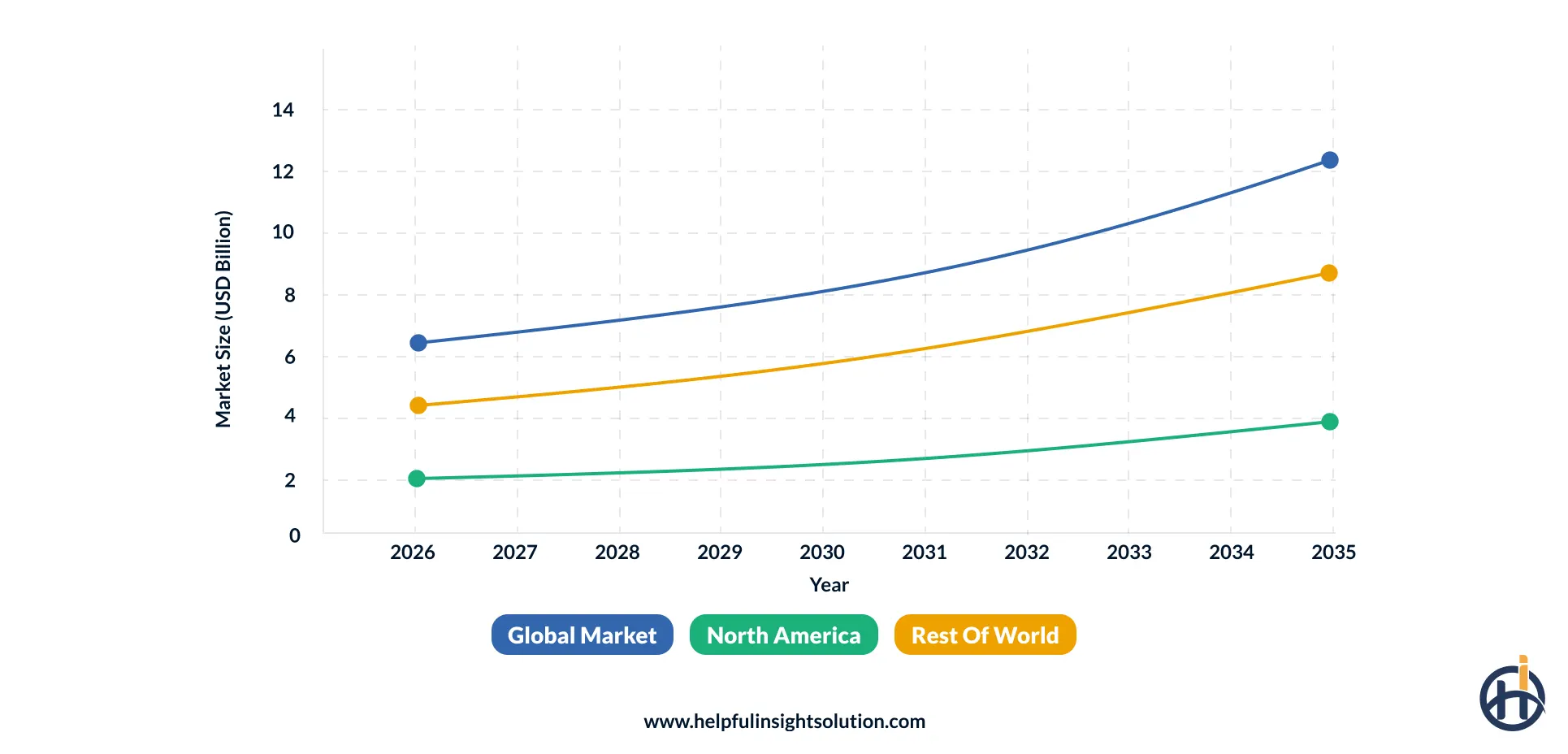
Currently, North America has the maximum share of 30.7% in the market, generating a revenue of $3.8 billion by 2035. According to the World Bank, enhancements in supply chain management can decrease delivery times by 25%, increasing customer retention and sales volume.
Advantages of grocery store management software
Grocery warehouse management software offers multiple benefits, from food waste tracking to stock optimization. In this section, we will observe the key business advantages of a grocery inventory system.
1. Real-time inventory visibility
This means that stores can instantly update stock levels during purchase, which prevents overstocking and out-of-stock situations. Additionally, the grocery store stock managementgenerates reorders after analyzing the products in the warehouses, ensuring customer trust on the grocery platform.
2. Reduced food waste (Expiry management)
An app like Ocado uses a First-Expired, First-Out (FEFO) model at checkout that triggers predictive alerts for perishable goods, reducing food wastage. These systems provide automated discounts and charity donations by regularly tracking batches per order.
3. Improved demand forecasting & inventory planning
The grocery stock tracking systems observe and collect historical data by using predictive analytics to improve market demand. Based on the results, supermarkets and retail stores can easily make successful inventory plans to manage stocks, orders, and purchases in real-time.
4. Automated stock synchronization (Faster checkout)
It links Point-of-Sale (POS) transactions with inventory databases to ensure grocery management efficiency and reduce checkout times. After item scanning, the product is automatically deducted from the catalog, and prices are updated digitally, which prevents manual data entries.
5. Speedy billing process
Through instant barcode scanning, automated price updates, and integrated payment gateways, these systems enhance transactional processes. This improves grocery billing by minimizing human data entry errors and reducing long wait times for customers.
6. Centralized store operation management
An online store management system manages daily grocery operations by connecting all branches, warehouses, and digital storefronts. Owners can easily control inventory, pricing, and promotions from anywhere, reducing manual tasks and ensuring customer experiences.
What grocery industry challenges does inventory management software resolve?
Before a grocery store management system, there were different challenges that businesses were facing worldwide. Here, you will study those issues and how these platforms have resolved them with efficiency.
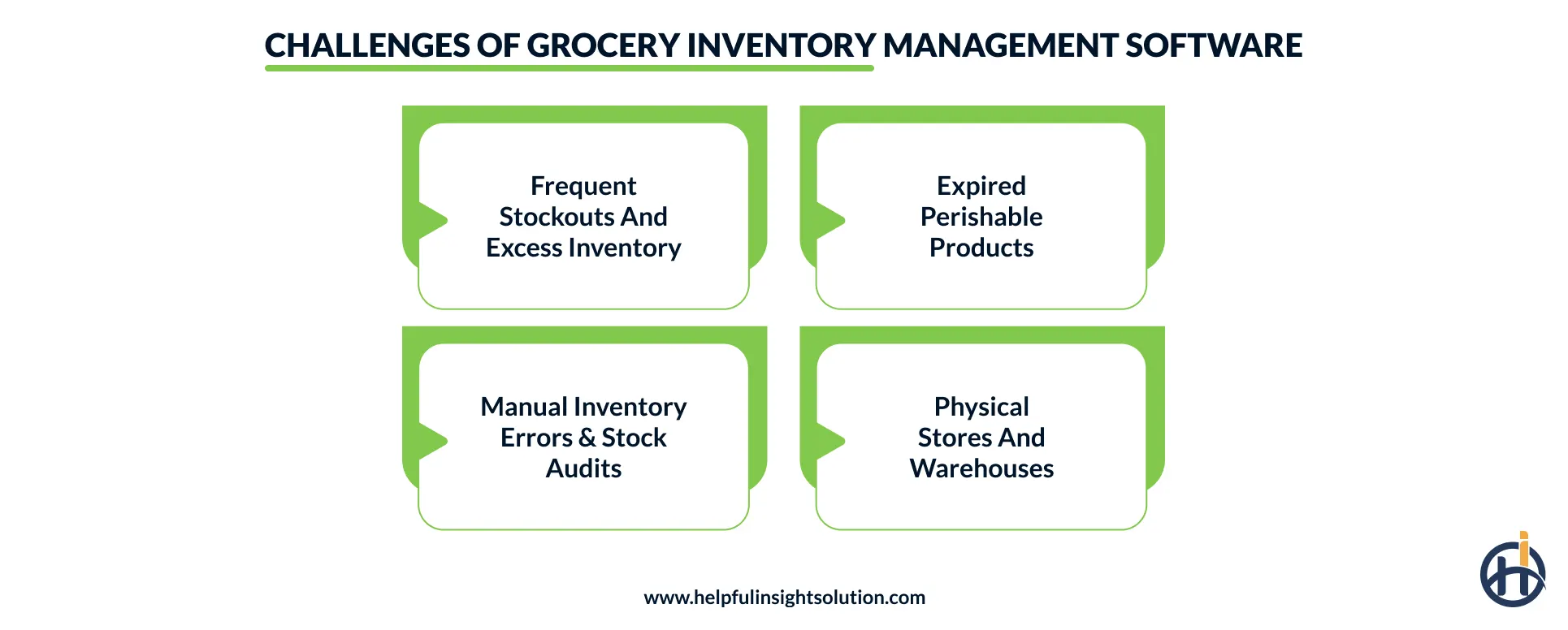
1. Frequent stockouts and excess inventory
Businesses experienced revenue loss and reduced customer loyalty due to empty shelves during high demand. Additionally, excessive buying of grocery items leads to warehouse expansion, which requires extra investment.
Solution: Advanced store handling systems provide automated reordering and analyze historical data to manage purchases and customer orders.
2. Expired perishable products
Most products like dairy items and meat are difficult to store for long, as they are perishable and have a short shelf life. Without a proper system, grocery stores suffer from severe inventory shrinkage and financial losses.
Solution: The system generates automated expiry alerts within a threshold time, allowing staff to arrange products for discounts and offers.
3. Manual inventory errors & stock audits
The manual tracking of inventory can lead to data entry mistakes, such as delayed updates and wrong product entries. Large quantities can reduce stock audits, which can lead to various issues like poor quality and increased prices.
Solution: Modern grocery billing software provides built-in POS systems for dynamic monitoring and mobile barcodes for audit breakdown.
4. Physical stores and warehouses
It is difficult to monitor inventory with limited physical resources, which can lead to product expiration and misplacement. There is a high chance of human error, as they depend on manual paperwork that slows down the process.
Solution: The software ensures batch-wise tracking and automated FEFO rotation protocols that ensure the sale of products based on priority.
Key features of a grocery POS inventory system
Store management, live order tracking, and billing are the key grocery store inventory solutions features. The following table describes the most widely integrated features of a warehouse management platform
| Features | Description |
| Live inventory tracking | Monitors how stock we have in real time across all our stores and warehouses. This helps us keep records of our inventory. |
| Barcode and QR code scanning | Makes it easy to find products quickly and update stock levels instantly. We do this by scanning barcodes or QR codes. |
| POS and billing integration | Updates our inventory automatically every time we make a sale have a return or exchange a product at the point of sale. |
| Expiry date & batch management | Keeps track of product batches and expiration dates. This helps us reduce food waste and make sure we follow the rules. |
| Automated stock replenishment alerts | Sends us notifications when our inventory gets low. This way we can restock on time. |
| Multi-store inventory management | Brings all our inventory monitoring, stock transfers and reporting together. This makes it easier to manage store locations. |
| Supplier/purchase order management | Makes it simpler to work with suppliers. We automate purchase orders, deliveries and getting inventory. |
| Demand forecasting & inventory analytics | Looks at sales data and trends. This helps us predict what products will be in demand and plan our inventory better. |
| Mobile inventory management | Lets our staff count stock receive shipments and update inventory using their mobile devices. |
| Reporting dashboard | Gives us real-time insights, into sales how well our inventory is doing, stock movement and important business numbers. We get this information through reports. |
How to build grocery inventory management software?
Entrepreneurs can create grocery management software that offers advanced inventory services by following a dedicated process. From ideation to maintenance, we will examine key development stages crucial from a business perspective.
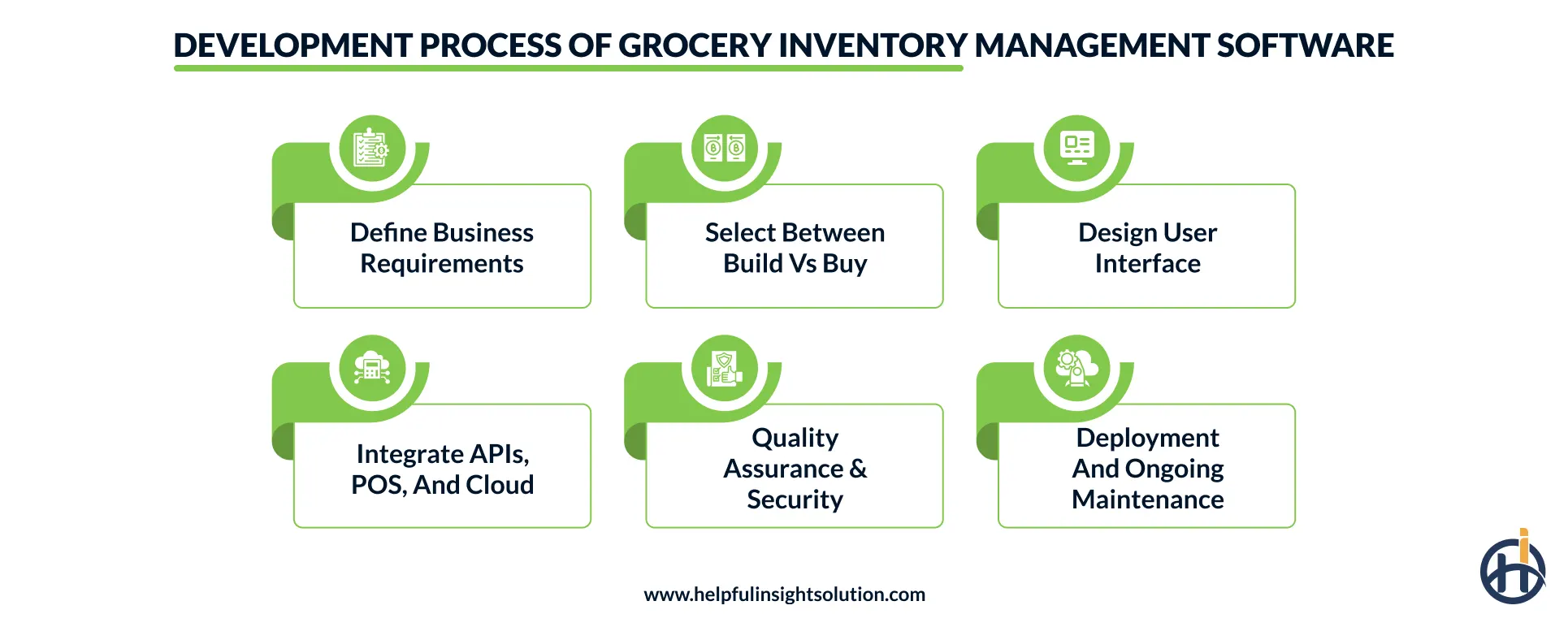
1. Define business requirements
To start, you need to figure out what your grocery business needs to run, like keeping track of inventory, restocking shelves, managing suppliers, scanning barcodes, and making reports. You have to think about stores, users, and types of products the software has to handle.
We help investors to build effective business strategies, which include revenue models, future expectations, and current technical needs. Businesses can discuss their plans or ideas with our experts and prepare for final documentation.
2. Select between Build vs Buy
Next, you have to decide if you want to create your stock tracking system or buy one that is already made. Making your system gives you more flexibility, and you can make it grow with your business, and it can work with other systems.
A grocery inventory management software development company helps you to buy a system that is readymade, which is faster and more affordable. It is crucial to identify the budget, project timeline, and maintenance cost to prioritize development options.
3. Design user interface
Businesses can make apps like Instacart that are easy for your employees to use every day for buying groceries and fresh products. Create screens for looking at stock orders, sales reports, and suppliers, and make it easy to get around.
Make sure it works well on different computers, tablets, and phones so your warehouse and store staff can use it instantly. If the system is easy to use, your employees will not need much training, and they will get more work done.
4. Integrate APIs, POS, and cloud
Connect your system to the machines that handle sales, barcode scanners, supplier lists, accounting software, and payment systems. Use cloud computing so your inventory is always up to date across all your stores and warehouses.
Add tools to analyze data and make reports so you can predict what will happen and make decisions. If everything works together smoothly, your business will run efficiently, and you will not have to enter data by hand.
5. Quality assurance & security
Test your system completely to make sure it is accurate, works well, and works on all devices. Do kinds of tests like making sure it works, integrates well, performs well, and is easy for users to work with before you start using it.
Put security measures in place like controlling who can access what, encrypting data using multiple ways to verify users, and checking for vulnerabilities often. If you test it well, your system will be reliable, have less downtime, and keep your business data safe.
6. Deployment and ongoing maintenance
When you are ready, put your system in place, either a little at a time or all at once, depending on what your business needs. Watch how it works, fix problems, and train your users so they can use it smoothly without any interference.
Put out updates regularly to add features, improve security, and keep it working with new technologies. If you keep taking care of your supermarket inventory management system, it will stay reliable, grow with your business, and keep up with changing business needs.
Case study on grocery stock management
Our client was rapidly expanding its grocery retail chains with 35+ stores and an online delivery venture. Their business struggled to manage inventory across various locations due to manual stock tracking and disconnected POS systems, resulting in stockouts and declining customer satisfaction.
The client approached us to build a centralized Grocery POS inventory system that automates warehouse operations and improves supply chain efficiency.
Challenges it faced:
- Inaccurate inventory tracking that caused product shortages and overstocking.
- Excessive food wastage triggered poor demand forecasting and lost sales.
- Store managers could not monitor inventory at multiple branches.
- Delayed purchases and reorders affected delivery operations, reducing efficiency.
Our solution: We created a cloud-based platform that offers real-time stock visibility at all grocery stores, automating inventory control. Our AI-driven systems ensured smart product management, optimized replenishment, and seamless integration with existing retail systems.
What we have implemented:
- AI-based demand forecasting helps to predict stock levels and trigger reorders by analyzing historical data.
- Supplier portals for purchase order tracking, delivery scheduling, and vendor performance monitoring.
- We connected all retail stores and warehouses through the cloud infrastructure, which ensures inventory sync.
- For data security and compliance, we integrated role-based access control, encrypted data storage, and audit trails.
- An integrated POS and barcode scanning system to automatically update stocks after each purchase.
Business outcome: After system deployment, the retailer experienced improvement in store operations. This removed stock visibility issues, reduced manual workload, and prevented stock shortages.
With predictive analytics, grocery product management and customer satisfaction have improved. Cloud services helped in managing billing cycles, tracking items, and increasing revenue.
Tech stack for building a grocery inventory tracking system
Businesses must know which tools and technologies are essential for developing grocery store inventory management software. This helps them to hire a suitable partner who can deliver advanced solutions at reasonable prices.
You must approach a full-stack firm instead of connecting with an AI development company or a tech-specific expert, who is expensive. In this section, we will explore a table listing the tech stack that is crucial for making grocery item tracking services..
| Tech Stack Component | Tools/Technologies | Work Description |
| Frontend Development | React.js, Angular, Vue.js | Builds a responsive web interface for managing inventory, sales, and reports. |
| Mobile App Development | Flutter, React Native, Kotlin, Swift | Enables store managers and staff to track inventory and perform stock operations on mobile devices. |
| Backend Development | Node.js, Python (Django/FastAPI), Java (Spring Boot), .NET | Handles business logic, inventory processing, user authentication, and API requests. |
| Database Management | PostgreSQL, MySQL, MongoDB | Stores product catalogs, inventory records, supplier data, and transaction history securely. |
| Cloud & Hosting | AWS, Microsoft Azure, Google Cloud Platform | Provides scalable infrastructure, backups, and high availability for multi-store operations. |
| POS & Third-Party Integrations | Square API, Stripe API, Shopify API, REST APIs | Synchronizes inventory with POS systems, payment gateways, eCommerce platforms, and ERP software. |
| Barcode & QR Code Scanning | Zebra SDK, Scandit SDK, ML Kit Barcode Scanner | Enables fast product identification and accurate inventory updates through barcode scanning. |
| Analytics & Reporting | Power BI, Tableau, Google Looker Studio | Generates dashboards and reports for inventory turnover, sales trends, and business performance. |
| Security & DevOps | OAuth 2.0, JWT, Docker, Kubernetes, GitHub Actions | Secures user access while automating application deployment, scaling, and continuous updates. |
What is the cost and timeline to create grocery inventory software?
Businesses that know the grocery inventory management software development cost can easily prepare a budget and invest in the process. The average price ranges from $15,000 to $80,000 for a simple store tracking platform that provides features like barcode scanning and POS integration. As the number of features and complexity increase, the overall cost may rise to $300,000 or more depending on the requirements.
The cost of making cloud-based or mobile inventory systems is influenced by various market factors like location, platform choice, and hiring models. You will get an idea of the estimated rates in this section through the following table.
| Project Complexity | Estimated Cost (USD) | Timeline | Description |
| Basic/MVP model | $15,000 – $35,000 | 2–4 Months | Includes core features such as inventory tracking, barcode scanning, basic reporting, and single-store management. |
| Intermediate platform | $35,000 – $75,000 | 4–7 Months | Adds POS integration, supplier management, automated stock alerts, mobile access, and advanced reporting capabilities. |
| Advanced-level system | $75,000 – $150,000 | 7–12 Months | Incorporates multi-store management, demand forecasting, cloud infrastructure, analytics dashboards, and third-party integrations. |
| Enterprise-grade solution | $150,000 – $300,000+ | 12–18+ Months | Features AI-powered forecasting, warehouse management, ERP integrations, custom workflows, enterprise security, and global scalability. |
You can get a custom cost structure based on the needs and project specifications through our cost calculator that considers all parameters. It helps to identify the necessary features that users want and select the right tech stack with the latest technologies.
Regulatory compliance for a retail inventory management solution
A grocery store inventory management system must ensure data privacy, secure transactions, and supply chain tracking. These platforms follow strict industry standards, which include data protection guidelines (GDPR), consumer privacy regulations (CCPA), and payment security (PCI DSS).
They provide role-based access control (RBAC), batch tracking, and a data interchange facility to the service providers. Let’s understand some commonly used compliance requirements with their definitions in this section.
| Compliance / Regulation | Description |
| General Data Protection Regulation (GDPR) | Ensures the secure collection, storage, processing, and deletion of customer data for businesses serving users in the European Union. |
| Payment Card Industry Data Security Standard (PCI DSS) | Protects credit and debit card transactions by enforcing secure payment processing and storage of payment information. |
| California Consumer Privacy Act (CCPA) | Grants California consumers rights over their personal data, including access, deletion, and opt-out of data sharing practices. |
| Sarbanes-Oxley Act (SOX) | Requires accurate financial reporting, audit trails, and internal controls for inventory records in publicly traded companies. |
| International Organization for Standardization (ISO/IEC 27001) | Establishes best practices for information security management to safeguard inventory, supplier, and customer data from cyber threats. |
| GS1 Standards | Standardizes barcodes, product identifiers, and supply chain data exchange to improve inventory accuracy, product traceability, and interoperability across retail systems. |
Monetizing a multi-store inventory management system
You can build a retail inventory management solution to generate revenue by gathering more audience and expanding services. Here are some important monetization strategies that every entrepreneur must implement.
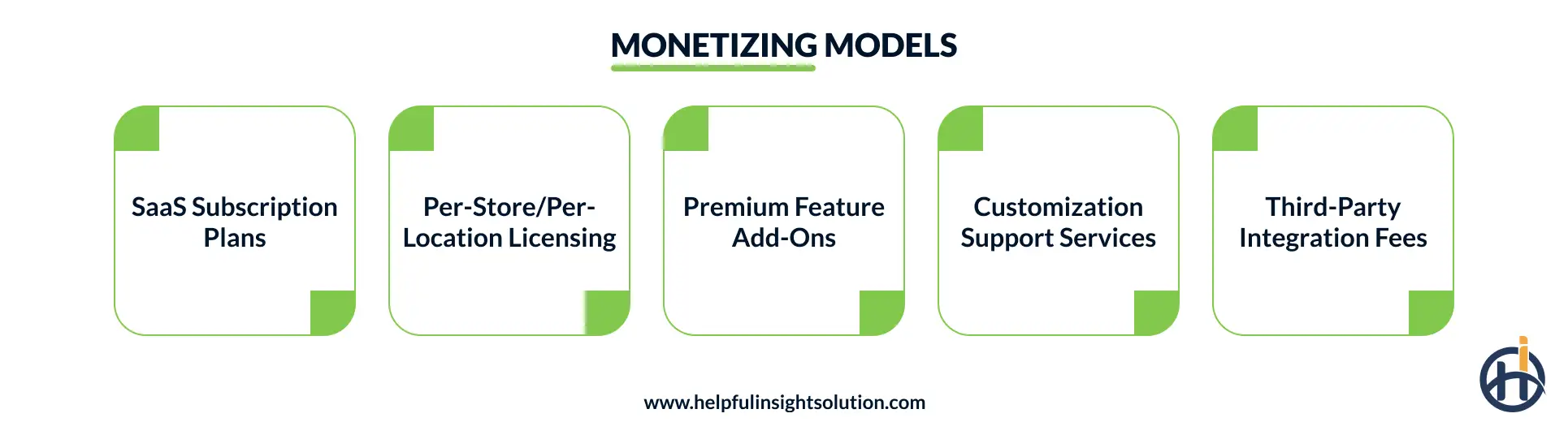
1. SaaS subscription plans
You can offer businesses a subscription to your service for a month or for a year. The cost of the subscription depends on how many people are using the service, how big their inventory is, or what features they want to use.
2. Per-store/per-location licensing
You can also charge businesses based on how many stores or warehouses they have that use your service. This is going to be the future of grocery shopping because as businesses get bigger and open more stores, they will pay you more money.
3. Premium feature add-ons
Some businesses might want to use features like tools that use artificial intelligence to guess what people will buy or tools that automatically order more products when they are running low. This way, businesses only pay for what they need and can easily make more money.
4. Customization support services
Big businesses might want you to make workflows just for them, or they might want a dashboard for managing grocery inventory. They might also want reports or features that you do not normally offer, helping them get started with your service.
5. Third-party integration fees
You can also charge businesses to connect your service to the tools they use, like the machines they use to handle sales, their accounting software, or the websites they use to sell products. This makes things easier for them, generating increased revenue.

Why choose Helpful Insight to develop an inventory management solution for supermarkets?
Businesses investing in grocery inventory management software development services are creating a huge difference through smart warehouses and stock replenishment. It is beneficial for them to approach an experienced and reliable partner who can ensure instant product delivery with safety and scalability.
We integrate advanced technologies like AI, AR/VR, cloud, and blockchain that improve grocery management efficiency. Our experts help entrepreneurs to easily understand various business models before implementing them.
In our grocery delivery app development company, we ensure a collaborative environment that guides investors through a dedicated process. From planning to execution, our experts provide constant support at every stage, allowing businesses to experience smart inventory solutions.
This enhances customer retention, reduces overstocking, and optimizes brand visibility across formats.
FAQs
AI modernizes grocery inventory platforms by automating orders and tracking real-time stock levels with standard algorithms. The key roles of artificial intelligence in grocery inventory are discussed as follows:
- Demand forecasting: AI needs massive datasets, like sales history, to predict future results with accuracy.
- Real-time shelf monitoring: It uses computer vision and sensors to scan different products and generate instant notifications.
- Automated Replenishment: AI triggers stock reordering based on inventory levels that go below the threshold value.
It is beneficial to integrate POS with real-time inventory tracking systems, as it streamlines product selling and stock management. The software allows automatic purchase orders to suppliers, checks product count, and reduces wastage. Built-in APIs in various systems handle all these complex functions, enhancing workflow efficiency for businesses.
Most inventory management platforms in the grocery industry support multi-location supermarkets by providing control over distributed stocks. It ensures real-time store visibility, instant delivery transfers, and product expiry tracking. These systems set reorder points or values that help market vendors manage damage control and enhance customer experiences.
An AI-driven grocery stock tracking solution uses predictive analytics to prevent spoilage and minimize out-of-stock situations. The system tracks historical sales, seasonal trends, and weekly demands to predict stock availability, managing warehouses efficiently. With the FEFO method, it removes products from the list that are expired and cannot be used further.
You must know the differences between the types of software used by grocery businesses before investing in these solutions. Some of the common software platforms are described in the following manner:
- Cloud-based: These remote servers are fast, cost-effective, and highly accessible from anywhere.
- On-premise: These local servers require hardware configuration and are expensive due to licensing and security.
- Mobile: It runs on mobile operating systems with different enterprise models and uses mobile hardware.