


Key Takeaways
- Computer vision in manufacturing pairs AI models with industrial cameras to read production line images, cutting down on manual checks across inspection, robotics, and equipment tracking.
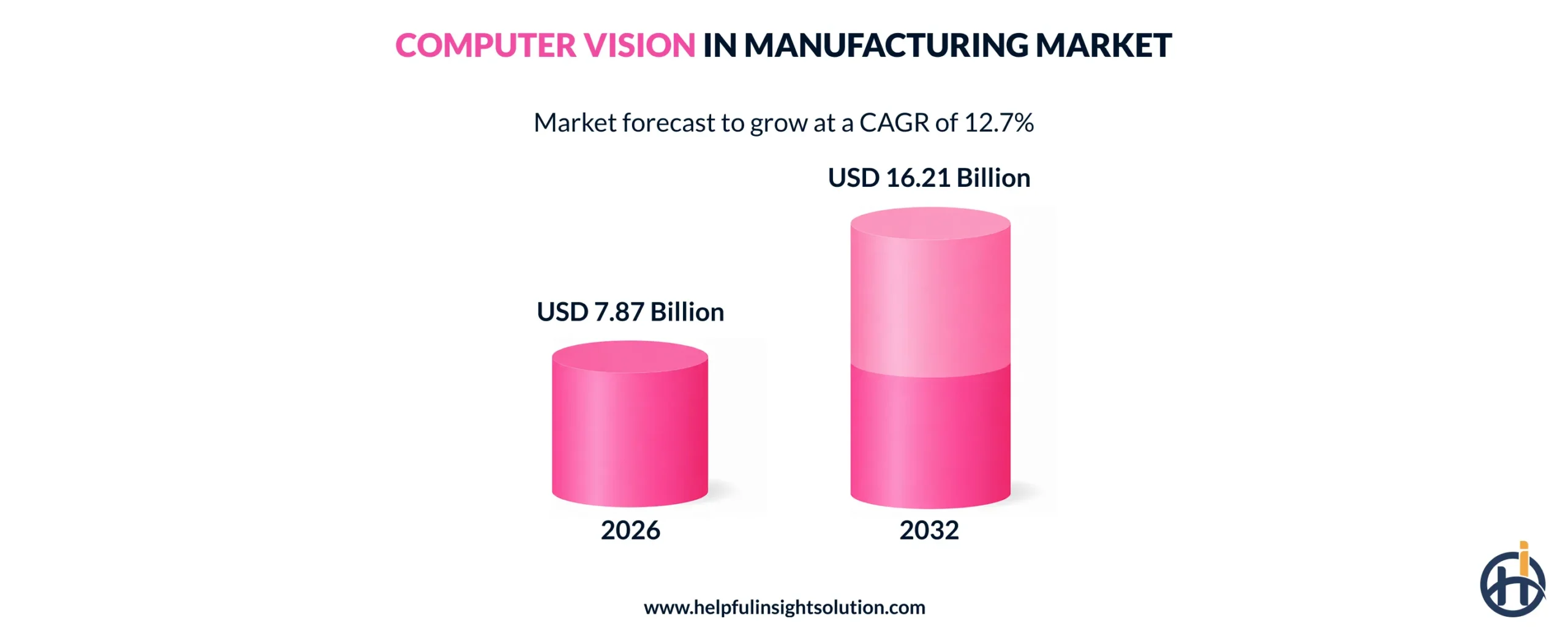
- The computer vision in manufacturing market is expected to reach $16.21 billion by 2032, which says a lot about where adoption is headed.
- Defect detection, predictive maintenance, and assembly line automation are some of the popular use cases of computer vision for manufacturing.
- Implementing computer vision in manufacturing follows a clear sequence that includes defining the use case, annotating data, training the model, and testing before deployment.
- Legacy systems, tight budgets, and a shortage of labeled defect images are the common challenges manufacturers face during implementation.
Manufacturing plants generate thousands of visual data points every minute and most of it never gets caught by a human inspector in real time. Computer vision in manufacturing closes that gap.
It pairs high-resolution cameras with AI models to automate visual inspections, monitor equipment condition, and track inventory. This cuts down the defects and delays that used to depend entirely on human attention.
Manufacturers have moved past pilot projects with this technology; it’s now running across entire production lines. According to Research and Markets report, computer vision in the manufacturing market is projected to reach $16.21 billion by 2032. That figure lines up with what’s actually changing on factory floors from tighter quality control, earlier maintenance flags, better safety monitoring, and more visibility into the supply chain.
Most factories spent the last decade going Industry 4.0-ready, connecting machines and digitizing data. Industry 5.0 is now pushing that further, putting humans and intelligent systems on the same floor. Computer vision plays right into that shift, giving machines the ability to actually see and respond to what’s happening on the line.
This guide walks through how computer vision works in a manufacturing setting, where it’s already being applied, the benefits it brings, and what it actually takes to implement it.
How does computer vision work in manufacturing?
For businesses planning to adopt computer vision solutions for manufacturing, it’s important to know whether it’ll actually work for their line, and that starts with understanding what the system is doing at each step.
A camera captures something, and somewhere between that and a robotic arm reacting, several things happen that decide how accurate and how fast the whole setup ends up being.
Here’s how the process actually works.
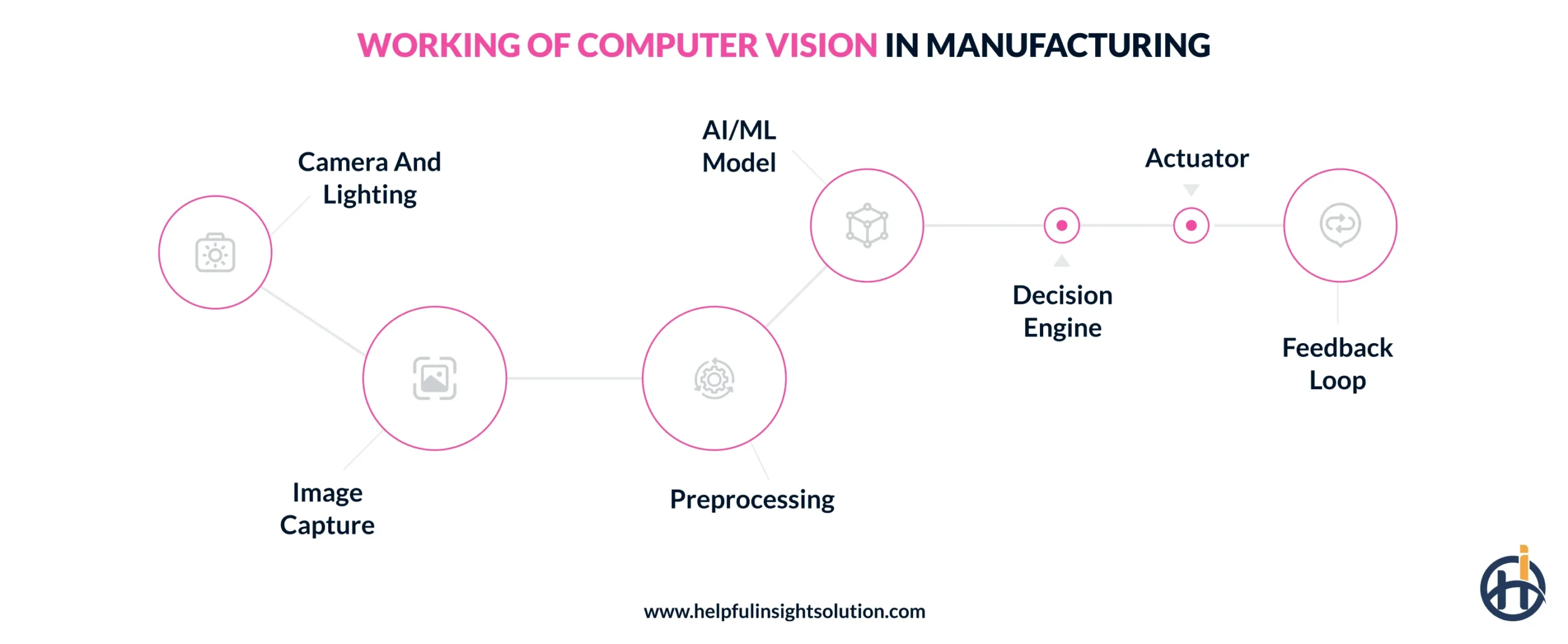
1. Camera and lighting
Camera placement and lighting design are tuned to the product being inspected. The lighting setup controls for shadows and glare, creating consistent contrast so surface defects, edges, and dimensional details are visible enough for the sensing module to capture reliably.
2. Image capture
As products move, the camera fires off a rapid sequence of image frames, either 2D or 3D depending on the setup. Each frame is digitized into pixel data on capture, ready to be handed off for preprocessing and analysis.
3. Preprocessing
Before an image reaches the AI model, it usually needs cleanup. Preprocessing handles brightness correction, noise reduction, and distortion fixes. This matters because even minor inconsistencies between frames can throw off detection accuracy at the model level.
4. AI/ML model
This is where a trained AI/ML model actually earns its place on the line. It checks the image against patterns built from prior training data, picking out microscopic defects, dents, cracks, misalignment that a human would likely miss at production speed. Getting this reliability usually requires investing in AI development services, not an off-the-shelf model dropped in without tuning.
5. Decision engine
Once the model flags something, the decision engine takes over, checking it against quality rules or benchmarks set in advance. It’s what actually triggers pass, fail, or flag-for-review, using either rule-based logic or more advanced AI scoring behind it.
6. Actuator
The actuator is the physical hardware that receives the command from the decision engine and carries it out, pulling a defective item off the line before it moves further.
7. Feedback loop
Every flagged defect, error, and inspection result gets logged rather than discarded. That data eventually goes back into retraining the model, so the system gets sharper over time.
Top use cases of computer vision in manufacturing
Not every manufacturer needs the same setup, and computer vision applications in manufacturing reflect that. Some plants lean heavily on defect detection, others prioritize predictive maintenance or safety monitoring.
The use cases below cover where this technology is actually delivering measurable results on the floor.
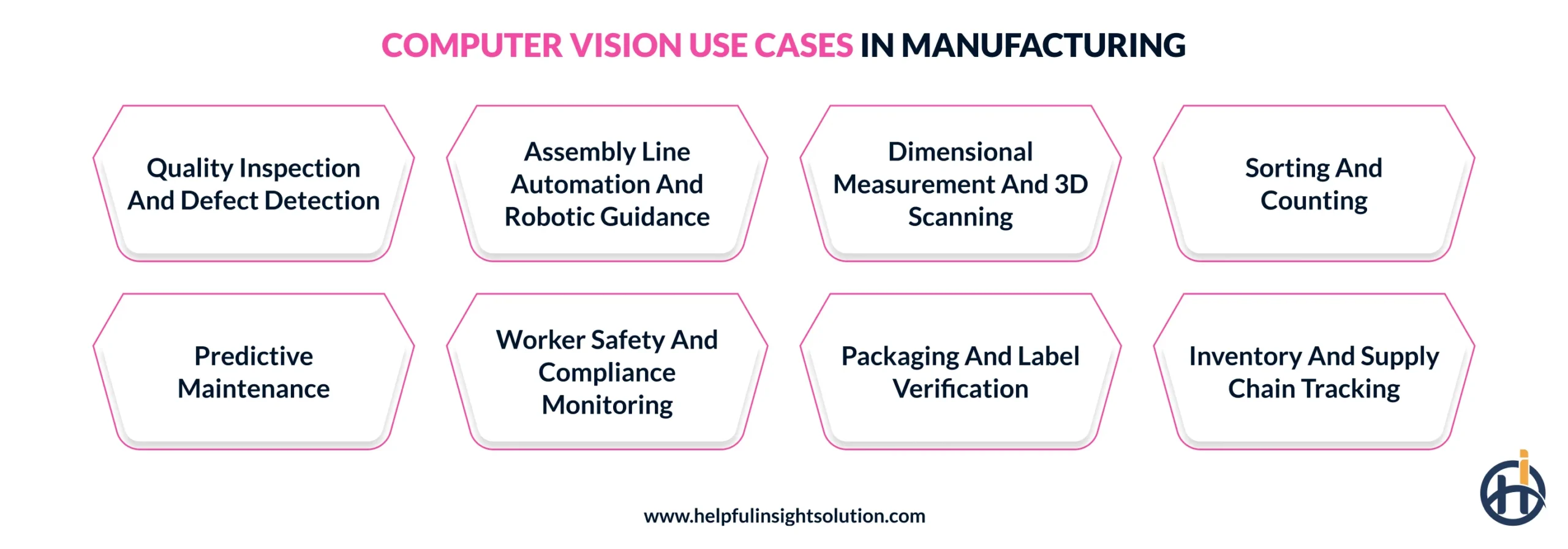
1. Quality Inspection and defect detection
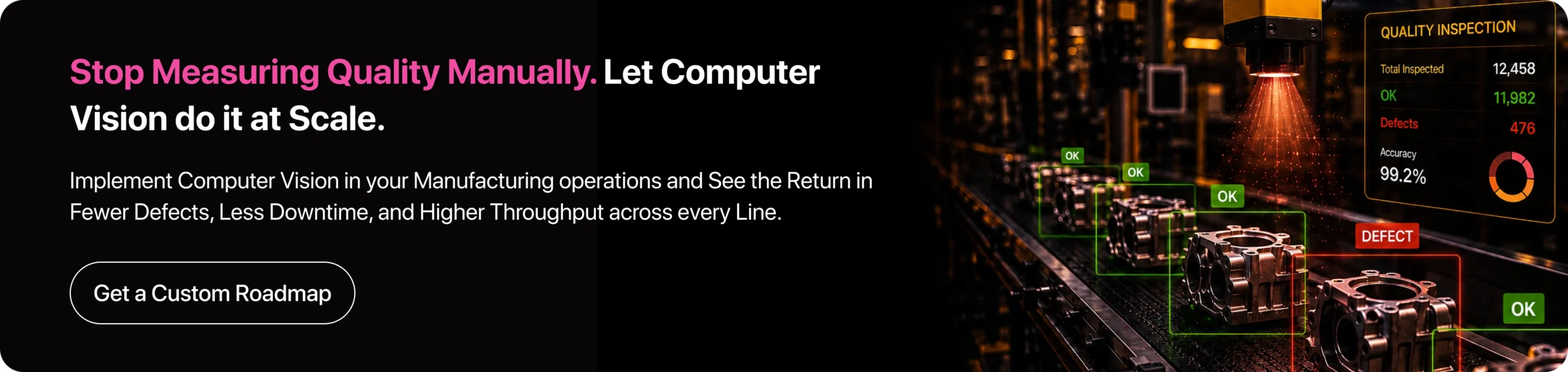
Quality inspection is where most manufacturers first apply computer vision, and for good reason. Manual inspection depends on human attention span, which drops over long shifts and varies between inspectors.
Cameras don’t run into that problem. They scan every unit moving down a high-speed conveyor instead of pulling random samples, picking up scratches, or discoloration as they happen. In food or pharma settings, the same system also catches foreign contaminants before a product ever reaches packaging.
The result is defect detection that’s not just faster, but applied consistently across every single item rather than a sampled few.
2. Assembly line automation and robotic guidance
Robotic guidance depends entirely on what the camera sees, and how fast that information reaches the arm doing the work. Multiple cameras, positioned at different angles, give robots the depth and orientation data needed to pick or align parts without a human correcting for error.
In automotive and chip manufacturing, this level of precision isn’t optional. If a robot places a part even slightly off, it can throw off everything assembled after it. Vision-guided systems can adapt to minor part variation without needing a full reprogram every time a supplier changes tolerances.
3. Dimensional measurement and 3D scanning
Instead of spot-checking a handful of units per shift, the computer vision system runs through nearly every part as it’s produced. A 3D sensor builds a model of the component and flags anything that’s drifted from the original spec before it reaches assembly.
In aerospace especially, this kind of image recognition in manufacturing catches small deviations early, well before they turn into a part that fails or simply doesn’t fit where it’s supposed to.
4. Sorting and counting
Manufacturers use computer vision to sort and count parts as they come through production, work that used to mean someone standing there recognizing items and directing them by hand. Cameras handle this now, in computer vision manufacturing setups they classify items by shape, size, color, or barcode right on the conveyor and send each one where it needs to go.
Counting works the same way, so manufacturers get accurate numbers on parts or finished goods without anyone tallying it manually.
5. Predictive maintenance
Equipment failures don’t happen suddenly, they build up gradually, and that’s exactly what’s hard for a person doing periodic checks to catch. Implementing computer vision in manufacturing changes that by monitoring continuously, catching small visual shifts, a part loosening in between those scheduled checks.
Getting this right isn’t just about installing cameras. It usually takes proper machine learning services to train the model on what early-stage wear actually looks like across different machine types.
6. Worker safety and compliance monitoring
Worker safety is one area where computer vision earns its place fast, since the cost of missing a violation isn’t just inefficiency, it’s someone getting hurt. Camera networks positioned across the factory floor continuously check for PPE compliance, whether someone’s wearing a hard hat or safety goggles in a zone that requires it, and flag violations as they happen.
Computer vision manufacturing systems also monitor restricted zones, how close workers get to moving machinery, and general safety compliance, catching risks a supervisor watching multiple areas might miss.
7. Packaging and label verification
Ever wonder how a bottling facility catches a mislabeled batch before it ships out? That’s usually computer vision in manufacturing doing the checking, not a person scanning labels. The system verifies that packaging matches what’s actually inside like label, barcode, and count, and flags anything that’s off before the product moves further into distribution.
For manufacturers running multiple SKUs, this matters since a mislabeled product is a compliance issue, not just a packaging mistake.
8. Inventory and supply chain tracking
Keeping inventory counts accurate across a large warehouse used to mean someone walking the rows, checking shelves one by one. Computer vision for manufacturing now handles that instead, cameras, sometimes mounted on drones, scan storage areas continuously and flag empty containers or low stock as they happen.
Scheduled counts are usually outdated by the time anyone finishes them. This system triggers restocking the moment inventory actually drops, so supply chain data reflects what’s happening on the floor rather than a count from hours earlier.
Real-world examples: Who’s using computer vision in manufacturing industry
The use cases above sound reasonable on paper, but seeing how established manufacturers have actually deployed computer vision for manufacturing operations makes the impact easier to understand.
The examples below show how specific companies have applied it. Let’s have a look:
1. Ford Motor Company
Ford Motor Company, one of the largest automakers in the world, uses IBM’s AI-powered computer vision system, called MAIVS, to catch assembly defects using photos taken during production, checking for part misalignment and missed installations. The system has run 150 million individual inspections and caught 400,000 quality issues that human inspectors missed.
2. The Dow Chemical Company
At Dow, safety monitoring runs through Microsoft’s Azure Video Analyzer for PPE compliance and entrance gate checks, one piece of how the company applies CV with advanced manufacturing systems across its plants. It also handles containment monitoring.
Trained vision models recognize what a leak looks like, its shape, color, spread pattern, and alert operators early. Dow has cited this as part of its broader push toward zero safety-related incidents across its plants.
3. Protex AI
Another popular example is Protex AI that turns a plant’s existing CCTV network into a safety monitoring system. It tracks forklift proximity, flags unsafe manual handling, and catches restricted zone breaches without needing new cameras installed.
Safety teams can customize the rules per site, so a food manufacturing plant and a warehouse aren’t monitored with the same fixed criteria, which is where a lot of off-the-shelf safety tools tend to fall short.
Benefits of computer vision in manufacturing
Manufacturers don’t adopt computer vision technology out of curiosity, they adopt it because it changes specific numbers that matter in terms of cost, output and error rate. That’s likely why adoption among large manufacturers has already climbed to roughly 68-75% as of 2026.
For those still weighing whether manufacturing vision AI solutions are worth the investment, the return tends to show up in a few consistent, measurable ways.
1. Higher production throughput
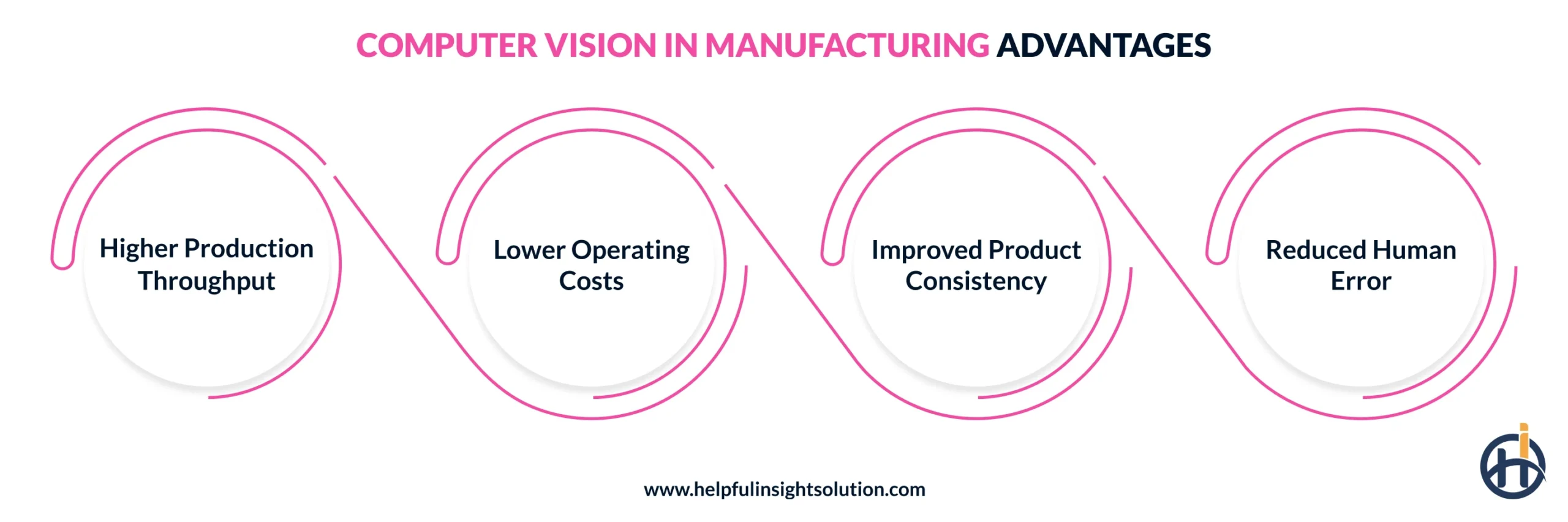
Human pace naturally dips over a long shift. Cameras don’t have that problem, which is the direct driver of higher production throughput. Computer vision-guided robotic arms handle sorting, packaging, and assembly at a steady processing speed, regardless of time of day or shift length, a core piece of what drives computer vision operational efficiency on the floor.
This predictability compounds across a facility. Planners can forecast weekly output with far less variance than they’d get from manually staffed operations.
2. Lower operating costs
Cost savings here come down to uptime. Automation paired with machine vision in manufacturing keeps equipment running closer to full capacity, cutting the idle time and unplanned stoppages that quietly drive up operating expenses. Fewer breakdowns also means fewer emergency repair costs, which adds up faster than most cost breakdowns account for.
3. Improved product consistency
Every business wants its product to look and perform the same way every time, and that consistency is where computer vision in business applications tends to matter most. Measurements and defect checks get applied identically to every unit, catching subtle deviations that would vary between human inspectors on different shifts.
4. Reduced Human Error
Manual inspection error rates run higher because fatigue and distraction are unavoidable over a shift. Computer vision in manufacturing applies the same detection standard every time, which drives error rates close to zero and lifts overall product quality.
How to implement computer vision in manufacturing: Step-by-step
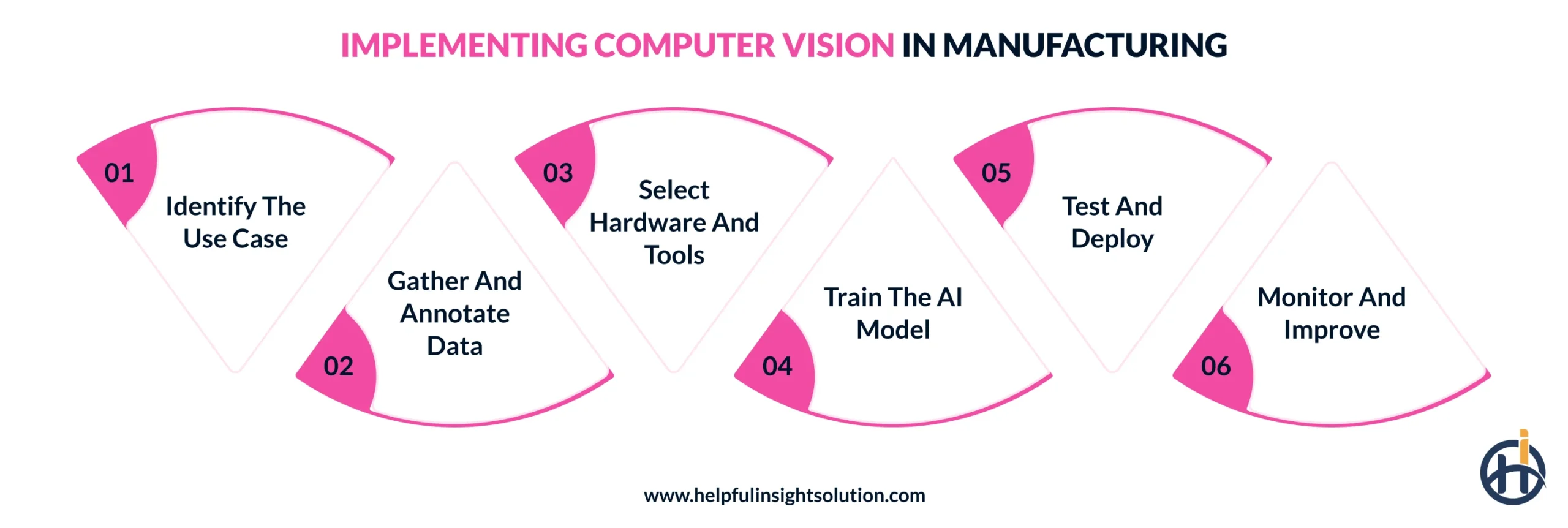
Want to implement computer vision in your manufacturing operations? It involves following a sequence of steps, from defining the problem you’re solving to deploying the trained model on the floor. Let’s explore them in detail below.
1. Identify the use case
First, identify the objective, why you want to implement computer vision and what specific problem it will solve. Start by listing the recurring issues then pick the one with the clearest visual signature and the most measurable impact.
A goal like reducing scratches reaching packaging works because it’s specific and trackable, while improving quality doesn’t, because there’s nothing concrete to build the system around.
2. Gather and annotate data
Once the objective is set, the system needs training data, real images from the actual production line. Each image gets labeled to show what a defect or correct assembly looks like, which is what the model learns from. More varied, accurately annotated data usually means fewer false flags once deployed.
3. Select hardware and tools
Next, pick hardware that matches your actual floor conditions, not whatever looked good in a product demo. Depending on where cameras go, they need to hold up against heat, dust, or vibration. Lighting matters just as much, it has to stay consistent and shadow-free.
Getting this wrong early is costly, since fixing bad image quality later usually means retraining the model from scratch.
4. Train the AI model
Once the data is ready, the model gets trained to recognize whatever the use case calls for. This stage usually takes several rounds, the model runs against real samples, gets corrected where it’s wrong, and retrains until accuracy holds up consistently.
Rushing this step is where a lot of deployments go wrong, since a model that looks accurate on a small test set doesn’t always hold up once it’s seeing full production volume.
5. Test and deploy
Before rolling out, the model runs on the live production floor for a limited period, checked against real conditions rather than test data alone. This is where problems that didn’t show up in training tend to appear, unexpected lighting shifts, new product variants, occasional false flags. Once it’s holding up consistently, the computer vision solution gets connected to the actual equipment on-site.
6. Monitor and improve
If you think the job is done at deployment, it isn’t, that’s actually where the real work starts. Accuracy drifts as products change or conditions shift, and nothing fixes that on its own. Keeping computer vision for manufacturing systems reliable means feeding it new data, regularly monitoring its performance and catching drift before it costs you.
Challenges in adopting computer vision in manufacturing
Planning to implement computer vision for manufacturing? Know going in that it won’t be as simple as it looks. Businesses run into real obstacles along the way, and understanding common computer vision in manufacturing challenges upfront makes the actual rollout far less painful.
1. Legacy system integration
One of the biggest adoption challenges is that most factories run on older machinery and proprietary software never built to communicate with modern AI systems. Ripping out functioning equipment just to fix this isn’t realistic for most manufacturers.
The more practical fix is middleware or edge AI gateways that translate data between the two so integration happens in phases, without replacing what’s already working.
2. High implementation costs
Implementing computer vision in manufacturing isn’t cheap; cameras, GPUs, custom software, and integration work all add up fast, which is usually what makes ROI a hard sell to leadership early on. The better approach is starting smaller. Run a pilot in one high-impact area first, using no-code platforms or pre-built vision hardware, then scale once results actually prove out.
3. Data quality and annotation
Training a reliable model takes a lot of labeled images, and manufacturers often get stuck here. Defects rarely happen on a healthy line, so collecting enough real examples takes longer than most teams plan for. Synthetic data helps close that gap, and specialized annotation platforms let subject matter experts label images faster.
Computer Vision for Manufacturing: What’s Next
Computer vision has earned its place in the manufacturing sector already. What we’ll cover here is different, the future of computer vision in manufacturing, and what businesses can reasonably expect these systems to do as the technology keeps moving forward.
1. Robots that adapt without reprogramming
Future systems won’t need a full reprogram for every new product variant. CV-powered robots will likely read the environment in real time and adjust movement on their own, handling machine tending and unsorted parts without manual setup.
2. Wider use of 3D and hyperspectral imaging
As these cameras become more affordable, expect them to replace standard 2D setups in more facilities, catching structural or material-level defects that today’s inspection systems still miss entirely.
3. Self-improving models
Instead of static systems that need manual retraining, future computer vision systems are expected to adjust automatically as they encounter new product variants or changing floor conditions.
4. Fully on-device decision-making
Processing will likely move almost entirely to edge hardware, removing cloud latency altogether so decisions happen at the exact moment an image is captured.
Ready to adopt computer vision in your manufacturing operations? Here’s how we can help
The role computer vision in manufacturing plays today goes well beyond automating a task or two, it’s reshaping how decisions get made on the floor, from what gets flagged as a defect to when a machine actually needs servicing. Manufacturers still relying on manual judgment for these calls are already operating at a disadvantage.
But actually seeing returns from this technology depends on applying it correctly, matching it to the right use case and rollout plan which is exactly where Helpful Insight can help.
We’re a reputable computer vision development services provider with 10+ years of experience building CV systems for manufacturers. Our team includes certified developers who’ve worked through the harder parts most projects run into, which are legacy system integration, data scarcity, and models that drift after deployment, not just clean pilot environments.
That experience is what separates a system that works in a demo from one that holds up on a real production floor for years. If you’re evaluating computer vision for your operations, share your requirements with our team, we’ll help you scope it right from the start.
FAQs
Computer vision in manufacturing is the use of AI-powered cameras and software to interpret visual data from a production line, spotting defects, checking part dimensions, and monitoring equipment condition without needing a person to look at every item. It runs continuously, catching issues in real time rather than through periodic manual checks.
In manufacturing, computer vision takes over tasks that used to depend on someone watching closely like catching defects, guiding robots during assembly, keeping inventory counts current, and monitoring for safety violations.
Computer vision is the broader AI field for interpreting visual data. Machine vision is a narrower, industrial application built for tasks like inspection and robotic guidance, where speed and precision matter most.
Computer vision systems are generally very accurate in manufacturing, often outperforming manual inspection since they apply the same detection standard every time, without fatigue affecting results over long shifts.